
Antec ISK 310-150 Mini-ITX Desktop Case
Antec ISK 310-150
If you´re looking for a Mini-ITX case for your new "high-efficiency" platform the Antec ISK 310-150 might be the right product for your needs. In 2009, some Mini-ITX motherboards were launched based on the Intel Atom platform. Antec quickly response was the ISK 300-65. At this moment, many other brands like Zotac, ECS, ASUS or even ASRock have taken the Mini-ITX market and expanded it to make the HTPCs powerful and affordable. There was still a limiting since many products offered low power PSUs (65 watts is simply not enough). If you want a Mini-ITX H55 paired with the Intel Core i3/Core i5 CPUs you need at least a 150 watts PSU to make sure you won´t have power-related problems. Benchmark Reviews tests the Antec ISK 310-150 which offers a new, elegant front finish with a 150 watts Flex-ATX PSU to power your system.
The ISK 310-150 is based on the first model: The Antec ISK 300-65. This product in particular was presented as one of the first Mini-ITX cases available for the ION platforms. The 310 number means they added a different front looks, and the 150, of course, means they changed the 65 watts PSU for a 150 watts Flex-ATX PSU. In our recent G.Skill ECO memory review, we added some power consumption results with a Mini-ITX motherboard and the ECS H55H-I motherboard. You might want to have a look at the results (see here) to understand that the Core i3 platform paired with a Flex-ATX PSU consumes no more than 100 watts at full load with the right components. By right components I mean a SLIM Optical drive and 2.5" HDDs with a low power PSU. If you use a high-end 700 watts PSU you won´t get the effectiveness you want for this kind of systems. So, basically, all the components I´ve mentioned here are needed to build a Mini-ITX PC with the Antec ISK 310-150 and they perfectly fit for this review.
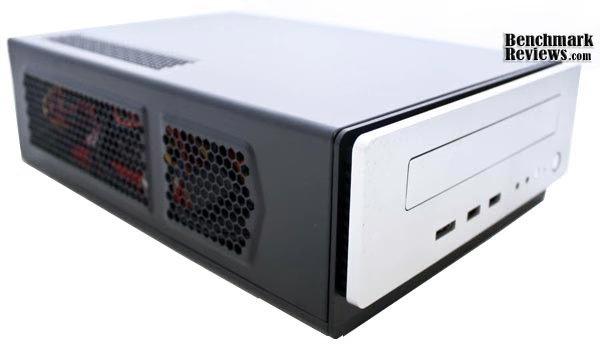
Let´s have a look at the Antec ISK 310-150 Mini-ITX chassis to check the interior and exterior features. Finally, this could end being your next chassis for the HTPC you´ve been planning for months. Remember that if you´re looking for a HTPC with an ION-based system you might want to look the ISK 300-65 , since you won´t ever need more than 40-50 watts. Also, Antec launched the ISK 300-150, which is the same model as this one but with a black front finish similar to the ISK 300-65 for $5 USD less.
Antec ISK 310-150 Features
-
Power supply: 150-watt power supply
-
Silver front bezel
-
Cooling system: 1 x side 80mm TriCool 3-speed exhaust fan
-
3 drive bays: External 1 x 5.25" slim optical bay, Internal 2 x 2.5" HDD bays
-
1 half-height expansion slot
-
Mini-ITX motherboard: 170mm (W) x 170mm (L)
-
Convenient front ports: 2 x USB 2.0, 1 x eSATA, Audio (AC'97 and HDA compatible) In and Out
-
0.8mm cold rolled steel frame for durability
-
Case dimensions: 96mm (H) x 222mm (W) x 328mm (D), 3.8" (H) x 8.7" (W) x 12.9" (D)
-
Packaging dimensions: 295mm (H) x 380mm (W) x 195mm (D), 11.6" (H) x 15" (W) x 7.7" (D)
-
Net weight: 5.5 lb / 2.5 kg
-
Gross weight: 8.3 lb / 3.8 kg
About the company: Antec Inc

Antec, Inc. is the leading global brand of high-performance computer components and accessories for the gaming, PC upgrade and Do-It-Yourself (DIY) markets. Founded in 1986, Antec is recognized as a pioneer in these industries and has maintained its position as a worldwide market leader and international provider of efficient, quiet, and reliable products. Antec has also achieved great success in the distribution channel, meeting the demands of quality-conscious system builders, VARs and integrators.
Antec's offering of enclosures includes a large range of cases, such as its technically advanced Performance One Series, cost-effective New Solution Series and server grade cases designed for the needs of all workstation and server markets. Antec's products also include front line power supplies such as its Signature Series, TruePower Quattro series, NeoPower series, and EarthWatts, the most environmentally friendly power supply available. PC gamers are an increasingly significant consumer of performance components, and many Antec products are geared toward the gaming demographic, like the Twelve Hundred, the premier gamer enclosure. Antec also offers a computing accessories line comprised of many original products, including its patented LED Fans and Notebook Cooling solutions.
Antec is headquartered in Fremont, California, with additional offices in Rotterdam, The Netherlands as well in the UK, Germany, France, Spain and Italy. The company's products are sold in more than 30 countries throughout the world. Please visit www.antec.com for more information.
Closer Look: ISK 310-150 Exterior
Antec´s ISK packages are just brown carton boxes, with the Antec logo and the product model written in the sides of it, so I didn´t pay much attention to it. On the other hand, when you open your box you will notice some accessories apart from the chassis.
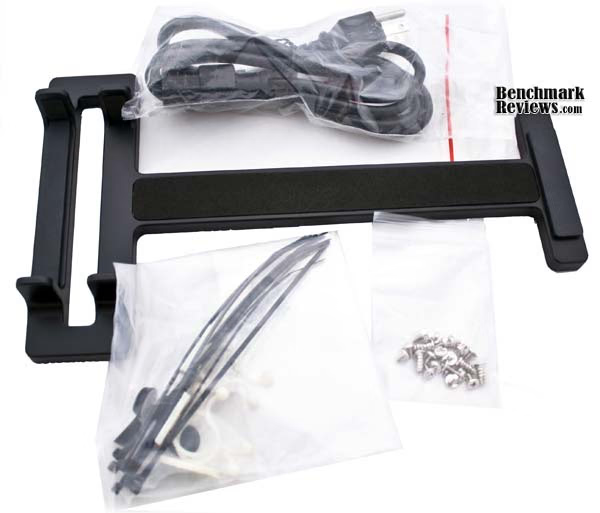
Included with this item are an AC Power cord, a stand for vertical positioning, a screws bag, and some belts for cable management. There is nothing else relevant in there.

Have a look at the front view of the ISK 310-150. This Mini-ITX chassis features a sleek and elegant design which keeps simplicity and a very interesting appeal of a mini Home Theater. In fact, the case is so simple that it seems Antec forgot to add a logo somewhere in the exterior of the case. By looking at it, you won´t know which brand manufactures it unless you´re quite familiar with Antec products. The front ports from left to right are: eSATA, 2x USB 2.0, HD Audio in & out, a reset button, HDD activity LED and finally the power button.

Using the stand for vertical positioning can be quite useful in reduced spaces. Since the Optical drive is slim, it won´t have any problems at all. On the bad side, the stand feet are too thick and might obstruct some space at the sides of the chassis. If you´re planning to use the stand, please keep in mind the air-flow routing. Unless changing the fans orientation, you should put your Mini-ITX case exactly as it´s shown in the photo (right-side up).

Finally, the rear is composed by a small I/O panel and an expansion port for half-height GPUs. On the upper side, there is the AC power connector and a fan speed regulator for the Antec TriCool exhaust fan. There´s actually a second port for another fan-speed controller, but pitifully, Antec doesn´t includes a second fan for this purpose. The cover uses thumb-screws for easy access to the interiors.
Detailed Exterior Features
There is plenty of ventilation on both sides of the case. Antec uses honey-comb grills in specific parts of the chassis to remove heat efficiently from the system.

On the left side, there are honey-comb grills which remove heat from the GPU and HDDs. You can even watch your components trough those grills.

At the right side, there are more grills, but this time there are 2 fans exhausting air trough them. The left fan is specially designed to exhaust PSU heat, while the right side fan exhausts the heat from the CPU and motherboard components. You can add a second fan in the middle of both by removing a small plastic cover. I´ll show you that in the next section.

Once you open the case this is what you´ll see. The case is pretty small, so small that you might ask if your HTPC will fit on it. It will fit, it might be difficult, but it will...
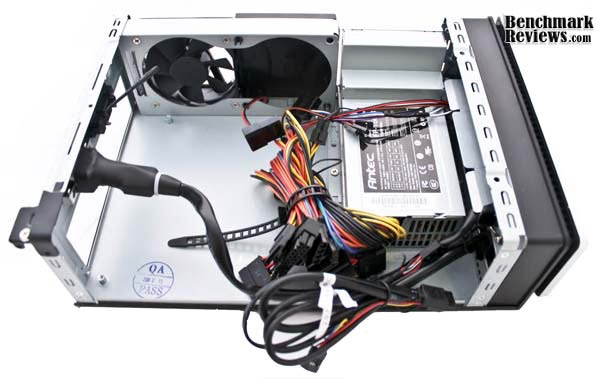
The PSU features most of the connectors you´ll ever need for your Mini-ITX system. It comes with a 24 pin ATX connector, a 4-pin ATX12V connector and some S-ATA and Molex connectors enough for 3 drives and fans.
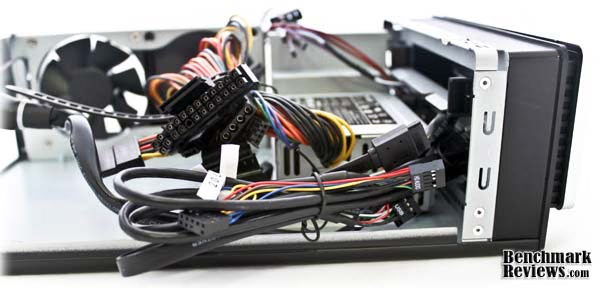
The front panel connectors include: HD Audio (AC97 also), eSATA connector, Power, Reset, HDD LED and Power LED. I am wondering if I will be able to manage a proper cable routing with so many cables inside this mini case.
Closer Look: ISK 310-150 Interior
Now let´s remove all those messy cables and look what we´ve got. The AC power cord is thick and big. That shouldn´t be necessary, but let´s hope it won´t interfere with the installation.
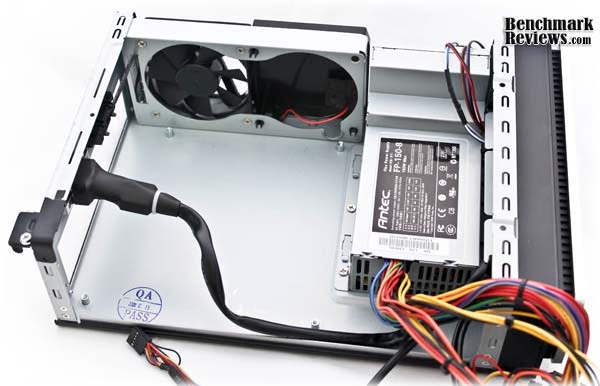
As you can see, there is enough room for a Mini-ITX motherboard. The motherboard screws are already there and there is a QA pass seal printed in the interior. The Flex-ATX PSU is mounted with a very personalized system and screws mixed with the exhaust fan at the right side of the ISK 310-150. Unluckily, if you want to remove the PSU you´ll need to remove the fans bracket first, and then the PSU mounting system. Please notice the plastic cover at the side of the 80mm fan. I´d recommend anyone to remove it even if you don´t install a fan in there. Your case will have better ventilation by using the honey-comb grills rather than a plastic cover sealing the heat inside of it.

Once removing the drives bay, you´ll have this little structure. On the right side, you can mount up to 2 2.5" drives (HDDs or SDDs) and below them there´s space for a slim optical drive (DVD or BD). The left squared side has no purpose at all, so I can´t really say it works for something other than (probably) cable management. You´ll have a closer look of this at the next section.
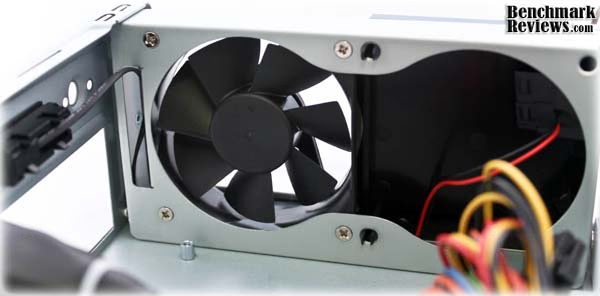
A closer look to the fans reveals the cable of the rpm controller. The plastic cover seems to be "easy" removable by pressing 3 push-pins at the corners but it isn´t. First, you need to remove the whole fan metal bracket. Other way, you won´t be able to remove the plastic cover and add a fan (or just to improve some air-flow) there. That´s a bad design, really.
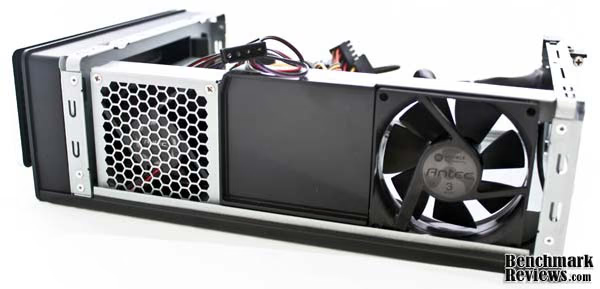
This picture shows the exhaust fans at the right side of the ISK 310-150. Again, the left fan is based on a "special" designed structure for the PSU.
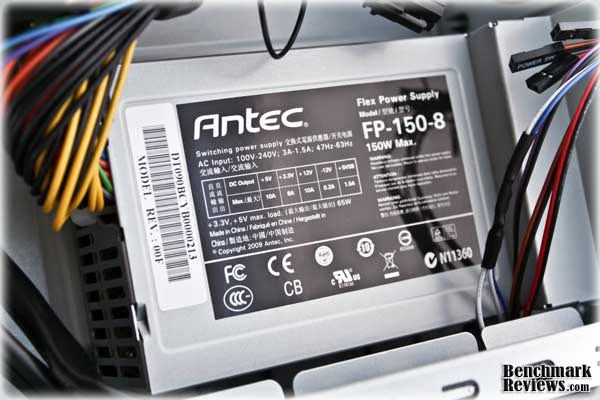
A closer look to the PSU reveals the next specifications: +5V:10A, +3.3V:8A, +12V:10A, -12V:0.2A, +5VSB:1.5A. It seems enough for our high-performance HTPC based on a Core i3/H55 platform. Keep in mind this PSU won´t support other than a low-end GPU. It doesn´t have PCI-E connectors either.

The front door opens with a little touch and reveals your optical drive. It will keep your front view clean even you´re not using a plated-colored drive.The ugly part is that it uses a push-clip to open and it´s not automatized.
Detailed Interior Features
Let´s begin the installation with the motherboard. Once you start trying to fit your motherboard you´ll notice the AC power cord is too thick. It will constantly interfere with your motherboard and after that, it might be enough to block your CPU heatsink fan. Make sure your CPU fan is able to spin before closing the chassis and powering on the system.
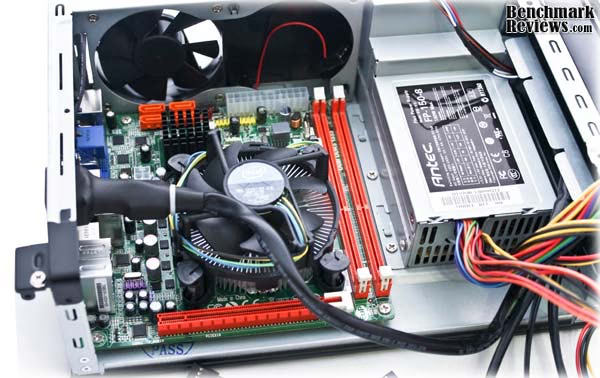
At this point, I was not able to install the motherboard. Remember those push-pins in the fan plastic cover? Well, let´s say they block the 24-pin ATX connector. The next step was to remove the plastic cover in order to avoid those pins, but remember you can´t take it off without removing the whole metallic-fan bracket, so it was like starting all over again. It´s not like we had done so much at this point though...

Once you start connecting all the cables you´ll think you´re creating a messy monster in there. There isn´t really lots of space for cable routing, and remember I still need to install the drive structure again.
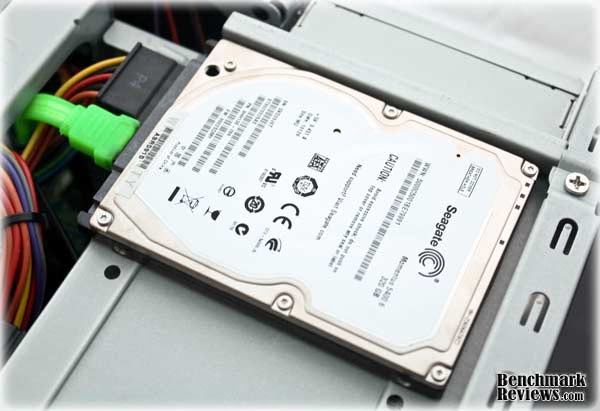
Installing the HDDs and optical drives is pretty easy. For the HDDs, you just need to align the drive with the bay and put 4 screws below it. The same method applied for the slim drive but this time there will only be 2 screws at the side of the unit.

This is how it looks almost finished. Again, I can´t see the purpose of that left metal square in the drives structure. It only interferes with the cables and reduces the space between them and the CPU heatsink. Maybe Antec was thinking it could really work for cable routing... who knows?

Here is a closer look showing how you need to blend the cables to reach the drives. Adding a second HDD would be more problematic since you´ll need to make sure you connect the optical drive before trying to connect the second drive at the bay on the right-side.
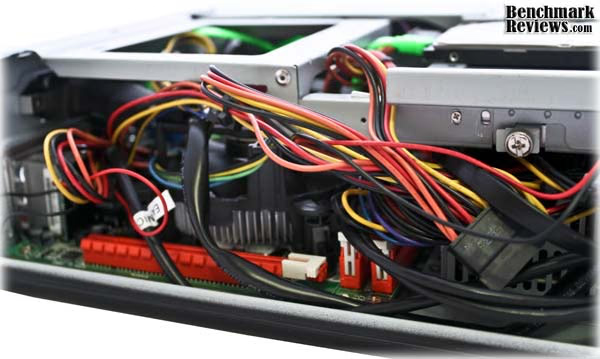
This is how my installation ended. Here is where you start thinking you need a modular, sleeved-cables PSU, but you won´t find it on Flex-ATX form factor. Some cable ties here and there might do the trick, but really, there isn´t much space to work inside the ISK 310-150. You won´t even find space for those adhesive belts included in the accessories bag.
Antec ISK 310-150 Final Thoughts
The Antec ISK 310-150 has many small details making the installation harder than it should be. Before starting with the conclusions, keep in mind that this little case is designed for some-what "high-end" HTPCs. I mean high-end because a Core i3 will definitively smash an Atom without problems. It will offer a pretty good efficiency and performance without consuming lots of power, but it still can´t be powered with a 60 watts (or less) PSU. The Antec ISK 310-150 fits right there where you want to build a Mini-ITX platform using a LGA775 or H55 motherboard for max performance. The PSU will handle a 100 watts system without problems but forget about die-hard overclocking if you want to keep between safe margins.
There are some things I haven´t still touched in the article. First of all, the ISK 310-150 doesn´t allows you to install 3.5" drives. That means you must buy or use a 2.5" HDD/SDD in order to build your system. The same applied for the Optical drive. Slim drives are (by far) much more expensive than typical drives. While the whole idea of an HTPC and a Mini-ITX system is being small and consume less energy, we would always be happy if we had the space for both kinds of drives. That makes the change easier and keeps it open to more possibilities.
Other than that, I think this case looks great for a HTPC. It is small and keeps a very clean design. It also offers more ventilation than other Mini-ITX cases with many honey-comb grills and the possibility to add a second 80mm fan to the left side of the case. It offers enough ports and even the possibility to add a low-profile GPU, but I can´t imagine the mess inside of it.
Finally, this case offers a good PSU, but doesn´t offer modular connectors or sleeved cables, and that makes the cable routing so difficult even with the plastic belts included with the package. It´s not as I´m adding this as a contra, because I haven´t ever seen a Flex-ATX modular/sleeved PSU, but it would be great if Antec were the first in this area.
Let´s wrap all and end with the conclusions of the Antec ISK 310-150.

Antec ISK 310-150 Conclusion
Antec's presentation of the ISK 310-150 kit is very modest, with a plain brown box doing its best to sell this HTPC enclosure on the retail shelves on electronic boutiques. Supposing that this is an online-only product, then the package might be fine, but for shoppers comparing this kit to others inside a retail store, the lack of printed features, specifications, and contents, might put off some buyers.
Performance on PC cases is very subjective. The product works OK and the cooling is great compared to other Mini-ITX cases. Even that, it still has room for optimization. They could find the way to add space for a 3.5" or a non-slim optical drive. The push-clip front cover could also be replaced with a mechanical door to return to its position automatically. As for the installation, the process was somewhat hard, but not impossible.
The appearance of the ISK 310-150 has been improved from the 300-150. The front view is much more aesthetical and it now looks like a small home theater and not an old VHS player. It can be mounted horizontally or vertically to benefit from small areas in the living room and it keeps a very simple and sleek design. The only fail on the aesthetics section is the box where it´s packaged, of course.
The construction of the chassis is good. Antec is normally recognized for high-quality and this isn´t the exception. The whole construction feels very solid, and even the front part is hard and difficult to damage. The only exception could be the push-clip front cover but other than that, Antec gets an A with the ISK 310-150.
The ISK 310-150 is a compact Mini-ITX case packed full with functionality. Front panel eSATA, USB, and audio ports, tri-level cooling fan, and room for a half-height expansion bay are all impressive features usually found on larger enclosures. The room is just enough for the components that can be installed, but I have the feeling that a 3.5" drive could be accommodated above the PSU. The plastic belts included on the accessories bag lose some functionality since there is no much space for cable routing, specially the sticky ones.
As of May 2010 the Antec ISK 310-150 can be found for $69.99 USD on NewEgg. Many ITX-Cases can be found for less than $50 USD, which moves the Antec ISK 310-150 to a semi-premium level, but considering the features and the solid design, it might worth it. Remember you´ll need to pay for a slim optical drive and 2.5" HDD, which are also more expensive than regular size units. The ISK 300-150 and ISK 65-300 can be found for $79.99 which don´t really match the price point at this moment, specially considering they are simpler versions of the product reviewed in this occasion. We should see Antec uppering the ISK 310-150 price or lowering the rest of the prices within the next weeks. Hopefully, it will be the second.
Based on the results obtained, I can recommend the Antec ISK 310-150 for those who want a high performance HTPC like the one described and used in this review. If you are still looking for a case for your Intel Atom system, consider the ISK 300-65 as a viable option and a less expensive product. Most ION/Atom based systems will feature its own external PSU (AC-DC adapter) and you won´t need the 150 watts Flex-ATX PSU included in this product.
Pros:
+ Includes 150 watts power supply
+ eSATA, USB and HD Audio on the front panel
+ 80mm TriCool fan included
+ Allows 2x2.5" drives installation
+ Can be positioned vertically if needed
+ Features pretty good ventilation compared to other Mini-ITX cases
+ Very solid construction and sleek design
Cons:
- The price compared to others moves this to a semi-premium level
- Can´t mount 3.5" drives or non-slim optical drives
- Drive tray door is not automated
- Cable management and installation can be time consuming
Ratings:
- Performance: 8.50
- Appearance: 9.00
- Construction: 9.00
- Functionality: 8.75
- Value: 8.25
Final Score: 8.70 out of 10.
Recommended: Benchmark Reviews Seal of Approval.
Questions? Comments? Benchmark Reviews really wants your feedback. We invite you to leave your remarks in our Discussion Forum.
Reader comments from the original article
11 comments were posted before commenting closed. They are preserved as written. Original avatars no longer resolve and are shown as a placeholder.
Safety Engineer Paul Parkinson Permalink:
This product does not meet the applicable safety requirements for a fire enclosure when used in the vertical position. DIY users can use it as they see fit however be for warned. However if something does happen you can sue Antec as they provided a vertical mount.
Fire Enclosure Ralph Permalink:
Since when was your average PC case considered a "Fire Enclosure"???? And "applicable safety requirements" you must be joking.
RE: Antec ISK 310-150 Mini-ITX Desktop Case Curious Zealot Permalink:
What about the noise? Are the fans silent? What about vibrations? It would also be interesting to know the PSU efficiency. And how a video card fits in there :).
RE: RE: Antec ISK 310-150 Mini-ITX Desktop Case Servando Silva Permalink:
Hi Zealot, the fans are very quiet indeed, especially if you put them on the lowest rpm. PSU efficiency isn't great as it's a very basic PSU. It won't even give you 80% efficiency as it's not certified. If you wan't a good PSU for your ITX system look for other options then. FSP has some nice low wattage PSUs with 80 plus certified efficiency.
CPU Cooler nino Permalink:
Does anybody know the max. CPU cooler height?
RE: CPU Cooler mmj Permalink:
I think if you need a CPU cooler, it's too high. This would be designed for Atom boards with integrated CPU and heatsink I think. It looks like the power supply has to sit over the CPU area.
RE: RE: CPU Cooler mmj Permalink:
Actually, I might be wrong, from the looks of this an LGA 1155 fits fine - pictured here with stock cooler. I'd imagine you'd be severely limited though - either the stock cooler or an AC Alpine 11 GT.
RE: RE: RE: CPU Cooler mmj Permalink:
Link ##tomshardware.com/gallery/Antec-ISK310-150-side,0101-268401-0-2-3-1-jpg-.html
RE: Antec ISK 310-150 Mini-ITX Desktop Case Someone Permalink:
Can anyone tell me about what is inside mini desktop case?
RE: RE: Antec ISK 310-150 Mini-ITX Desktop Case David Ramsey Permalink:
Have you tried reading the rest of the review, which has photos and descriptions of the interior?
RE: Antec ISK 310-150 Mini-ITX Desktop Case David Lamkins Permalink:
FWIW, I just built a Haswell i7 system using this case. I used the 65W TDP 4770S to reduce power consumption and cooling load. The rest of the system is fully-loaded: two HDDs, an ODD and even a GeForce 210-compatible display card. The stock Intel CPU cooler fits just fine. I replaced the Antec fan with a pair of PWM fans. It's worth noting that Antec changed the design of the plastic fan cover to be held in place with a couple of flat screws instead of the click tabs on the review unit. There was no need for me to disassemble the fan framework to swap fans. The 3-speed switch for the Antec fan simply clicks out of its rear-panel holder; no tools required. (If you wanted, you could add a second Antec fan with speed-control switch; the switch will click in to the reserved space on the rear-panel holder.) Routing cables inside the case is tight, but not particularly difficult. I needed a couple of zip-ties to hold cables away from the CPU cooler.