
Razer Imperator Laser Gaming Mouse RZ01-0035
Razer Imperator RZ01-0035 Review
The company name Razer is practically synonymous with PC-gaming peripherals. Their wide selection of gaming keyboards, mice, and other accessories make them a top choice when shopping for the best gaming gear. The Razer Imperator is the latest release, and the RZ01-0035 model offers gamers an ergonomic mouse with highly-sensitive 5600 dpi laser. Razer compromises nothing when it comes to comfort, looks, and features. In this article, Benchmark Reviews tests the Razer Imperator USB-2.0 5600-DPI Laser Gaming Mouse RZ01-0035. Boasting such features as adjustable thumb buttons, on-board (Razer Synapse) flash memory, and many other features, this mouse has the potential to pack a serious punch. Learn if the Imperator can live up to the Razer name; and the Benchmark Reviews standard of quality.
Often gamers strive for the best processor, max out their system memory, buy the fastest video cards, and view them on the largest high-resolution monitor they can find. Many gamers overlook the simple things that are really the gateway to all of this technology, and that is their input devices. Seasoned gamers know that all that horsepower inside that custom made gaming rig serves no purpose if you skimp out on one of the only things you physically come into contact with, and that is the mouse. Gaming mice have become parallel with other high-end equipment in their degree of importance to a PC gamer. A good mouse gives you great control and great comfort as you frag away at home, or your favorite LAN party.
The Razer company knows how important input devices are to gamers, and strives to make the best possible products to fill that need. Their newest gaming mouse, the Imperator boasts a variety of features found on many top quality gaming mice, but it also has a few features not found on many, or not found on any at all. Such common features include on-the-fly sensitivity adjustment, high DPI rates, precision laser tracking, ergonomic design and side-mounted thumb buttons. Some features they have, such as the on-board memory to store your custom gaming profiles, and adjustable side thumb buttons are not found on many other mice, or any at all.

As a hardcore gamer, I was a bit leery of using a new mouse to be quite honest. I have used my tried-and-true Logitech MX-518 for almost four years now, and I have had nothing but great things to say about it. I was willing to give the Razer Imperator a try because I trust the Razer name, and I was intrigued by the features and technology behind it.
If this mouse is any bit as good as it sounds on paper or looks, for that matter, it is going to be a real contender for not only winning over a loyal user of a non-Razer mouse, but it may also win over some of the people that already own a Razer mouse, and are looking for a way to gain a bit of that extra edge in their competition.
About Razer, USA
Razer is the world’s leading manufacturer of high-end precision gaming products and peripherals that are designed "For Gamers. By Gamers". Headquartered in Carlsbad, California, Razer’s award-winning lineup of products includes desktop speakers, headsets, keyboards, mice, software, and gaming surfaces. Since 1998, Razer has collaborated with leading professional gamers to develop, manufacture and market cutting-edge gaming peripherals using proprietary technologies that give gamers the competitive edge. Razer products offer the best in precision, sensitivity, usability and distinctive product design and have a reputation for being leaders in gaming peripheral technology.
Imperator Features
-
Ergonomic right-handed design
-
Adjustable side buttons
-
5600dpi Razer Precision 3.5G laser sensor
-
Razer Synapse on-board memory
-
Up to 200 inches per second/ 50g acceleration
-
Seven independently programmable Hyperesponse buttons
-
1000Hz Ultrapolling / 1ms response rate
-
On-the-fly sensitivity adjustment
-
Zero-acoustic Ultraslick Teflon feet
RZ01-0035 Specifications
-
Model: RZ01-0035
-
Color: Black
-
Lighting Color: Blue
-
Size: 123(L) x 71(W) x 42(H)
-
DPI Sensitivity Range: 100 - 5600dpi
-
24k Gold Plated USB Plug
System Requirements:
-
PC/Mac With USB Port
-
Windows XP/x64/Vista/Vista64 (also tested working on Windows 7/64)
-
Mac OSX (v10.4 and above)
-
35mb of free hard drive space
-
Internet connectivity (for driver installation)
Closer Look: Razer Imperator
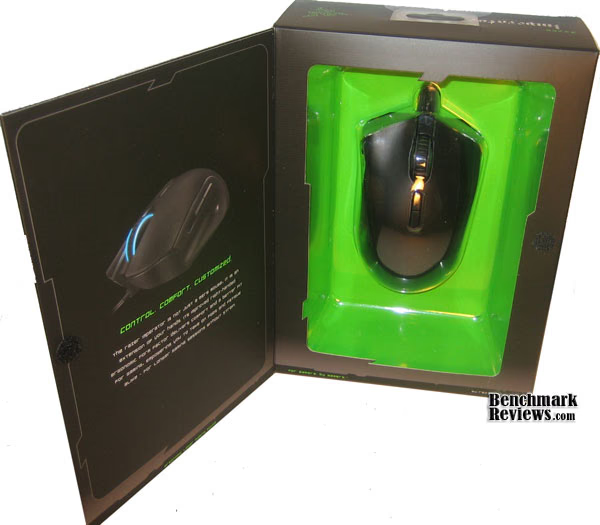
The packaging that this mouse was included in is par for the course when it comes to the Razer company. They are no slouch on design, and when they design such a good looking product as the Imperator, they do their best to reflect their creative passion with quality packaging. Included in this package is a detailed set of separate instructions for both Mac and PC, a Product catalog, as well as some Razer branded goodies such as a coaster, stickers, and a seal of authenticity.
As you can see, there is a very nice oversize mouse wheel to allow for easy access to weapon switching, scrolling through an in-game inventory, or a big clickable surface for a variety of uses with the reprogrammable third mouse button. You can also see in this picture the two reprogrammable on-the-fly sensitivity adjustment buttons.

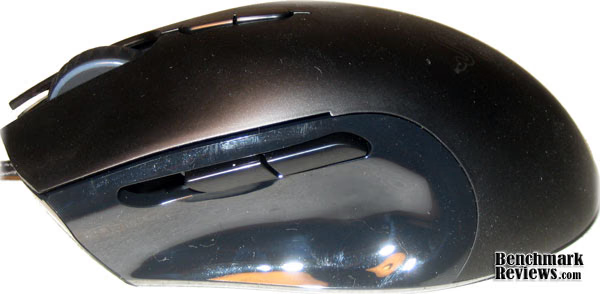
The side thumb buttons are adjustable for those of you who have very long or very short thumbs. The buttons and adjustment action itself feels a little cheap, but not in a fashion that would make me believe that it would break over time. It is a much welcome addition to help ergonomics. Here you can also see the blue ring where the very bright light emanates from the mouse wheel.
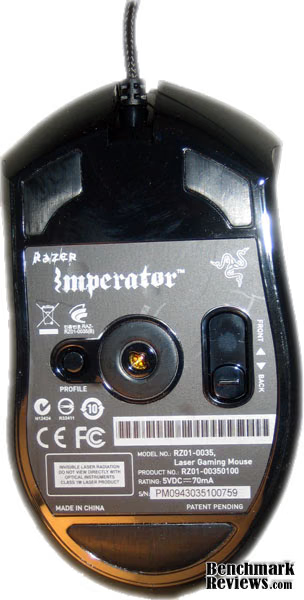
Keeping on the subject of the sliding thumb buttons, the bottom is where you do the adjustment. The slider on the right hand is what controls the position of the buttons. You can see on the left side, a button labeled "profile". This button is used for on-the-fly profile switching so you don't need to minimize or ALT+TAB out of your game to open the application, or map one of the 7 programmable buttons for this feature.
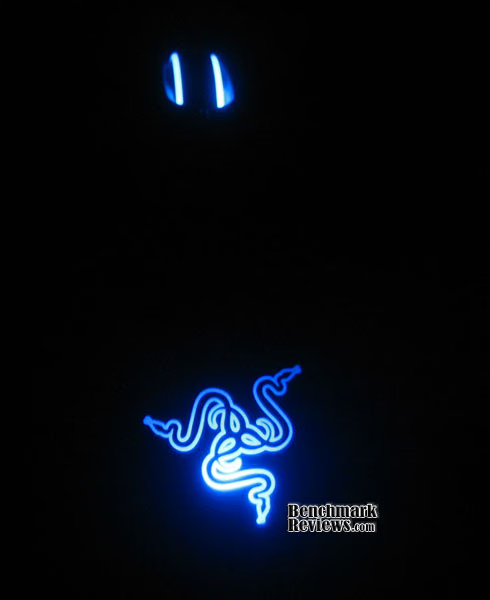
Here is a picture of the back of the mouse sporting the brightly illuminated Razer logo. This logo is sure to grab people's attention, for it is very bright, and it pulsates. I was curious as to whether the pulsating served a purpose, whether it meant it was in a lower power state or something, so I asked Razer. Their response was that it is the life-force of the mouse, and it indicates that the mouse is ready to frag. In other words, it means it is powered on.

Here you can see the gold plated USB connector, as well as the 7 foot long braided cord. The gold plated plug is a nice touch, but it is becoming more and more common with high-end USB peripherals. I was more interested in the braided cord. The 7ft length makes it very easy to accommodate most any setup, and the braiding allows for greater durability. It is surely a nice touch, and I was pleasantly surprised.

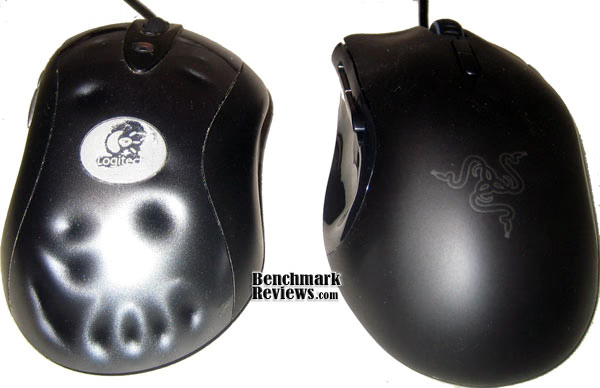
This is a side-by-side comparison between the Logitech MX-518 and the Razer Imperator. As you can see, they are very similar in size and shape, and button layout. The Imperator does feel a bit lighter, and a bit more light on its feet, which can allow for much faster response to hostile gaming situations. However, the lighter weight can also mean you may under-estimate the amount of effort needed to move your mouse, so I found myself often overshooting by just a bit.
Below is an image of the Razer Imperator with the lights lit in all their glory. If you did not pick it up by now, believe me when I say that these are bright. They cast a large blue hue across the room and ceiling. The added feature of the Razer logo is that it pulsates, so you may either find that extremely cool, or very distracting.
In the next section, we inspect the software that is used to configure the Razer Imperator.
Imperator Software Features
The software for the Imperator RZ01-0035 model should look very familiar to users of other Razer software. It is essentially the same GUI. Why they insist on using a non-traditional window is beyond me, but I guess it adds to the flair of their products. The nice thing about this mouse is that the settings are store on the mouse itself, so there is no need to import/export saved profiles to a USB stick when you want to game on a different computer. You should just be able to fire this software up, and your settings will be wherever your mouse is.

This is the main screen of the Razer Imperator Configuration software. This is an overview of the buttons and their functions. This is also where you can map each of the 7 individual buttons and two mouse wheel scrolling directions to whatever function you choose from a pre-defined list of functions specific to the mouse. Some of these functions include clicks, sensitivity, profiles, macros, etc.
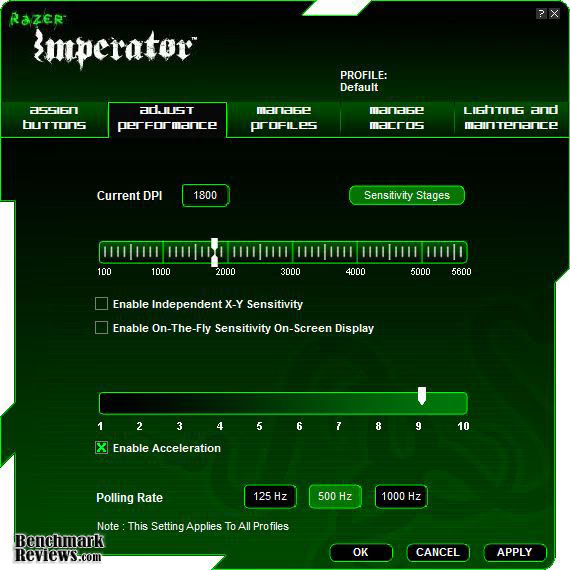
The image below illustrates the options for adjusting the DPI sensitivity, Acceleration level, and Polling Rate. This is also where you find the settings for different DPI profiles, as shown in the next image.

This screen is where you would make adjustments to the different profiles for your DPI settings. These can be used to switch your mouse settings, for example, in a FPS from frantic fast paced fire fight, to a precise sniper scenario. It is nice to be able to change profiles with a quick push of a button.

The screen below is the application profile manager. It is used to set up different profiles for each application or game you wish to customize. You can save different key maps, DPI settings, etc for each game. You would most likely not want the same mouse button mappings used for both a FPS like Left 4 Dead 2 and a MMO like Lord of the Rings: Online.

This section is for creating and editing macros. If you are unaware of what macros are, they are a series of keystrokes put in a certain order and timed in a specific way. Macros are designed to allow someone to, for example, press the middle mouse button, and have a complex action take place, such as "hold W for ten seconds, then wait 5 seconds, then press SPACE, etc. This allows someone to create events such as "cast spell 1, then wait 5 seconds, cast spell 2, wait 2 seconds, use a potion". You get the idea. This screen is where you create the macros you will use in your applications. The macros also support advanced pre-defined actions such as copy, paste, save, switching windows, running a program, etc. The possibilities are virtually unlimited.

And finally, the screen I was looking for, the one where you can turn the lights on and off! It also allows you to check for updates, and restore everything to default settings.
Using a Razer mouse like the Imperator in tandem with a keyboard like the Razer Arctosa could very easily yield some amazing combinations of macros, shortcuts, and hotkeys. It would be very interesting to see Razer create a way to manage their devices together to create some kind of cross-macro support so the mouse could activate macros you create with the keyboard software, and vice versa.
Testing & Results
Testing Methodology
When testing the Razer Imperator RZ01-0035 laser gaming mouse, I tried to use it in many different scenarios. I used it with basic day to day activities such as web surfing, precision work such as photo editing, and gaming such as a FPS and a MMO.
Test System
-
Motherboard: Gigabyte GA-P5NE-SLI
-
System Memory: 4gb of Corsair XMS DDR2 800mhz
-
Processor: Intel Core2Duo E6600
-
Operating System: Windows 7 Professional 64bit
Results
I found that throughout the entire testing period of about 4 weeks, is that my hand did not get cramped, tired, sweaty, etc. The mouse fit very naturally in my hand, and feels very nice in your palm. The adjustable thumb buttons on the side make it very easy to find a comfortable spot for your thumb to rest, and not have to constantly stretch or squish your thumb into position to quickly use the buttons for Back/Forward navigation through web pages and folders, or while swapping through weapons and items during games. I did not once find myself blaming my deaths or lack of aim on the mouse, which only frustrates me more, because now I know it is just me.
The click response of the mouse is very good, as well. All the buttons respond well, and the mouse wheel has a very fluid movement, but with enough friction to not want to spin out of control. Often you find on cheaper mice, that when you are scrolling through windows, you get to a situation where you are in the middle of a scroll, and the page constantly moves up and down as if you are scrolling up and down due to a lack of precision in the mouse wheel position. This did not occur with the Imperator. There are the normal little indents inside the mouse wheel which give you tactile feedback that you are moving it, but there is next to no stray movement between the "clicks".
Razer Imperator Final Thoughts
I had no trouble using the Razer Imperator as naturally as anything. It felt as thought it was designed for my hand. The mouse is very well constructed, and it feels light and nimble in my hand. It feels like it would be something that is built to game, and built to last. The craftsmanship did not stop there, however. The cord also gives me a very good feeling as far as durability goes, and it shows the great attention to detail Razer gives its products.
The Razer mouse software seemed to be very user friendly, and intuitive. It allows a novice user to poke around and change settings with ease without feeling like they are going to mess things up, but it also allows advanced users to fully unlock the potential of their Imperator with highly-customized macros.
Imperator RZ01-0035 Conclusion
Performance with the Razer Imperator 5600-DPI gaming mouse was outstanding. It was responsive to both slow and fast movement, and the clicks and mouse wheel scrolling actions were spot on.
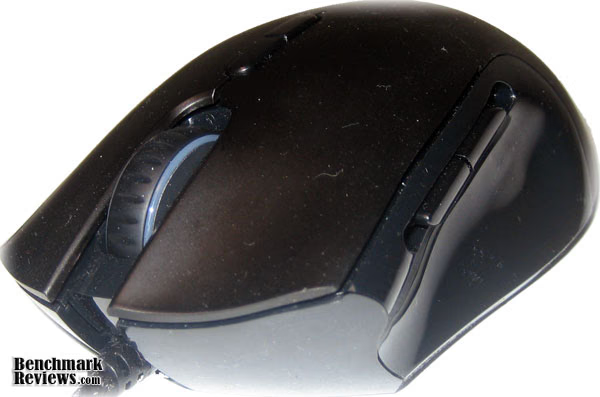
As far as Appearance goes, the Imperator is a good looking mouse. The RZ01-0035 model has a sleek flat black finish on the top and a nice glossy shine on the bottom half. I was not too crazy about the brightness of the lighting on the mouse, but it does look pretty cool. I was just glad they have the option to turn it off.
Construction on the Imperator seems very high quality. The braided cord and gold plated USB plug are very nice details, and the mouse itself feels sturdy. I was not real impressed by the action of the thumb-button sliding mechanism, but it is more than acceptable.
The Razer Imperator gaming mouse functions just as it should for a high-performance peripheral. The RZ01-0035 model is a solid performer with both games and regular (boring) tasks, and the Razer Configuration software (although a bit sore on the eyes) is very user friendly.
Speaking on the value, Newegg.com currently lists the Razer Imperator RZ01-0035 for $79.99. That seems like a steep price for a mouse in my opinion, but you must also consider that this peripheral offers a 5600-DPI laser.
Other than the Imperator being just a little pricey, I would highly recommend this laser mouse to someone looking to step up their game, start fragging with the best of 'em, and stop giving yourself an excuse as to why you are always getting owned by your friends in online games.
Pros:
+ Looks Great
+ Very Precise for big and small actions
+ Superb Comfort with adjustable thumb buttons
+ High Quality construction
+ Great support for Macros and Profiles
+ Expert control over button mappings, DPI settings, Acceleration, etc.
+ Long, Braided cord and Gold Plated USB connection
Cons:
- Expensive price
- Super-bright accent lights (this may not be a con for everyone)
- Thumb button adjustment action feels a bit cheap
- Software UI is a bit on the ugly side (very persnickety)
Ratings:
-
Performance: 9.5
-
Appearance: 9.5
-
Construction: 9.0
-
Functionality: 9.5
-
Value: 7.50
Final Score: 9.0 out of 10.
Excellence Achievement: Benchmark Reviews Golden Tachometer Award.
Questions? Comments? Benchmark Reviews really wants your feedback. We invite you to leave your remarks in our Discussion Forum.
Reader comments from the original article
3 comments were posted before commenting closed. They are preserved as written. Original avatars no longer resolve and are shown as a placeholder.
RE: Razer Imperator Laser Gaming Mouse RZ01-0035 badr-mw Permalink:
i have coperhead mouse but Imperator is best mouse ever
- aly12 Permalink:
Hello I want to know which laser gaming mouse is best to do well in all the games that is to be efficient and quick and the 2 buttons not lose weight lose weight so fast as other mice ie left and right and of course the wheel sensor scrul be good and be the best
RE: Razer Imperator Laser Gaming Mouse RZ01-0035 gedrew18 Permalink:
# RE: Razer Imperator Laser Gaming Mouse RZ01-0035 ? badr-mw 2010-05-25 12:23 i have coperhead mouse but Imperator is best mouse ever