

| AZiO Levetron GM533U Gaming Mouse |
| Reviews - Featured Reviews: Input Devices | |
| Written by Akim Green | |
| Friday, 01 February 2013 | |
AZiO Levetron GM533U Gaming Mouse Review
Manufacturer: AZiO Corp Full Disclosure:The product sample used in this article has been provided by AZiO Corp. Choosing a gaming mouse nowadays can be rather difficult. Especially with the many compelling options and special features offered by multiple manufacturers. Above everything, a gaming mouse must be comfortable, durable, have programmable buttons, and a reasonable dpi range. Most modern mice come with extra features such as wireless functionality, adjustable weight, customizable lighting, and even onboard memory for button profiles.That being said, a particular model may tick all the boxes, and still be imperfect. There is a certain X factor when it comes to mice and other gaming peripherals; it just has to suit the individual using it. As a result, this article will necessarily be somewhat subjective. The mouse under inspection is one of the few offered from AZiO. the GM533U appears to have ticked many of the boxes but should you pick this one over the many other alternatives from reputable gaming brands? Benchmark Reviews takes the Levetron GM533U for a spin to find out. With the immense amount of gaming mice on the market, There's is a constant challenge among manufacturers to offer new features and make their product unique and special. The GM533U has an interesting design that is unlike most other gaming mice: it is visually appealing with it's red accents and lights. Priced at $40, the GM533U jumps into a crowded ring with contenders from Razer, Corsair, and Logitech such as the DeathAdder, the M60, and the G400. It will have to put up a good fight to stand a chance against the heavyweights.
This mouse will be used in typical day-to-day computer activities as well as tested in an array of games. I then express my thoughts about the GM533U and attempt to make comparisons with other mice I'm currently using. Features & Specifications
Closer Look: AZiO Levetron GM533UThe Levetron series from AZiO offers a set of input devices aimed mainly at gamers. The GM533U is one of two gaming mice available.There is no fancy packaging with this product. Opening the box reveals the mouse, the software CD, and the user manual.
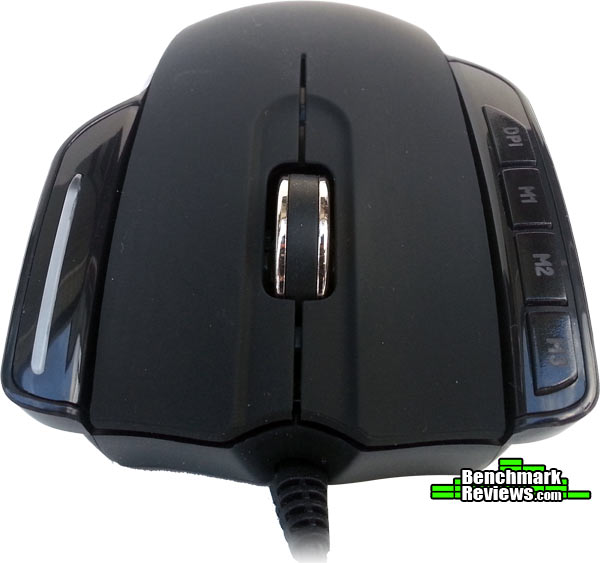
The GM533U does fairly well in the aesthetics department with its red accents and lights. It also features a braided cable and a gold plated USB connecter. On the top surface, the mouse sports a rubbery, matte finish. The sides are plastic with ribbed rubber pads.
This mouse may appear to be ambidextrous, but it is really designed for right-handed use. Four buttons are strategically placed on a separate platform from the left-click button. Three are programmable and one is the designated DPI switcher. On the right lies the DPI indicator light that will flash with a frequency proportional to one of the three DPI options: a low frequency flash appears when the 800dpi setting is selected and it flashes quickly when the highest dpi is selected.
The ability to adjust weight is becoming an increasingly popular feature in gaming mice. The GM533U allows weight modification in 5 gram increments. Personally, I never appreciated this feature; I would simply adapt to the weight of a mouse.
However, with this particular model, it felt quite heavy fully-loaded and I was grateful of the option to remove half of the weights, making it much more comfortable to use. Mouse SoftwareIn this section, we will take a look at the software included with the mouse.
The software bundled with the device is very basic; it will allow one to create different mouse profiles, assign actions to the buttons, record macros, and nothing else! It doesn't allow you to customize the dpi steps, polling rate frequency or anything like that. However, it is quite straightforward and simple to use.
In the console, you can program the 3 'M' buttons and reprogram the the mouse wheel. You may wish to create a multimedia profile for music and program the buttons to play/pause and skip tracks, another one for an MMO game, and perhaps a profile for shortcuts in a productivity application such as Photoshop. The mouse software allows unlimited profiles and macro creation.
The macro tool also enables the user to record the time between key presses for those tricky game combos; if you accidentally press a key in an otherwise perfect combination, it allows any unwanted sections to be deleted.
I managed to create multiple profiles and record many macros that executed correctly. Testing & ResultsTesting MethodologyPrior to the the GM533U, I have been using the Logitech G700 and occasionally, the Razer Abyssus. I attempted to use the GM533U in many of my typical computing tasks such as photoshopping, browsing the web, and of course, gaming. I will comment on how much I like the mouse as well as how it stacks up against other mice I've used. Test Software
ResultsComfort: I have hands big enough to barely grip a basketball so I find mice like the Logitech G9 and the Abyssus a bit on the small side. I also employ a palm grip when I am gaming or doing any other task. I have no problems with the size of the mouse; its length and width make for a reasonable fit in my hand. That, however, is about all that I'm pleased with. I find that little piece with the dpi indicator very obstructive because it leaves me with no place to put my ring finger. I would also rather a matte finish on the sides as opposed to plastic. The red rubber grips get very slippery in a heated game session. It is bearable while it's being used for normal tasks, but it is very frustrating when gaming for more than an hour. I much prefer the shape and texture of the G700 and despite it's size, and simplicity, the Abyssus was more comfortable in long game sessions. Functionality: The mouse performs very well in a variety of tasks. I have not encountered any major problems while gaming or doing anything else. The left and right click buttons are a little stiff, but provide very good feedback. On some occasions, moving the mouse wheel one increment was not enough to switch to a side-arm or scroll in a document. Unlike the more expensive mice such as the G700, there are only 3 dpi settings: 800, 2000, and 5000. The 800 setting is useful for photoshopping and perhaps in sniping situations. Personally, I mostly use the 2000 dpi setting on this or any other mouse; anything over 3500 dpi is ridiculous and not very useful. I would have preferred to see a better dpi range between 500 and 3000 as opposed what is available. I have created a few profiles with this mouse and made good use of the macro buttons. They came in handy in Arkham City where I assigned macros for evading and quick batarang to the M1 and M2 buttons. In FPS games like BF3 they weren't as useful as my index finger was fixed on the fire button; in this scenario, I would've appreciated thumb programmable buttons on the left side as on most modern gaming mice. Switching dpi on the mouse was efficient. The button is on top of the mouse and easily reachable; the flashing indicator allows you to keep focused on your game. I prefer this design over that of the Abyssus in which you have to pause the game, turn the mouse over, and adjust the dpi with a switch. Gaming Mouse Final ThoughtsIf I had to express how I feel about this mouse in a single sentence I would simply say that I don't like it. While it has many of the features that characterize a gaming mouse, it just doesn't fit right with me. My biggest problem is its ergonomics. I have never seen or used a mouse that is more awkward to hold than this one. Being on the cheaper side of gaming mice, too much cannot be expected, but I don't think it stands up against other mice in the same price bracket. It feels a lot less premium than it looks and I find it impossible to use for extended periods. Having used other Levetron peripherals such as the Mech5 keyboard, I must say that this mouse disappoints, and that I wouldn't readily recommend it to anyone looking for a budget gaming mouse.
AZiO Levetron GM533U ConclusionThe mouse performs quite well in most environments. With a 1000Hz polling rate, I didn't notice any lag or sudden jumps with the pointer. At the 2000 dpi setting, I had a very smooth gaming and browsing experience with the GM533U. I like the red and black theme of the mouse, as well as the lighting. It looks robust and modern but at the cost of comfort. I would have much preferred the sides and the glossy plastic strips to have a matte finish to provide better grip. The mouse appears to be well-built but still feels a little cheap when you hold it. The braided cable and gold plated are good additions, but they don't make up for the red rubber on the sides that gets slippery very fast. The mouse glides well on most surfaces. The mouse wheel seems to be a little buggy, as it doesn't always register a single scroll, but that may just be my model. The programmable buttons work great and the software is very straightforward. I was able to easily set up profiles for different tasks and assign macros to the buttons. This came in handy in Arkham City and PhotoShop where I assigned macros for combos and shorcuts respectively. I would've liked a button or two on the thumb side for use in FPS games. As of February 2013 the AZiO Levetron GM533U gaming mouse was available online for $39.99 (NewEgg / Amazon). While I don't think this mouse is overpriced, I feel that $40 would be better spent on similarly priced alternatives. The GM533U is by no means a bad mouse: it performs well in games and other tasks, its software is not the best out there, but it's usable. Macros and profiles were easy to create and executed properly. This mouse suffers most from bad ergonomics; it is awkward to hold, it gets slippery quite easily and there is no adapting to it. If you're looking for the best mouse $40 can buy, I urge you to look elsewhere. Pros:
+ Easy to use software Cons:- Awkward to hold- Slippery when wet! - Bad material used on the sides - Scroll wheel doesn't always register one increment movements - Not the best buy for $40 Ratings:
Final Score: 7.7 out of 10.COMMENT QUESTION: Do you think the author gave a fair score to the AZiO Levetron GM533U?
Related Articles:
|
|




Comments