

| QNAP TS-419P Turbo NAS 4-Bay Network Storage Server |
| Reviews - Featured Reviews: Network | ||||||||||||||||||||||||||||||||||||||||||||||||||||||||||||||||||||||||||||||||||||||||||||||||||||||||||||||||||||||||||||||||||||||||||||||||||||||||||||||||||||
| Written by Olin Coles | ||||||||||||||||||||||||||||||||||||||||||||||||||||||||||||||||||||||||||||||||||||||||||||||||||||||||||||||||||||||||||||||||||||||||||||||||||||||||||||||||||||
| Friday, 20 November 2009 | ||||||||||||||||||||||||||||||||||||||||||||||||||||||||||||||||||||||||||||||||||||||||||||||||||||||||||||||||||||||||||||||||||||||||||||||||||||||||||||||||||||
QNAP TS-419P Turbo NAS ReviewBenchmark Reviews has monitored the network storage industry for several years now, and the same three features have always held the highest demand: speed, data redundancy, and simple operation. QNAP has earned the title of NAS pioneer, not by being the first to have a network attached storage (NAS) device on the market, but by being the first to consistently offer fast Gigabit Ethernet speeds with failover, RAID hard drive functionality, and a diverse feature-rich user interface. In this article, Benchmark Reviews test the QNAP TS-419P Turbo NAS based on the Marvell 6281 'Kirkwood' processor. If NAS technology was separated into two categories, there would be network storage for the small office/home office (SOHO) user, and NAS server appliances for the corporate Enterprise sector. Benchmark Reviews has recently tested the QNAP TS-119 NAS which is a single-disk network storage product made for home users, and we've also tested the goliath QNAP TS-809 Pro 8-Bay NAS that was designed with the storage needs of large businesses. Each of the network storage devices offers different things to different audiences, but neither of them make the ideal compromise to fit the needs of most users. The QNAP TS-419P does.
Excellent industrial design and hardware specificationsThe low-powered TS-419P Turbo NAS adopts Marvell 1.2 GHz CPU and 512MB DDRII RAM and is able to maintain superior performance in an intensive data access environment. The NAS supports four hot-swappable SATA hard drives, two Gigabit LAN ports for multi-IP settings, failover, and load-balancing, four USB ports and two eSATA ports for external storage backup, and is also equipped with an LCD panel for convenient system status checking. Superior performance and abundant server applicationsThe TS-419P Turbo NAS supports cross-platform services across Windows, Mac, Linux, and UNIX. Enhanced industry-leading features are also provided, e.g. EXT3 and EXT4 file systems, built-in iSCSI target service (max 8 iSCSI targets), virtual disk drive (VDD) by built-in iSCSI initiator for storage expansion, RAID 0/ 1/ 5/ 6/ 5+spare, single and JBOD disk configurations, online RAID capacity expansion, online RAID level migration, RAID recovery, policy-based IP blocking, instant SMS alert notification, schedule power on/ off, and 4 IP cameras (optional purchase) for network surveillance. Maximize the enjoyment of your home multimedia centerThe built-in UPnP/ DLNA media server (with TwonkyMedia enabled) of the Turbo NAS supports a wide range of DLNA media players such as Sony PS3 and Microsoft Xbox 360 gaming consoles and works well with NFS-supported High-Definition (HD) digital media players for HD video streaming. By installing the DLNA/ UPnP application on your iPhone or iPod touch, you can access the Turbo NAS on the local network and play the multimedia contents, e.g. videos, music, and photos on the server. In addition, the high-speed PC-less Download Station with the unique QGet utility enables you to manage the BT/ FTP/ HTTP download tasks remotely over the local network or the Internet. About QNAP Systems, Inc.
|
||||||||||||||||||||||||||||||||||||||||||||||||||||||||||||||||||||||||||||||||||||||||||||||||||||||||||||||||||||||||||||||||||||||||||||||||||||||||||||||||||||


| CPU | Marvell 6281 1.2GHz |
| DRAM | 512MB DDRII RAM |
| Flash Memory | 16MB |
| HDD | 4 x 3.5" or 2.5" SATA I/II HDD NOTE: The system is shipped without HDD. |
| HDD Tray | 4 x hot-swappable and lockable tray |
| LAN Port | 2 x Gigabit RJ-45 Ethernet port |
| LED Indicators | Status, LAN, USB, eSATA, HDD 1, HDD 2, HDD 3, HDD 4 |
| USB | 4 x USB 2.0 port (Front: 1; Back: 3) Supports USB printer, disk, pen drive, USB hub, and USB UPS, etc. |
| eSATA | 2 x eSATA port (Back) |
| Buttons | Power button, USB one-touch-backup button, reset button |
| LCD panel | Mono-LCD display with backlight and buttons for configuration |
| Alarm Buzzer | System warning |
| Form Factor | Tower |
| Dimensions | 177(H) x 180(W) x 235(D) mm 6.97(H) x 7.09(W) x 9.25(D) inch |
| Weight | Net weight: 3 Kg (6.61 lbs) Gross weight: 4.6 Kg (10.14 lbs) |
| Sound Level (dB) | W/o HDD installed: 33 dB Stand by: 33.2 dB In operation: 35.1dB (Background: 25.5 dB) |
| Power Consumption (W) | Sleep mode: 11W In operation: 26W (with 4 x 500GB HDD installed) |
| Temperature | 0~40°C/ 32~104°F |
| Humidity | 0~95% R.H. |
| Power Supply | Input: 100-240V AC, 50/60Hz, Output: 12V DC, 10A, 120W |
| Secure Design | K-lock security slot for theft prevention |
| Fan | 1 x quiet cooling fan (9 cm, 12V DC) |
Smart Fan
The fan rotation speed is automatically adjusted according to the server's temperature. You can also define the system temperatures to trigger high speed or low speed rotation of the fan. By manually setting the fan rotation speed, the fan will rotate at the defined speed continuously.
Instant SMS/ Email Alert
You can configure the SMTP server and SMSC server settings on the NAS in order to receive instant system warning or error messages by email or SMS.
SNMP (Simple Network Management Protocol)
Enable SNMP service on the NAS to collect the information, warning or error of the NAS and send to max 3 SNMP servers for centralized management and real-time monitoring of your NAS.
SSL Secure Certificate
The administrator can upload a secure certificate and an RSA private key in X.509PEM format issued by a trusted provider in order to allow the users to access the NAS by secure SSL login.
Syslog Settings
All the system event logs and connection logs can be saved to a remote syslog server.
Network Recycle Bin
The files deleted from the network shares of the NAS will be moved to a particular recycle bin folder. You can restore your data anytime in case of unintended file deletion.
Comprehensive Event Log System
The logs of connections to the NAS via samba, FTP, AFP, HTTP, HTTPS, Telnet, and SSH, and networking services accessed by online users are all recorded.
Detailed System Information
You can view the system status, e.g., CPU usage, total memory, free memory, packets received, packets sent, error packets, system up time, CPU temperature, system temperature, HDD temperature, and system fan speed.
DDNS Support
You can register a unique domain name from a DDNS service provider and assign it to your NAS. Your users can access the NAS by the domain name instead of the IP address.
Excellent Hardware Expansion
The TS-419P supports 4 USB 2.0 and 2 eSATA ports. You can connect external storage devices to the NAS for data backup or storage capacity expansion.
QNAP TS-419P Software
| File Server | File sharing across Windows/ Mac/ Linux/ Unix and centralized management |
| FTP Server | Supports data access from remote location via FTP (max. 256 concurrent connections) |
| FTP with SSL/ TLS (explicit) mode | |
| FXP supported | |
| FTP bandwidth control and connection control | |
| Passive FTP port range control | |
| Backup Server | QNAP client-side backup software-NetBak Replicator supports instant, schedule, and auto-sync backup |
| 3rd party backup software support: Acronis True Image, CA Brightstor ARCserve Backup, EMC Retrospect, Symantec Backup Exec, LaCie Silverkeeper Mac OS X Time Machine supported |
|
| Printer Server | Network printer sharing via USB (Windows & Mac) Supports all-in-one printer (max. 3 sets) |
| Remote Replication | Block-level remote replication supports instant, schedule backup management; supports synchronization mode |
| Web Server | Built-in phpMyAdmin, Joomla!, editable php.ini, SQLite and MySQL |
| My SQL Server | MySQL database server |
| UPnP Media Server | (Built-in TwonkyMedia) Supports UPnP or DLNA technology; the video, music, and photos on the NAS can be played by digital media players over the local network |
| Enjoy more than hundreds of worldwide Internet radio. | |
| Supports DLNA media playing with PS3, Xbox360, PSP | |
| Supports Nokia N95 (DLNA control point) | |
| Supports iPhone/ iPod touch DLNA/ UPnP application. | |
| iTunes Server | iTunes server for music sharing Smart playlist for iTunes software |
| Multimedia Station | Image slide show and rotation (+90°, -90°) |
| Display photo details: dates, exposure time, aperture, etc. | |
| Automatic thumbnail generation for easy browsing | |
| Photo album access authority management | |
| Multimedia files (video and audio) local playing | |
| Automatic file categorization | |
| Download Station | PC-less BitTorrent/ FTP/ HTTP download |
| QNAP remote download control software: QGet (Windows/ Mac), allows you to control the download tasks of multiple Turbo NAS on one PC via LAN/ WAN. |
|
| BitTorrent download supports TCP/ UDP tracker protocol, DHT | |
| BT schedule download | |
| BT download (up to 500 tasks) | |
| Download configuration (current seed number, configurable port range, bandwidth control, download percentage, UPnP NAT port forwarding for BitTorrent download) | |
| Download status list management (download percentage) | |
| Supports access from Mac by Mozilla Firefox | |
| Surveillance Station | Support 4 IP cameras (optional purchase) for network surveillance |
| Operating System | Linux-embedded system |
| Networking | TCP/IP, DHCP Client, DHCP Server, CIFS/SMB, AFP, NFS, HTTP, HTTPS, FTP, DDNS, NTP |
| Multi-IP setting | |
| Gigabit Jumbo Frame | |
| Port Trunking - Balance-rr (Round-Robin) - Active Backup - Balance XOR - Broadcast - IEEE 802.3ad - Balance-tlb (Adaptive Transmit Load Balancing) - Balance-alb (Adaptive Load Balancing) |
|
| Network Service Discovery (UPnP & Bonjour) | |
| File System | EXT3 (Internal/ external HDD) |
| EXT4 (Internal/ external HDD) | |
| FAT (External HDD) | |
| NTFS (External HDD) | |
| Supported Operating Systems | Microsoft Windows 98/ ME/ NT/ 2000/ XP/ 2003/ Vista/ Windows 7 (32bit & 64bit) |
| Mac OS X Linux and UNIX |
|
| Disk Management | Single disk, RAID 0 (Disk Striping), RAID 1 (Disk Mirroring), RAID 5, RAID 5+ Hot spare, RAID 6, and JBOD (Linear Disk Volume) |
| Multiple RAID Online RAID Capacity Expansion Online RAID Level Migration RAID Recovery Bitmap support for faster RAID rebuild (RAID 1/5/6) |
|
| Disk usage status management | |
| Check disk (Check Linux file system) | |
| HDD S.M.A.R.T. | |
| Bad blocks scan | |
| Built-in iSCSI target service | |
| Virtual Disk Drive (VDD) for storage expansion (max. 8 Volumes) | |
| User Management | User quota management (per user) |
| Windows AD | |
| User account management (max. 4,096 users) | |
| User group management (max. 512 groups) | |
| Batch creating users | |
| File System Management | Network share management (max. 512 shares) |
| Network volume status management | |
| Share folder level ACL support | |
| Hide share folder on Windows network | |
| Unicode support | |
| Journaling file system | |
| Web File Manager | |
| System Tools | E-mail alert (SMTP authentication) |
| SMS alert | |
| HDD standby mode | |
| Disk usage alert | |
| Automatic power on after power loss | |
| System firmware upgrade SNMP |
|
| Back up, restore, reset system settings | |
| Smart fan setting | |
| Configurable management port | |
| Policy-based unauthorized IP blocking | |
| Secure remote login by SSH connection | |
| Remote login by Telnet connection | |
| USB, SNMP UPS support | |
| Schedule power on/ off (max. 15 settings) | |
| Network recycle bin | |
| Import SSL certificate | |
| Real-time System Resource Monitor | |
| LCD | When the system is ready, users can check or configure the IP settings, physical disk info, volume info, system info, shut down or reboot the NAS, etc. |
| Event Logs | Complete system logs (file level): system events management, connection logs, current connection of on-line users |
| Multilingual Support | English, Traditional Chinese, Simplified Chinese, Japanese, Korean, French, German, Italian, Spanish, Russian, Swedish, Norwegian, Finnish, Danish, and Polish |
| Backup Management | PC-client backup software-NetBak Replicator: Instant/ Schedule/ Auto-sync backup |
| Remote replication supports Rsync | |
| Encrypted remote replication | |
| One touch USB copy for different destination folders | |
| Data backup to external storage device | |
| Multi-browser support | Internet Explorer 7 & 8 |
| Safari 3 & 4 | |
| Firefox 3 | |
| Google Chrome |
QPKG Center Software Expansion
Explore the Unlimited Possibilities of Your NAS with QPKG
The Network Attached Storage (NAS) used to refer to a basic network storage device for simple data sharing but now with the high performance SoC and the advantage in power-saving design, it is redefined as a powerful embedded system that allows the possibilities of offering numerous fascinating applications. Over the past years, QNAP has successfully developed a series of All-in-One NAS servers for power users and business users providing a wide variety of software applications. Besides those QNAP provides, many other software packages are also developed in Linux open source community that power users are able to install them on their NAS to further enrich the functions. However, this is only limited to those advanced users or software developers who are more familiar with Linux systems. In order to let majority of general QNAP NAS users to also utilize their NAS servers with those software packages already developed by the open source community, QPKG platform and development framework is then introduced by QNAP.
Inspired from the powerful software package management system in Linux (yum, dpkg, etc.), but unlike those running in the modern PCs today, QPKG is designed and fine-tuned for running on Linux embedded systems like NAS along with many popular software packages ready for install. Besides, in order to publish your software in our official repository all the software packages will be verified by QNAP to prevent from others to embed malicious codes for system intrusion or potential risks of data damage. Therefore QNAP NAS users may enjoy these software packages developed by the community in a safe way through an installation method as easy as firmware update just like you would install/uninstall software in the Windows environment without the need to go through the complicated process.
QNAP has introduced some popular QPKG software packages as the demonstration purpose. Below are the quick introductions on each of them:
MLDonkey (eMule)
MLDonkey (eMule) is a door to the 'donkey' network, a decentralized network used to exchange big files on the Internet and present most features of the basic Windows donkey client. (e.g., eMule)
Slim Server on Turbo Station (with SqueezeCenter 7)
Squeeze Center is the server software from Slim Device that manages common digital audio formats (.mp3, .flac, .ogg, etc.) and streams them to its players. Slim Server On Turbo Station (SSOTS) developed by flipflip is an add-on to the Turbo Station's firmware which provides the environment to run Squeeze Center 7 on it.
Optware Ipkg (Itsy Package Management System)
Ipkg, or the Itsy Package Management System, is a lightweight package management system designed for embedded devices. It is used in the Unslung operating system for the Linksys NSLU2, in OpenWRT, OpenMoko, Gumstix, iPAQ and now on QNAP NAS too.
SABnzbd+
SABnzbd+ is a multi-platform binary newsgroup downloader written in Python language. The program works in the background and simplifies the downloading, verifying and extracting of files from Usenet. SABnzbd+ does not search for files, instead NZB files (similar to .torrent files, but for Usenet) are fed to SABnzbd+ from sites like newzbin.com, binsearch.info and tvnzb.com (Requires prior installation of Python)
Python
Python is a general-purpose, high-level programming language. Its design philosophy emphasizes programmer productivity and code readability.
WordPress
WordPress is a free, open-source personal publishing system that allows you to easily create a complex blog, or web log, on your site. Written in PHP and supported by a MySQL database, WordPress offers intuitive administrative tools and sophisticated design features that make it easy to develop and integrate a personal or professional blog on your site.
Joomla CMS
Joomla! is a free, open source content management system for publishing content on the world wide web and intranets. The system includes features such as page caching to improve performance, RSS feeds, printable versions of pages, news flashes, blogs, polls, website searching, and language internationalization. Benchmark Reviews is built from the Joomla! CMS.
phpMyAdmin
phpMyAdmin is an open source tool written in PHP intended to handle the administration of MySQL over the Internet. Currently it can create and drop databases, create/drop/alter tables, delete/edit/add fields, execute any SQL statement, and manage keys on fields.
xDove Email Server
XDove named after XMail & Dovecot the 2 open source offerings that are combined to provide a complete set of Email server functionalities which is one-click installable on your QNAP NAS. XDove not only provides SMTP, POP3 and IMAP services, it also comes with a variety of features like multiple virtual domains and accounts, AJAX webmail with extended functionalities including personal folders, address book, calendar and real-time chat among users under the same mail domain. Besides the mail services XDove offers scheduled backup and restore of your mailboxes from multiple domains which gives you an extra protection on the top of your RAID data redundancy.
AjaXplorer
AjaXplorer is a file explorer for remotely managing files on a web server or operation as a simple file-sharing system. Its rich layout and actions make it easily accessible to virtually any end-user. The AJAX based interface, providing streamlined and intuitive functionalities, similar to that of a standard file-system explorer on any operating system.
Software Expansion via QPKG Platform
The QPKG software package platform enables the users to maximize the usage of Turbo NAS by installing additional software packages developed from the users and community worldwide. This can be done by simple "download & install" clicking without going through any complicated process.
Closer Look: QNAP TS-419P
The QNAP TS-419P may share the same technology inside as the smaller QNAP network storage products, but the 6.97" tall by 7.09" wide by 9.25 deep profile certainly sets it apart. The empty TS-419P NAS unit weighs roughly 6.6 LBS empty, and then bulks up to 10.2 LBS when filled with metal hard disk drives.
It's a rather biased of me to say, but I generally agree that four drives is enough for any NAS product. In fact, because most users won't get deeper than RAID-5 on their NAS, it seems that three drives could even hit the target.

The QNAP TS-419P Turbo NAS 4-Bay server is equipped with a Marvell 6281 'Kirkwood' controller chip includes a 256KB L2 cache that operates at 400MHz when the unit is clocked to 1.2GHz, and 512MB of DDR2 system memory. QNAP employs the integrated (soldiered) Marvell Kirkwood 6281 CPU (88F6281 88F6-B1A2) processor control unit with a passive cooling heatsink on the TS-419P. QNAP enthusiasts may recall that this same central hardware was used in their smaller QNAP TS-119 NAS and TS-219 models, and so the TS-419P will simply add storage capacity and some connectivity options beyond the smaller SOHO models. Like the TS-119/219-series NAS products, the TS-419P also uses 16MB of flash memory for operations.

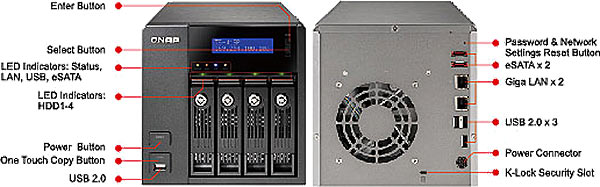
QNAP has kept the front panel clutter to a minimum on the TS-419P Turbo NAS 4-Bay server, with basic information displayed on the LCD screen and only a few buttons placed on the bezel. A single power button and USB (2.0) copy port are located along the lower left corner of the Turbo NAS, with four removable drive trays illuminating a green LED when a SATA HDD/SSD has been installed into position.

The LCD panel offers general information, and a two-button Enter/Select key allows for basic navigation. Beneath the LCD screen there are three colored LED lights, which indicate status on the TS-419P, LAN Ethernet activity, and if a USB device is connected to the Turbo NAS.

QNAP uses a steel-framed tray with black plastic latches for each of the four drive bays on the TS-419P. Each tray stands vertically and slides smoothly into the NAS. If additional security is desired, the barrel lock can secure the drive in place.
The four SATA drives can be installed in single disk, RAID 0 (Disk Striping), RAID 1 (Disk Mirroring), RAID 5, RAID 5+ Hot spare, RAID 6, and JBOD (Linear Disk Volume); all featuring iSCSI target services. Each drive can be formatted using FAT, NTFS, EXT3, or EXT4 file systems.
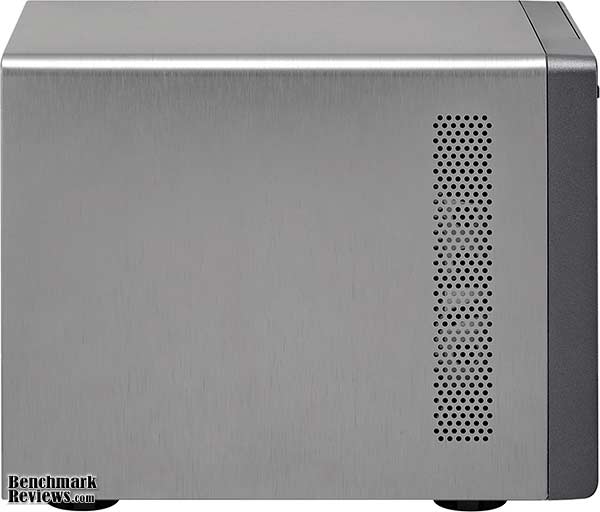
There's a single 1x5" strip of ventilation holes on the left side of the QNAP TS-419P Turbo NAS. Other than the drive trays this is the only entry point for cool air to the Marvell processor, which then exhausts heated air out through a 90mm cooling fan positioned at the rear of the unit.
QNAP uses a EDAC Power AC adapter on the TS-419P. The model EA11351A-120 is rated for 12V 10A output. To measure isolated NAS power consumption, Benchmark Reviews uses the Kill-A-Watt EZ (model P4460) power meter made by P3 International. At idle standby mode the QNAP TS-419P consumed 14 watts of electricity, which is a short distance from the specified 11W. With four 500GB hard drives installed (to match QNAP's test specification), formatting the TS-419P NAS drives drew 36W according to the Kill-A-Watt power meter, which is nearly 39% more than QNAP's estimate of 26W under load.

Twin eSATA expansion ports are available on the QNAP TS-419P, which enabled the connection of additional high-speed attached storage appliances. Dual Gigabit Ethernet NICs are available, with a total of three USB 2.0 ports below them. A Kensington lock hole is also available, allowing administrators to tether the nearly 20LB NAS to a nearby surface.
QNAP v3 User Interface
QNAP has recently launched the v3 Graphical User Interface on their Turbo NAS servers. As a long-time NAS product tester, my experiences with the many GUIs used on the server products has been quite extensive. For the past three years, which is essentially the time period NAS products have gained in popularity to the point where network administrators consider them mainstream appliances, the one company that has always set the standard for software and menu navigation has been QNAP. So should it surprise me that a new version of their already-popular software interface was even better than the last?
QNAP is equally impressed, and has launched a demo site especially for the v3 GUI firmware, and as of this writing a new v3.2 beta firmware is available with expanded functionality. If you're considering a QNAP NAS product, I highly recommend that you browse over the demo site to get a better understanding of how nice the new GUI is.

The very first thing I noticed different once I updated the firmware was a new Administration logon screen. For a moment, I thought that I had logged into my media server, which has a similar iPhone-ish feel to it. The QNAP v3 User Interface borrows the nice rounded GUI design made popular by the Apple smart phone, and adds a myriad of sub-menus behind it.

Finding what you need has never been so easy! Whenever I test NAS products, the very first thing I must do (after updating the firmware) is to configure network settings and build the drive array. Usually this takes a few minutes of searching through the menu, even the older QNAP v2 GUI took some time, but the latest navigation interface is unbelievably easy to work with.
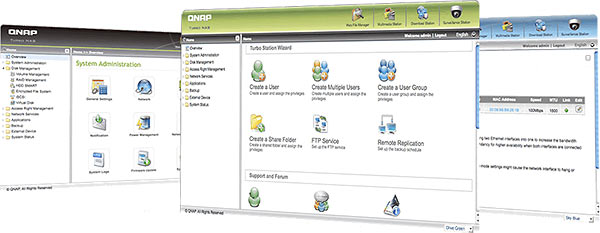
While many of the new aspects behind QNAP's v3 Graphical User Interface are cosmetic, it's nice to have the ability to customize the interface and build a color theme that best suites your mood. Normally I wouldn't pay this much mind, but when you work in the GUI so much that it becomes a regular stop on your Web Favorites list, it's nice to have a things tuned to your own needs. QNAP offers a live video demonstration of the v3 firmware GUI for those wanting more hands-on.
Network Terminology
Benchmark Reviews has decided to abandon our effort to educate readers on the difference between a Gigabyte, and a Gibibyte. This article will use the common metric terminology for data measurement, instead of the binary units we've used in past articles. Sadly, too many people are more interested in comfortable reading, even if it means being technically inaccurate. But for anyone who might still be interested in learning real technical terms relevant to the industry, I've added a small explanation below:
The basic unit data measurement is called a bit (one single binary digit). Computers use these bits, which are composed of ones and zeros, to communicate their contents. All files are stored as binary files, and translated into working files by the Operating System. This two number system is called a "binary number system". In comparison, the decimal number system has ten unique digits consisting of zero through nine. Essentially it boils down to differences between binary and metric measurements, because testing is deeply impacted without carefully separating the two. For example, the difference between the transfer time of a one-Gigabyte (1000 Megabytes) file is going to be significantly better than a true binary Gigabyte (referred to as a Gibibyte) that contains 1024 Megabytes. The larger the file used for data transfer, the bigger the difference will be.
Have you ever wondered why your 500 GB hard drive only has about 488 GB once it has been formatted? Most Operating Systems utilize the binary number system to express file data size, however the prefixes for the multiples are based on the metric system. So even though a metric "Kilo" equals 1,000, a binary "Kilo" equals 1,024. Are you confused yet? Don't be surprised, because even the most tech savvy people often mistake the two. Plainly put, the Kilobyte is expressed as 1000 bytes, but it is really comprised of 1,024 bytes.
Most network engineers (myself included) are not fully aware that the IEC changed the way we calculate and name data chunks when they published the new International Standards back in December 1998. The International Electrotechnical Commission (IEC) removed the old metric prefixes for multiples in binary code with new prefixes for binary multiples made up of only the first two letters of the metric prefixes and adding the first two letters of the word "binary". For example, instead of Megabyte (MB) or Gigabyte (GB), the new terms would be Mebibyte (MiB) or Gibibyte (GiB). While this is the new official IEC International Standard, it has not been widely adopted yet because it is either still unknown by institutions or not commonly used.
Personally, I think the IEC took a confusing situation and simply made it more of a mess. As I mentioned earlier, the Kilobyte was previously expressed as 1000 bytes, even though it was really comprised of 1,024 bytes. Now, the Kilobyte really is expressed correctly as 1000 bytes, and the Kibibyte is the item comprised of 1,024 bytes. In essence, the IEC just created a new name for the binary item and left the existing name for the metric item. Hopefully that clears things up, and you can thank Benchmark Reviews for training the next generation of Network Engineers.
NAS Testing Methodology
Although each of the devices we tested can accommodate several different disk configurations, it was decided that basic (single) disk and RAID-5 configurations were the best way to measure data throughput for our NAS servers.
Connected directly to the Realtek RTL8168D Family PCI-E Gigabit Ethernet NIC by a three-foot CAT6 patch cable, the NAS products received one test transfer followed by three timed transfers. Each test file was sent to the Seagate 1.5 TB 7200.11 SATA-II HDD installed in the NAS for a timed write test, and that same file was sent back to an identical Seagate 1.5 TB 7200.11 HDD drive (ST31500341AS) in the test system to record the read test. Each test was repeated, and the first three identical results were recorded and charted.

The two transfer tests: read and write, were conducted on each NAS appliance using the 100 MB file and then the 1 GB file. Additionally, a second set of tests were conducted with Jumbo Frame enabled. While the Synology Disk Station DS209, DS408, Cube Station CS407, and QNAP TS-409 Pro/TS-209 Pro each offered 9000K MTU Jumbo Frame settings available, the D-Link DNS-323 and QNAP TS-509 Pro do not. In the Jumbo Frame tests the Realtek RTL8168D Gigabit NIC was set to use the 9K MTU value with Jumbo Frame enabled. For the sake of benchmark results, the TS-509 Pro was also tested in the RAID-5 configuration (three disks), and included 10 GiB file transfers.
NAS Comparison Products
-
D-Link DNS-323 Gigabit 2-Bay SATA NAS server
-
QNAP TS-209 Pro Gigabit 2-Bay SATA NAS server
-
QNAP TS-409 Pro Gigabit 4-Bay SATA NAS Server
-
QNAP TS-419P Gigabit 4-Bay SATA NAS Server
-
QNAP TS-509 Pro Gigabit 5-Bay SATA NAS server
-
QNAP TS-809 Pro 8-Bay SATA Turbo NAS server
-
Synology Disk Station DS209 2-Bay DS209 NAS server
-
Synology Cube Station CS407 Gigabit 4-Bay SATA NAS server
-
Synology Disk Station DS408 Gigabit 4-Bay SATA NAS server
-
Thecus N7700 Gigabit 7-Bay SATA NAS server
-
Patriot Corza PCZ35SNAS2 Gigabit 2-Bay SATA NAS Server
Support Equipment
-
(3) Seagate 1.5 TB 7200.11 SATA-II 7200 RPM Hard Disk Drives
-
3-Foot Category-6 Solid Copper Shielded Twisted Pair Patch Cable
-
Realtek RTL8168D PCI-E Gigabit Ethernet Controller (Driver Version 5.724.423.2009)
-
1 metric Gigabyte Test File (1 GB / Gigabyte = 1,000,000,000 bytes)
-
10 metric Gigabyte Test File (10 GB / Gigabyte = 1,000,000,000 bytes)
Test System
-
Motherboard: Gigabyte GA-EX58-UD4P (Intel X58/ICH10R Chipset) with F10h BIOS
-
Processor: Intel Core i7-920 Nehalem 2.66 GHz (BX80601920)
-
System Memory: OCZ 6GB 1600MHz CL7 DDR3 OCZ3P1600LV6GK
-
Disk Drive: OCZ Vertex 120GB SATA SSD OCZSSD2-1VTX120G
-
Operating System: Windows XP Professional SP-3 (optimized to 16 processes at idle)
1GB Single-Disk Test Results
With so many features available to offer a broad range of functionality, NAS server products can be daunting when you try to nail down performance. In this article, Benchmark Reviews will refer to performance as the bandwidth speed results of a file transfer test. The first tests we perform utilizes a single 1GB (1000 megabytes / 1,000,000,000 bytes) file in a transfer to and from the NAS. On products that support the feature, tests using the EXT3 and EXT4 file format will be included. Using an FTP tool so that exact transfer time could be captured, each NAS was tested for transfer bandwidth.
As you can see for yourself in the chart below, QNAP has certainly set itself apart as the dominate force in file transfer speed... even without the aid of Jumbo Frame support on their NAS products. The TS-809 Pro is built from similar hardware found in the TS-509 Pro, and even without the extra Jumbo packet size we see that QNAP products are designed for optimal transfer performance. Offering an all-time best of 62.5 MB/s read speed (using EXT4), the TS-809 Pro leads the pack. Next in line is the TS-809 Pro with 58.8 MB/s using EXT3, matching the 58.8 MB/s read bandwidth of the QNAP TS-509 Pro. The single-drive QNAP TS-119 and Synology DS408 coming in close behind with a best of 55.6 MB/s each with Jumbo Frame. The Thecus N7700 comes in right behind the top three leaders, with a best of 50.0 MB/s, matching performance with the Synology DS209. Although the QNAP TS-419P shares the same hardware as the TS-119, for some reason it didn't post the same performance numbers and dropped back to 50.0 MB/s with Jumbo Frame support.

Moving on to the 1 GB write bandwidth test, our results suggest that while it may sometimes it will be faster to read files from a NAS server then it is to write files onto it, the opposite is true more often than not. The Network Attached Storage servers each have their own strengths, with some being more robust in write-to performance when others conformed to the traditionally impressive read-from performance.
At the top of our charts the QNAP TS-809 Pro offers the highest performance with EXT4, as it did in 1GB read tests, and yields 76.9 MB/s. Formatted with EXT3, the TS-809 Pro offered 71.4 MB/s, followed by the QNAP TS-509 Pro which maintained 62.5 MB/s without the comfort of Jumbo Frame support. Next came the Thecus N7700 which produced a best of 62.5 MB/s. The Synology Disk Station DS209 narrowly beat the larger DS408, and scored a swift 43.5 MB/s write performance with Jumbo Frame enabled. A single-drive QNAP TS-119 held a steady 33.3 MB/s speed, scoring the same with and without Jumbo Frame enabled, and was tailed by the Thecus N3300 at 32.3 MB/s.

The lower-end spectrum consists of all the remaining NAS products, with the next closest competitor being the QNAP TS-419P which scored a noteworthy 25.6 MB/s. The QNAP TS-409 Pro reached only 20.3 MB/s write performance using Jumbo Frame, and 16.5 MB/s without it. The older Synology CD407 performed at roughly half the speed of its newer predecessor, and the remainder of the bunch trailed distantly behind. Let's move on to the larger file chunk testing, because next up is our 10 GB (1000 metric megabytes / 10,000,000,000 bytes) tests. Using only a single hard drive for testing in each NAS, network throughput would be put to the test.
10GB Single-Disk Test Results
Fresh out of the gates, QNAP's TS-809 Pro and TS-509 continued to impress us with the high-bandwidth read performance of 55.6 MB/s that lead the pack. QNAP's single-drive TS-119 offered the same performance once Jumbo Frame was enabled, but reduced to 47.6 MB/s at 1500 MTU. The Synology DS209 and DS408 maintained a close relationship with peak performance around 47 MB/s in normal mode, and improved to 49.3 and 48.3 MB/s read performance with Jumbo Frame enabled at both ends (respectively). At 50.3 MB/s with Jumbo Frame support, the QNAP TS-419P offers very good large file transfer speeds, but without JF support the speed slows to 39.8 MB/s. The Thecus N7700 was able to sustain 44.5 MB/s using Jumbo Frame, and 41.5 MB/s without it, which was very similar to the N3200 Pro.

In our 10GB write performance tests, the charts were shuffled a bit. The Thecus N7700 makes up for above-average read performance by offering excellent large-file write performance and sustained 56.2/58.8 MB/s in normal and Jumbo Frame modes, and for once QNAP was not the performance leader. Next in line came the QNAP TS-809 Pro with 54.4 MB/s using EXT3 and 48.3 MB/s with EXT4. Then came the TS-509 Pro, which has held a top position for most tests until now, and scored 47.0 MB/s. The Synology DS209 and DS408 have performed in the middle of the pack for our 10GB file transfer tests, and performed at 42.9/40.0 and 36.8/36.3 MB/s in normal and Jumbo Frame modes.

The single-drive QNAP TS-119 and three-drive Thecus N3300PRO both score around 32 MB/s in our large file JBOD tests, and trail behind the leaders by almost 20 MB/s. QNAP's TS-419P illustrates a weakness in write-to performance, and produces only 25.4 MB/s at its best and trailing it's CPU/RAM clone (TS-119) by 7 MB/s. In each and every test the Patriot Corza NAS performed poorly compared to similar network storage appliances, but then again this network appliance costs less than $100.
In our next section, Benchmark Reviews tests these NAS appliances with RAID-5 disk configuration.
NAS Comparison Products
-
D-Link DNS-323 Gigabit 2-Bay SATA NAS server
-
QNAP TS-209 Pro Gigabit 2-Bay SATA NAS server
-
QNAP TS-409 Pro Gigabit 4-Bay SATA NAS Server
-
QNAP TS-419P Gigabit 4-Bay SATA NAS Server
-
QNAP TS-509 Pro Gigabit 5-Bay SATA NAS server
-
QNAP TS-809 Pro 8-Bay SATA Turbo NAS server
-
Synology Disk Station DS209 2-Bay DS209 NAS server
-
Synology Cube Station CS407 Gigabit 4-Bay SATA NAS server
-
Synology Disk Station DS408 Gigabit 4-Bay SATA NAS server
-
Thecus N7700 Gigabit 7-Bay SATA NAS server
-
Patriot Corza PCZ35SNAS2 Gigabit 2-Bay SATA NAS Server
1GB RAID Test Results
Unless you're operating a data center or have so many files that they require the raw storage space of three (or more) individual drives, most NAS owners will likely take advantage of a RAID-5 configuration instead. In a Basic Disk configuration, each drive is partitioned similar to the drives on most desktop computers. However, when three or more drives are combined into a RAID-5 array, the size of two disks is combined while the third (or forth) disk holds bit parity information. In RAID-5 each disk rotates responsibility, so one disk holds the parity bit for each cycle while data is written to the others. This improves performance in most circumstances, but there are drawbacks under the right conditions.
On products that support the feature, tests using the EXT3 and EXT4 file format will be included. Using an FTP tool so that exact transfer time could be captured, each NAS was tested for transfer bandwidth.
Beginning with a single 1GB file transfer to each NAS built into a three-drive RAID-5 array, our results look very similar to those we recorded with basic disk/JBOD configuration. Setting a trend, the QNAP TS-809 Pro found itself at the top of our charts. Performing at 66.7 MB/s using EXT4, the TS-809 Pro was a good notch ahead of the next best result. Matching EXT3 performance of the TS-809 Pro was the TS-509 Pro Gigabit 5-Bay SATA NAS server, offering 62.5 MB/s read performance. Synology's Disk Station DS408 4-drive SATA RAID NAS server performed at 58.8 MB/s with Jumbo Frame and 55.6 without it. Each the Thecus NAS servers performed similarly in our RAID-5 tests. The N7700 pushed files to our workstation at 50.0 MB/s max, while the Thecus N3200 offered 47.6 MB/s in both versions of the test. Reading a single 1 Gigabyte file from either NAS showed that the performance was close, but RAID-5 proved to be the better option. The QNAP TS-419P Turbo NAS offered decent RAID-5 performance, producing a 1GB file read at 43.5 MB/s.

In the chart below, write-to testing doesn't seem to change the order of top-performers. Writing a single 1-Gigabyte file from these NAS products isn't much work for a RAID-5 array, and the results show it. With an impressive lead, the QNAP TS-809 Pro offers 76.9 MB/s performance using EXT4, and 71.4 MB/s with EXT3. Next is the QNAP TS-509 Pro, which showed a personal best of 66.7 MB/s, the Thecus N7700 offered 50.0 MB/s with Jumbo Frame enabled. The Synology DS408 indicates reversal of benefits for RAID-5 over Basic Disk for this test. The RAID-5 disk array offered only 30.1 MB/s under normal transfers for the DS408, compared to the more impressive 38.5 MB/s for the Basic Disk configuration. At the tail end of our chart is the Thecus N3200PRO, which offered relatively poor results. With three drives behind a RAID-5 array, the N3200PRO could perform no better than 23.3 MB/s. Just as it has done in the basic disk test, the QNAP TS-419P NAS demonstrates slower write-to performance than its read speeds, and score only 21.7MB/s with Jumbo Frame support. Next stop, 10GB file transfers...

Testing with 10GB files is a lot to ask from any server, let alone a compact NAS product. There aren't too many occasions that call for file transfers of this size, but these occasions are on the rise as HD video sizes grow larger. For this test series, Benchmark Reviews has uploaded the large 10GB test file with and without Jumbo Frame to see how well the NAS performed with a three-disk RAID-5 array.
10GB RAID Test Results
In our 10GB read-from benchmark test, the results were extremely close just like we discovered in the 1GB tests. Despite the lack of Jumbo Frame, QNAP's TS-509 Pro offered the fastest performance by pushing 58.8 MB/s through the Broadcom BCM5787 NetLink Gigabit Ethernet NIC. Trailing slightly behind was the TS-809 which offered 55.9 MB/s using EXT4. The RAID-5 array performed better for the TS-509 Pro than single disk, as was expected with the divided disk workload. Synology wasn't so far behind though, because with Jumbo Frame enabled the DS408 sill read at an impressive 52.6 MB/s, which was even with the Thecus N7700 when you compare the average. Even the Thecus N3200PRO did extremely well, performing at 46.5 MB/s at 1500 MTU, and 52.6 MB/s with Jumbo Frame. At 41.3 MB/s the QNAP TS-419P keeps up with the others, but still falls short of the performance a larger NAS product like the TS-809 Pro can produce.

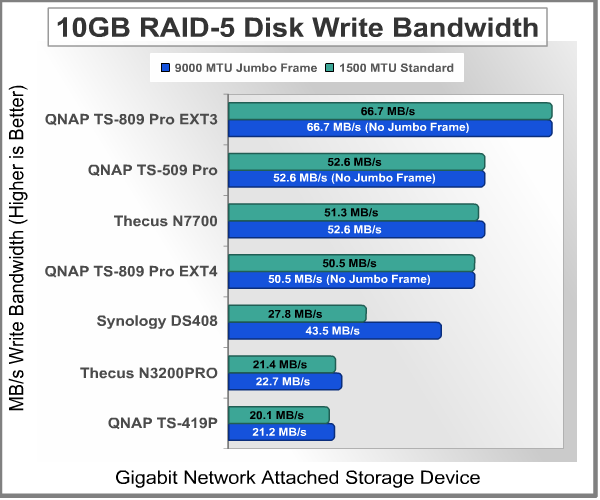
Things change noticeably in the 10GB write-to tests, which keep the QNAP TS-809 Pro ahead of the others with 66.7 MB/s using EXT3. The QNAP TS-509 Pro on still near the top, with the Thecus N7700 right behind it, and then the Synology DS408 and Thecus N3200PRO attached to the bottom. Beginning with the TS-509 Pro, the top performance is recorded at 52.6 MB/s while operating in a RAID-5 array. The Thecus N7700 offers similar performance at 51.3/52.6 MB/s, essentially matching speed. At the other end of the spectrum is the Synology DS408 which takes a huge performance hit without Jumbo Frame to record only 27.8 MB/s, and then a more modest 43.5 with 9000 MTU enabled. Configured in a RAID-5 array, the Thecus N3200PRO scored a Jumbo Frame best of 22.7 MB/s. There's a large difference in performance between a top-end NAS product like the TS-809 Pro (or even TS-509 Pro), and the QNAP TS-419P. Offering 21.2 MB/s isn't bad mind you, but if write speed is critically important to your organization, then the higher-end products will be the best fit.
From our perspective, and after testing two of the newest NAS products available, it appears that technology is still catching up to potential. NAS products equipped with full-blown desktop processors are pushing the bandwidth speeds as high as they've every been measured, while on-chip solutions (like those from Marvell) are steadily improving. Some NAS products even offer 10GBps Ethernet connections, which may not seem reasonable with the limitations of a SATA interface, but who really knows what the future holds. Please continue on to my final thoughts and conclusion.
NAS Comparison Products
- D-Link DNS-323 Gigabit 2-Bay SATA NAS server
- QNAP TS-209 Pro Gigabit 2-Bay SATA NAS server
- QNAP TS-409 Pro Gigabit 4-Bay SATA NAS Server
- QNAP TS-509 Pro Gigabit 5-Bay SATA NAS server
- QNAP TS-809 Pro 8-Bay SATA Turbo NAS server
- Synology Disk Station DS209 2-Bay DS209 NAS server
- Synology Cube Station CS407 Gigabit 4-Bay SATA NAS server
- Synology Disk Station DS408 Gigabit 4-Bay SATA NAS server
- Thecus N7700 Gigabit 7-Bay SATA NAS server
NAS Server Final Thoughts
It's not going to make a lot of sense for resellers and IT professionals to outfit a client with a Windows-based server if it's only going to be used for serving out files, sharing printers, and controlling Active Directory objects; one fairly inexpensive NAS does all this in its most basic form at less than half the cost. It's not until you consider that some manufacturers outfit their NAS series with full LAMP (Linux Apache MySQL and PHP) package for web servers, along with FTP and media tools, that the list of items a NAS product could potentially replace grows very large.

So what can you expect from most NAS products? More than you can with some pedestal or rack servers. This is supposed to be my final thoughts, and quite frankly I just barely touched the surface of features NAS products can offer. Most of my NAS reviews focus on performance, and sparingly supply feature lists. So let's recap some feature highlights that most modern NAS products offer:
-
Hot-swappable SATA-II drive storage bays, usually with 5.25-to-2.5" adapters available.
-
RAID-0, 1, 5, 6, 5 + Spare, 10, Single, and JBOD disk configurations.
-
Dual Gigabit Ethernet ports for failover redundancy or network teaming.
-
Windows Active Directory Services and NT4 support with login via Samba/AFP/FTP for domain users.
-
Linux based O/S with Apache-based web serving, usually partnered to PHP and MySQL allowing you to run dynamic web sites directly from the NAS.
-
eSATA and High-Speed USB 2.0 ports capable of connecting external hard disk drives, flash storage, and compatible printers.
Obviously the list could go on and on, especially if you noticed the multi-page layout of features and functionality. Taking into consideration that NAS products seem to all offer a feature-set that reads like a chefs shopping list, it's no wonder why these NAS products are quickly replacing Windows Server products. After all, for the price of one RAID-5 capable NAS and three 2.0 TB SATA-II HDDs you'll get four Terabytes of total storage space and still spend well below the cost of one single Windows Server Operating System and the required client access licenses.
While it's true that these NAS products will do almost everything a Windows Server platform can, they still fall very short of one important task: Windows software. Many of my clients have servers which require some form of server-side software to manage a database. Some of the most common applications that require almost no processing power but still require installation on a Windows O/S are QuickBooks and AutoCAD licensing server. Imagine the possibilities you could offer clients with a full server-in-the-box solution. I believe that this will be the next evolution in NAS products, as consumer demand more versatility out of their investment.
But there are still a few more things you can't do on a NAS, such as utilize the onboard O/S to install applications. Most NAS products utilize a Linux variant ('Nix) with little or no command interface, so even if you knew how to install from YUM or a similar repository the functionality doesn't exist. Even once that obstacle is navigated, I have a feeling that users will then demand a Windows emulator so they can install and utilize Windows-specific software on their NAS (such as license servers and anti-virus command points). It seems that these problems all revolve around side-stepping Microsoft products and licensing, which is not surprising.
QNAP TS-419P Conclusion
Although our rating and final score are made to be as objective as possible, please be advised that every author perceives these factors differently at different points in time. While we do our best to ensure that all aspects of the product are considered, there are often times unforeseen market conditions and manufacturer changes which occur after publication that would render our rating obsolete. Please do not base your purchases solely on our conclusion, as it represents our product rating at the time of publication. Benchmark Reviews begins our conclusion with a short summary for each of the areas that we rate.
The first area we rate is performance, and in regard to the QNAP TS-419P Turbo NAS 4-Bay server we consider all other NAS products in comparison. The QNAP TS-419P is a read-oriented NAS server, with very good performance in fetching small to large files. Our best read-from performance was 50.3 MB/s using Jumbo Frame on a single-disk setup, and 41.7 at normal MTU. Write-to performance was decent but less impressive, and offered 32.3 MB/s with Jumbo Frame and 25.6 MB/s without it. Asking the QNAP TS-419P to combine three hard drives into a RAID-5 array didn't help matters, and the read performance dropped to 43.5 MB/s at 9000-MTU and 37.0 without Jumbo Frame. Writes did worse, and with Jumbo Frame it scored 21.7 MB/s and 20.0 MB/s without. Although the QNAP TS-419P shares the same 512MB of DDR2 and Marvell 6281 'Kirkwood' controller chip as the single bay TS-119, it seems that having three disk bays makes a small difference.
QNAP took a new approach on the appearance of the TS-419P, and the end result is a very strong product destined to command any environment it's placed into. The Titanium-colored brushed-steel chassis is more than enough to protect against impact damage, while the textured flat-black bezel will avoid fine scratches unlike glossy plastic surfaces. The titanium finish is both attractive and fingerprint friendly, while the front bezel looks good and maintains straight-forward ergonomics. An external AC power supply 'brick' is easily replaceable if there's ever a problem, but thankfully QNAP offers a warranty for those willing to be patient with their service.

If you're familiar with storage area network devices or large pedestal storage servers, then the TS-419P will be a welcomed appliance to the network. With four SATA drive bays worth of storage, there will be enough versatility for two RAID-1 sets or a single RAID-5 or -6 array. QNAP includes two network interfaces for separate networks or redundant failover connectivity, and two eSATA ports for adding additional external storage devices to the NAS. The vented drive trays help focus airflow through the chassis, and the vent holes along the left will prove helpful in keeping the entire using cool. The real credit for functionality is the GUI user interface, which turns a simple NAS into several different shades of workstation and server computer.
There's a lot of value in the QNAP TS-419P Turbo NAS 4-Bay RAID server for the corporate Enterprise environment, and as of late March 2010 the TS-419P was listed at NewEgg for $599.99. Considering the cost to performance ratio, along with the wealth of features the entire Turbo NAS series provides, the TS-459 Pro is a great jack-of-all-trades network storage appliance with top-level transfer speeds. For storage-centric environments that need the absolute best, QNAP offers the TS-809 Pro is still available for $1700 without drives. SOHO users might not need four or more drive bays, and home users could feel more comfortable with the single-bay QNAP TS-119 for $300. We've tested all of these QNAP network storage solutions, and user interface allows nearly unlimited possibilities.
The QNAP TS-419P Turbo NAS server is going to be an excellent alternative to small data clusters or a file server stuffed with drives. The additional functionality should certainly not go overlooked, because it could save your company money in other departments or cut the cost of buying additional equipment for your home business. The TS-419P offers four bays of SATA storage, allowing RAID configuration possibilities most other all-in-one products cannot offer, and satisfies the storage-space intensive corporate market as well as SOHO power-users at the same time. If you're an IT professional looking to offer a network-attached mass-storage server with redundant data arrays and network failover features, the QNAP TS-419P is great for storage-centric operational needs with a low startup cost.
Pros:
+ 50.3/32.3 MBps best read/write performance
+ Built-in iSCSI Target Service
+ Online RAID Capacity Expansion and Level Migration
+ 4-Bay hot-swap SATA storage up to 8TB+
+ Dual Gigabit Ethernet NICs offer teaming and failover safety
+ Pre-installed PHP+MySQL and Apache web server
+ RAID-0/1/5/6/5+Spare/JBOD disk configurations
+ No wiring needed; SATA and power on backplane
+ LCD Panel configures basic information without web interface
+ Rugged brushed-steel chassis provides durability
+ Three total High-Speed USB 2.0 ports + USB Copy port
+ Two eSATA ports for additional storage expansion
+ Frequent firmware development and free software support
+ One-year product warranty with free tech support
+ Outstanding new v3.2 administration GUI
Cons:
- Lacks AES encryption
- Lacks ZFS file system support
- Faster NAS products compete in the same price segment
- High-stress applications cause higher operating temperatures
Ratings:
-
Performance: 8.50
-
Appearance: 9.75
-
Construction: 9.50
-
Functionality: 9.50
-
Value: 6.75
Final Score: 8.8 out of 10.
Quality Recognition: Benchmark Reviews Silver Tachometer Award.
Questions? Comments? Benchmark Reviews really wants your feedback. We invite you to leave your remarks in our Discussion Forum.
Related Articles:
- D-Link DNS-323 SATA RAID Gigabit NAS
- QNAP TS-509 Pro Gigabit 5-Bay SATA NAS Server
- Synology Disk Station DS-207+ SATA Gigabit NAS
- QNAP TS-409 Pro 4-Drive SATA Gigabit NAS
- Thecus N5550 NAS Network Storage Server
- NETGEAR ProSafe GS110T Gigabit SmartSwitch
- ASUSTOR AS-604T NAS Network Storage Server
- QNAP TS-809 Pro 8-Bay SATA NAS
- QNAP TS-109 Pro SATA Gigabit NAS
- QNAP TS-259 Pro Turbo NAS Server
