

| QNAP TS-109 Pro SATA Gigabit NAS |
| Reviews - Featured Reviews: Network | |||||||||||||||||||||||||||||||||||||||||||||||||||||||||||||||||||||||||||||||||||||||||||||||||||||||||||||||||||||||||||||||||||||||||||||||||
| Written by Nitin Kumar - Edited by Olin Coles | |||||||||||||||||||||||||||||||||||||||||||||||||||||||||||||||||||||||||||||||||||||||||||||||||||||||||||||||||||||||||||||||||||||||||||||||||
| Wednesday, 20 February 2008 | |||||||||||||||||||||||||||||||||||||||||||||||||||||||||||||||||||||||||||||||||||||||||||||||||||||||||||||||||||||||||||||||||||||||||||||||||
QNAP TS-109 Pro NAS
|
|||||||||||||||||||||||||||||||||||||||||||||||||||||||||||||||||||||||||||||||||||||||||||||||||||||||||||||||||||||||||||||||||||||||||||||||||
 TS-109 Pro supports many valuable functions like File Server, FTP Server, Printer Server, etc. to satisfy the needs of SMB and SOHO users. Meanwhile, Windows ADS (Active Directory Service) is supported to help create an easy-to-access environment and lower the maintenance cost by centralized management. With the dual support of MySQLand SQLite, SMB/ SOHO users can easily set up their own web and database server. Moreover, the editable php.ini support enables higher flexibility in creating web pages.
|
QNAP Systems, INC. (QNAP) is a devoted and dominant provider of Internet Appliance products. With solid and integrated expertise on the Linux embedded platform, QNAP has delivered more than 30 models of network storage and surveillance products in the past 5 years. These products provide consumers with storage, backup, surveillance and many other professional applications that constitute the core competency of QNAP. Today, QNAP continues to lead the industry in innovation with its award-winning servers. For example, TS-101 was honored "the best choice of Computex" and QBack-25 honored the 1st place by Chip Magazine. To keep the proud and success, QNAP is dedicated to providing top quality products and best support for customers. |
| What Makes QNAP Different? |
|
QNAP TS-109 Pro Features
Powerful All-in-one NAS Server (12-in-1 Server!!!)
 |
Create your own File Server in the easiest way The basic purpose of File Server is to allow users to store and share files. Users often concern that their private data or confidential files would be accessed by others. TS-109 Pro allows server manager to create user ID and password, and define the authority and quota for each user. Thus personal data stored on TS-109 Pro are well protected. |
 |
FTP Server simplifies the data sharing Having troubles with sending large files by e-mail due to the limited capacity? You can establish your own FTP server by using TS-109 Pro. You can manage the access authority of the FTP server and share your files with your friends or customers easily in a few steps. |
 |
Backup Server with the most professional auto-backup software Data backup may sound time and effort consuming for most users. QNAP's Turbo Station now brings you the enterprise-class technology to make backup extremely simple and efficient! The most intelligent automatic backup software, NetBak Replicator, is provided for users to perform real-time synchronization or schedule backup from multiple PCs to TS-109 Pro. |
 |
Enhanced data protection by optional RAID-1 mirroring Imagine, your server's hard drive crashes and you lose everything. What would you do to have it back? QNAP's exclusive Q-RAID 1 provides the ultra-high-level redundancy, which helps to keep a real-time synchronized mirror in your external USB or eSATA hard drive box. In case the main storage is damaged, the backup disk can be installed to TS-109 Pro to resume normal operation |
 |
Remote Replication Remote Replication provides a superior level of data protection. Files can be backed up from TS-109 Pro to other QNAP NAS products in remote locations. Advanced options including data compression, block level incremental backup, and data synchronization save tremendous bandwidth and time for data backup. |
 |
Establish your interactive Web Server Owning a web server is no more a dream! With the dual support of MySQL and SQLite, SMB/ SOHO users can easily set up their own web server. With the editable php.ini support, there is no need of going through all the hassles of setting up a web server. You can either develop programs by yourself or download a variety of open-sourced applications, such as online shops, forums, blogs, etc., over the Internet. |
 |
MySQL Server TS-109 Pro is the most affordable choice as a standalone database server for system integrators. It can be applied flexibly in various deployments such as a database server of another web server in remote site or as an additional backup database server to achieve system redundancy. |
 |
Share your printer resource by Printer Server You can share your printer device over the network without duplicating investment by simply connecting a USB printer to TS-109 Pro's USB port and enabling the printer sharing function. |
 |
UPnP Media Server(with built-in TwonkyMedia Server) TS-109 Pro is a perfect media storage center and it works well with DLNA (Digital Living Network Alliance) compliant media players. You can play the photos and videos on TV. In addition, you can listen to your favorite music and Internet Radio on your Hi-Fi System. |
 |
Multimedia Station for photo sharing Now you can share photos with your family and friends by TS-109 Pro. By uploading your photos to TS-109 Pro, the server automatically generates a web-based photo album with thumbnails and details, such as date, resolution, focal length, aperture, etc.. You can browse and share the digital photos in a convenient way! |
 |
Enjoy continuous download independent of PC TS-109 Pro serves as a continuous BT Download ( BitTorrent ), FTP, or HTTP download center without turning on your PC. The great web-based interface allows you to manage the download tasks anytime, anywhere! |
 |
Share your music by iTunes Server Music fans and Apple enthusiasts will be certainly rocked by the coolest music-sharing feature of TS-109 Pro! All your MP3 music can be collectively stored and streamed to Mac or Windows PC. Just turn on the iTunes program and enjoy all the music around your home network! |
Support Windows ADS
With Windows ADS (Active Directory Service) support, you can deploy your Turbo Station in small business environment easily! It enables Windows domain users to easily access the shared data with the Active Directory authentication. This not only saves server manager's time and effort in creating duplicated groups and accounts, but also lowers the maintenance cost by centralized management.
Sharing files across Windows, Mac, Linux, and Unix.
TS-109 Pro is specially designed for different users to share the files across Windows, Mac, Linux, and Unix environment.
No fan design
The fan used inside a device is for the purpose of cooling system, no matter how quiet it is, the fan has to be activated for air ventilation. Somehow, it is inevitable to generate intermittent chirping noise which distracts your work or diminishes your enjoyment. TS-109 Pro adapts no fan design approach by using silver/ black aluminum case for thermal dissipation. It provides an absolute quiet working environment for you!!
For more details about fanless design

 One touch USB auto copy
When a USB device such as digital camera, digital camcorder, or pen drive is plugging into the front panel USB port, data in the USB flash disk or digital photos in your camera can be backed up to TS-109 Pro automatically by simply pressing the USB copy button.
Unique advanced HDD health scanning (HHS)
No idea how's the health status of your centralized storage hard disk? TS-109 Pro is embedded with HHS technology which lets you to perform checking disk and bad blocks scanning to prevent potential data loss.
Unique Web File Manager
TS-109 Pro provides unique Web File Manager function for you to easily download, upload and manage the files on the server by browser.
SSL Security (HTTPS)
You can access and manage your Turbo Station by using web browser securely. All connections between PC and NAS including user ID, password, files, download tasks, etc. are encrypted in SSL tunnels and are well protected.
Remote management of download tasks on multiple Turbo Stations
QGet is powerful P2P download management software provided with QNAP's Turbo Station series. QGet can be installed on any Windows computers for users to simultaneously manage BitTorrent, FTP and HTTP download tasks of multiple Turbo Station servers.
Network Recycle Bin
Can you imagine if you delete an important file on the NAS by mistake and lose it forever? You don't need to worry now! The files deleted from the network shares of the TS-109 Pro will be moved to a particular recycle bin folder. You can restore your data anytime in case of unintended file deletion.
Built-in DDNS support
TS-109 Pro supports dynamic DNS (DDNS). You can register a unique domain name from a DDNS service provider and assign it to your Turbo Station. There is no more need to remember a lengthy IP address! 
Establish a PC-less Home Multimedia Center by Using QNAP NAS and PS3 or Xbox 360
All the multimedia contents stored on QNAP NAS can be automatically shared to a PS3 or an Xbox 360 in the home network. Users can play their stored photos and videos on a TV, or listen to the music via their Hi-Fi system. QNAP NAS can be a perfect home storage and sharing center for establishing a PC-less, HD video-playing (via PS3, video resolution up to 1080p), highly accessible, and power-saving digital home theatre.
From the time I laid my hands on it I was extremely delighted by the ease of use it provided me with. The product was packaged very nicely and the the installation of the hard drive was as easy as it gets. I was also impressed by the instructions the product came with, which would make it a lot easier for first time users.
QNAP TS-109 Pro Specifications
| Processor: |
SoC 500MHz |
| Memory: |
128MB DDR II RAM, 8MB Flash |
| HDD Capacity: |
1 x 3.5" SATA I/II HDD, up to 1TB, expandable to 2TB via eSATA/USB (the HDD is not included) |
| LAN Port: |
1 x Gigabit RJ-45 Ethernet port |
| LED Indicators: |
USB, Status, eSATA, HDD, LAN, Power |
| USB: |
3 x USB 2.0, support USB printer, |
| eSATA: |
1 x eSATA port |
| Buttons: |
Intelligent USB auto copy button |
| Alarm Buzzer: |
System warning |
| Form Factor: |
Portable desktop |
| Dimensions: |
210(D) x 60(W) x 182(H) mm |
| Weight: |
Net weight: 1.2Kg |
| Operation Environment: |
Temperature 0~35°C |
| Power Supply: |
External power adapter, 12V, 36W, 100~240V |
| Power Consumption: |
Sleep mode 6.6W |
| Energy-saving Design: |
Fanless, HDD sleep mode |
| Thermal Solution: |
Heat dissipation by aluminum case |
| Secure Design: |
K-Lock security slot for theft prevention |
Software Specifications:
|
||||||||||||||||||||||||||||||||||||||||||||||||||||||||
| Software Specifications | ||||||||||||||||||||||||||||||||||||||||||||||||||||||||
|
QNAP TS-109 Pro Exterior
QNAP TS-109 Pro has an excellent exterior look and features. The interface is extremely user friendly, and the light silver finish combined with black front panel makes the unit look much more attractive. The front panel indicators on the TS-109 Pro are very clear and indicative of the unit's activity. The activity LEDs on the unit are of different colors for different activities. Now lets move on to the have a look at the exterior of the QNAP TS-109 Pro.
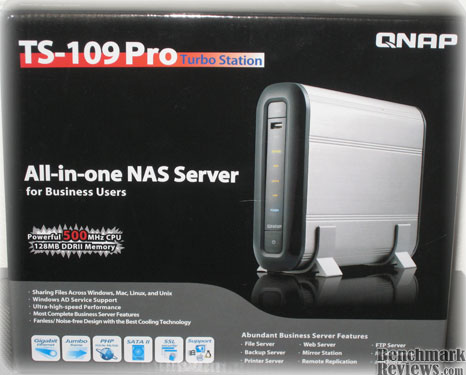
The box of the QNAP TS-109 Pro has an attractive art design. The labels on the box and the info on the back list almost every feature of the TS-109 Pro in a very small space.
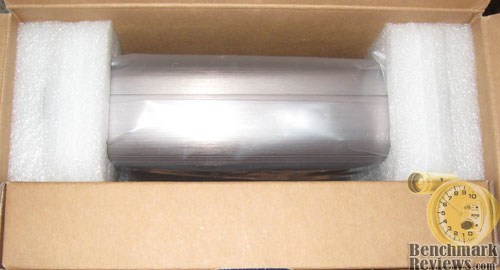
The packaging on the QNAP TS-109 Pro was clean and impressive. The unit was tucked in very securely and all the accessories were packed in the box on the side.
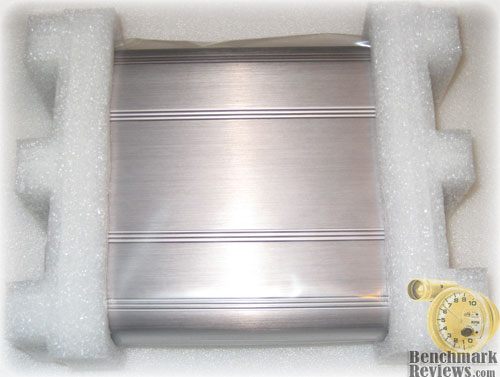
The QNAP TS-109 Pro was wrapped in a thick plastic cover. I was very impressed with the simplicity and the effectiveness of the packaging by QNAP.
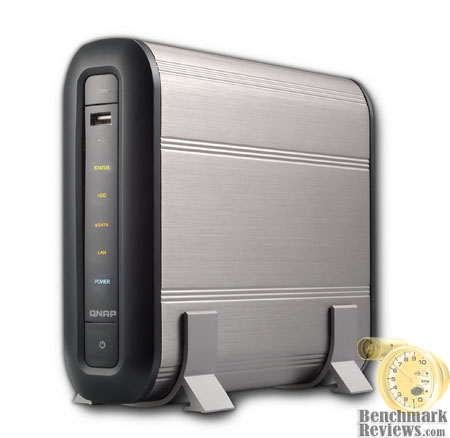
Looking at the front of the unit we can see numerous activity indicator. QNAP has used different colors for activity LEDs to differentiate each function and it really stands out every time you look at the unit.
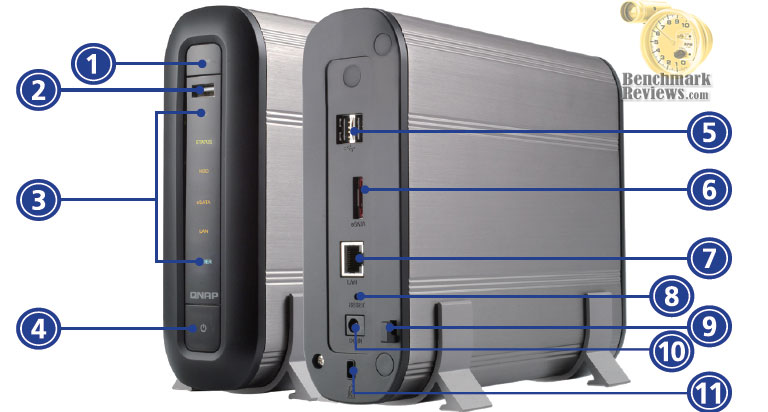
Here is another picture with the rear of the unit shown. The unit has two USB ports which can be used to expand the storage capability of the QNAP TS-109 Pro, as well as an eSATA port.
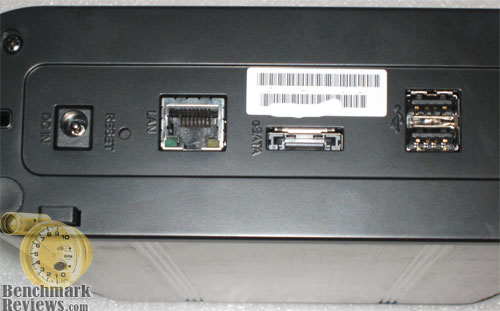
Here is another look at the rear of the QNAP TS-109 Pro showing the rear expansion ports, power connector and the ethernet jack.

Here is a screenshot of the front of the unit, as I have mentioned before the front of the QNAP is really attractive and it really stands out with the silver finish on the unit.
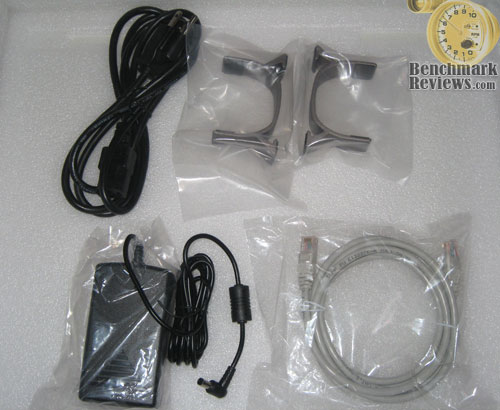
The QNAP TS-109 Pro doesn't come with any thing special other than what is necessary to get it working and nothing more can be desired from such a unit. QNAP provides stands to accompany the TS-109 Pro. The unit also included a intallation chart which was very helpful and explained each step in a very detailed manner to get the NAS server rolling.
QNAP TS-109 Pro Interior
QNAP left the unit unscrewed which made it even easier for me to install the hard drive. TS-109 Pro already had a beautiful exterior design, and I was excited to see the inner parts of the unit. I didn't really expect much as no one really cares how nice the interior is as long as it is high quality and it works.
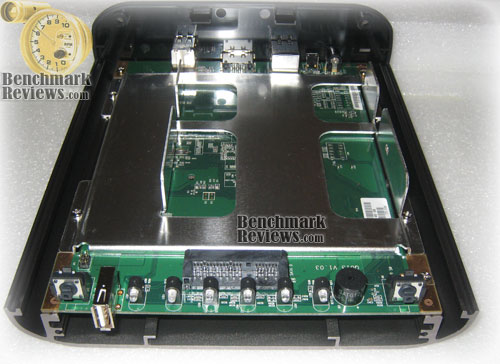
Though I have to admit as soon as I took removed the cover I was impressed. The finish on the inside was impressive. The TS-109 Pro looked very high quality and the finish on the HD-Tray had to be admired. The interior of the unit looked as good as the outside if not better.
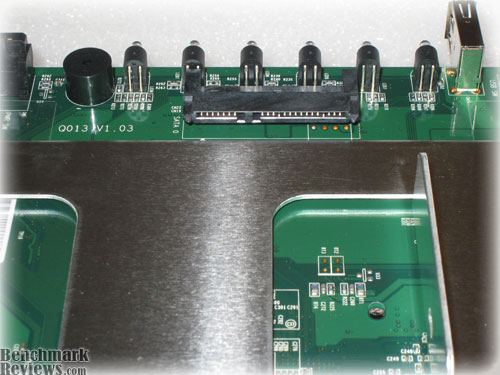
Here is a look at the SATA port on the TS-109 Pro along the power plug. Very easy and high quality design.
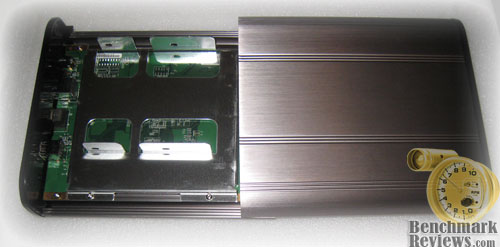
The top cover on the unit slides of very easily and smoothly. You don't have to ever struggle a bit to slide it on and off.
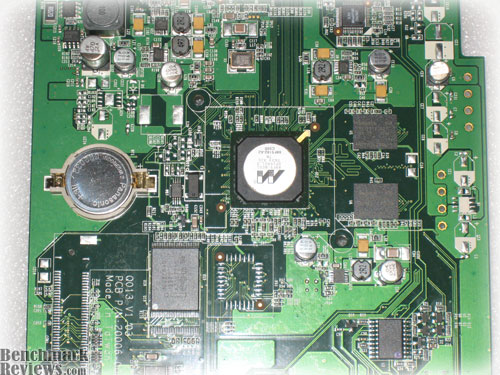
I actually removed the board from the unit to see the quality parts it was using. QNAP TS-109 uses Marvell based chip and uses all solid capacitors. From the design stand point the unit doesn't lag in any terms.
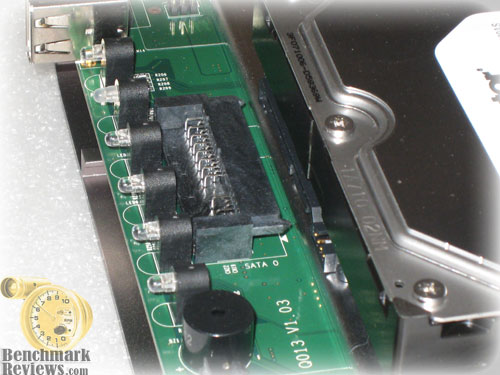
Installing the hard drive is as easy as just sliding it in and screwing the four screws provided, doesn't get any easier than this.
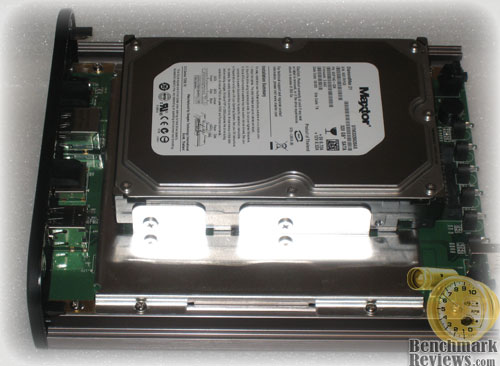
Here is a look at the HD installed. The installation looks very clean, thanks to QNAP for making the process extermely easy and painless.
Testing the QNAP NAS
Since Benchmark Reviews doesn't have a vast array of Network Attached Storage devices in our collection product resources, we do our best to compare products to as many related devices as possible. In this review, the QNAP TS-109 Pro was compared to Synology Cube Station CS407 4-Bay SATA Gigabit NAS, the D-Link DNS-323 SATA RAID Gigabit NAS, as well as the older QNAP TS-201 SATA Gigabit NAS Server. All four are Gigabit-speed Ethernet network devices, and all three share the same RAID-0, RAID-1, JBOD, and single disk capability.
In case you're not up to speed with network terminology, our you're just new to the technology, here is a little refresher for you. The basic unit data measurement is called a bit (one single binary digit). Computers use these bits, which are composed of ones and zeros, to communicate their contents. All files are stored as binary files, and translated into working files by the Operating System. This two number system is called a "binary number system". In comparison, the decimal number system has ten unique digits consisting of zero through nine.
Have you ever wondered why your 500GB hard drive only has about 488GB once it has been formatted? Most data files use the binary number system to express file size, however the prefixes for the multiples are based on the metric system. The nearest binary number to the metric amount of 1,000 is 1,024; which means that 1,024 bytes is named a Kilobyte. So even though a metric "Kilo" equals 1,000, a binary "Kilo" equals 1,024. Are you confused yet? Don't be surprised, because even the most tech savvy people often mistake the two. Plainly put, the Kilobyte is expressed as 1000 bytes, but it is really comprised of 1,024 bytes.
Most network engineers (myself included) are not fully aware that the IEC changed the way we calculate and name data chunks when they published the new International Standards back in December 1998. The International Electrotechnical Commission (IEC) removed the old metric prefixes for multiples in binary code with new prefixes for binary multiples made up of only the first two letters of the metric prefixes and adding the first two letters of the word "binary". For example, instead of Megabyte (MB) or Gigabyte (GB), the new terms would be mebibyte (MiB) or gibibyte (GiB). While this is the new official IEC International Standard, it has not been widely adopted yet because it is either still unknown by institutions or not commonly used.
Personally, I think the IEC took a confusing situation and simply made it more of a mess. As I mentioned earlier, the Kilobyte was previously expressed as 1000 bytes, even though it was really comprised of 1,024 bytes. Now, the Kilobyte really is expressed correctly as 1000 bytes, and the Kibibyte is the item comprised of 1,024 bytes. In essence, the IEC just created a new name for the binary item and left the existing name for the metric item. Hopefully that clears things up, and you can thank Benchmark Reviews for training the next generation of Network Engineers.
Testing Methodology
Although each of the devices we tested can accommodate several different disk configurations, it was decided that the single disk test was the best way to measure throughput. This configuration removed the chance that RAID array overhead would effect the test results.
Connected directly to the Marvell Yukon 88E8056 NIC by a CAT6 patch cable, the NAS products received one test transfer followed by three timed transfers. Each test file was sent to 320GB Maxtor 7200 RPM HDD installed in the NAS for a time write test, and that file was sent back to an identical 320GB Maxtor 7200 RPM HDD drive in the test system to record the read test.
The two transfer tests: read and write, were conducted on each NAS appliance using the 100 MiB file and then the 1 GiB file. Additionally, a second set of tests were conducted with Jumbo Frame enabled. While the Synology Cube Station CS407 and QNAP TS-201 had 9000K MTU Jumbo Frame settings available, the D-Link DNS-323 did not have any. In the Jumbo Frame tests the Marvell Yukon 88E8056 Integrated NIC was set to use the 9014 Bytes value with Jumbo Frame enabled.
NAS Comparison Products
-
QNAP TS-109 Pro Gigabit NAS server
-
QNAP TS-201 SATA Gigabit NAS Server
Support Equipment
-
MAXTOR 320GB SATA-II 7200 RPM Hard Disk Drive
-
3-Foot Category-6 Solid Copper Shielded Twisted Pair Patch Cable
-
Marvell Yukon 88E8056 PCI-E Gigabit Ethernet Controller (Driver Version 8.59.1.3)
-
100 Binary Megabytes Test File (100 MiB/Mebibyte = 104,857,600 bytes)
-
1024 Binary Megabytes Test File (1 GiB Gibibyte = 1,073,741,824 bytes)
Test System Hardware
-
Motherboard: ABIT IP-35 Pro (Intel P35 chipset)
-
Processor: Intel Core2Quad Q6600 G0 Stepping processor
-
Cooling: Zerotherm Nirvana 120 Premium
-
Video: EVGA GeForce 8800 GTS 640MB
-
Audio: Sound Blaster X-FI Xtreme Audio
-
O/S Hard Disk: Maxtor 500GB 7200 RPM SATA-II
-
Data Hard Disk: Seagate 500GB 7200.10 SATA-II 7200 RPM
-
Optical Drive: LG SATA 20x DVD R/W
-
Enclosure: Thermaltake Armor TX with 3x120mm cooling fans
-
PSU: ULTRA 1000watt Power Supply
-
Operating System: Windows XP Professional SP-2
Testing Results
Above system was used in the testing procedure and the results were compared to the previously tested NAS products here at benchmark reviews. The tests were conducted under Windows XP with a CAT 6 patch cable.
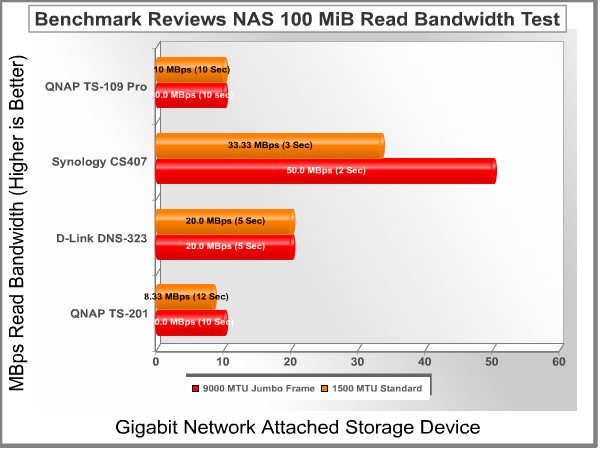
I didn't expect TS-109 Pro to be the fastest NAS server as it is aimed towards more balanced market than just performance oriented buyers. The QNAP TS-109 Pro does fairly well in this test and keeps up with the QNAP TS-201.
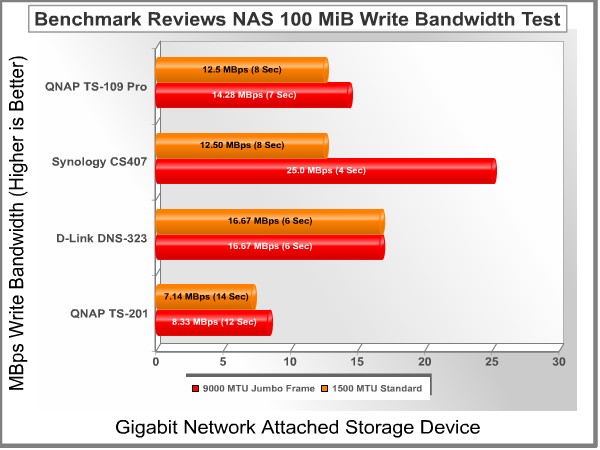
In the 100 MiB write test QNAP TS-109 Pro does fairly well and beats the TS-201 by a fairly good margin, and it also does fairly well against the other two NAS products in this particular test.
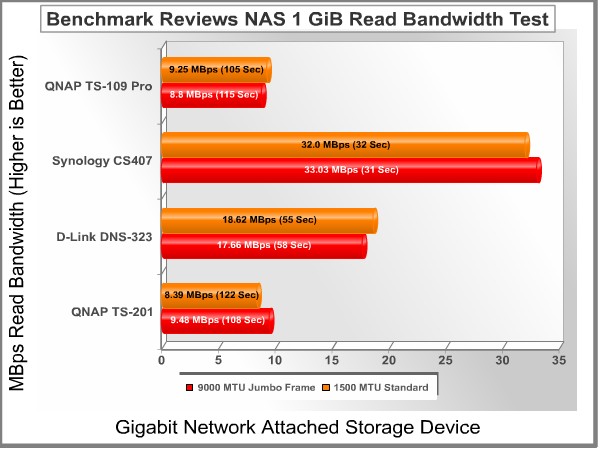
The QNAP TS-109 Pro does average in the read tests vs. write tests. In the 1 GiB read test it performs about the same as the QNAP TS-201, but is no where close to the Synology CS407 and D-LINK DNS-323. Also here you can see that the jumbo frame actually reduced performance, I tested this three times to rule out any possibilities of errors in the testing process but that wasn't the case.
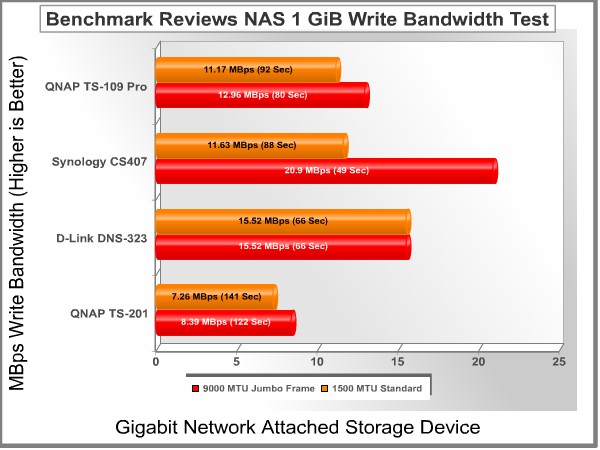
As mentioned before the TS-109 Pro seems to do fearly well in write test vs. the read tests. It performs on par with the Synology product without the jumbo frame enabled, but the Synology seems to have a product that is greatly influenced by the jumbo frame capability. QNAP TS-109 is certainly faster than the TS-201 by a fairly good margin.
Final Thoughts
I have never previously tested a NAS product so I was expecting this to be a complicated task for me, but I can honestly state that wasn't the case. QNAP TS-109 Pro had a very detailed instruction manual which provided step by step guide to set up the your own personal NAS server. The installation of the Hard Drive was a snap, and it just doesn't get any easier even if one asked for it. The software setup of QNAP TS-109 Pro was very detailed and the instructions went in to details about setting up and mapping a network drive. The software installation is very user friendly and the on-screen instructions make it fairly easy to set up the server. The software actually maps the network drive for you with a few clicks. There is no need to do it manually. I was just very impressed with the software setup of QNAP TS-109 Pro.
Performance wise TS-109 Pro didn't do too bad, it did keep up to the QS-201 in the read tests and actually surpassed it in a few instances, but in write tests it even matched up fairly well against the other two contenders by Synology and DLINK in our benchmark suite. However it didn't really take much advantage of the Jumbo Frame feature, where the Synology CS407 really shined. QNAP TS-109 Pro is not the fastest under read conditions but it is not the slowest either. Looking at the Price/Performance ratio the TS-109 Pro does fairly well and handily beats down TS-201 in performance which offers storage space of up to two hard drives. TS-109 Pro also offers the capability of adding more storage space via USB and eSATA ports, which is a plus. I was very impressed with TS-109 Pro overall.
Conclusion
TS-109 Pro was packaged in a highly informative box, which basically had almost every feature of the unit written on the outside, a big plus because it literally eliminates the possibility of the users not knowing what they are getting, or having any doubts about the product. TS-109 Pro was packaged securely and neatly inside of a fairly small box.
The QNAP TS-109 Pro looked impressive from the beginning. It really stands out sitting on top of your desk, and the activity leds are really attractive and differentiate themselves from each other on the unit. Overall TS-109 Pro is a very attractive unit with it's black and silver finish. The TS-109 is very solid when it comes to construction, the casing on the TS-109 Pro is really high quality, the unit has got some weight on it, not that it is really heavy, it just feels well constructed. You can easily be ensured that your hard drive will not be damaged if the TS-109 was to be dropped by accident. The casing is designed in a way where the inner parts of the unit will not take any damage of any sort, unless you really intend to damage it.
The QNAP TS-109 Pro does not lag in functionality, it has more than enough features that it offers to the end users. The software is very user friendly and does allow full control of the unit via highly intuitive interface. The highly informative setup instructions made it a painless process to install the TS-109 Pro and to get it to work properly. QNAP TS-109 pro is a product I could easily recommend to anyone either they are first time users of NAS based products or they are professionals just buying another NAS product. I thought the price to be a little high which it is, but looking at other NAS products in the market they are all priced in a similar manner, so I can highly recommend this product to someone looking for a feature rich product which is competitively priced compared to other similar products in the market.
Pros:
+Very Attractive Looks and Features.
+Storage Expansion Via USB and eSATA
+Very Solid Construction
+Priced According to Competition
+User Friendly Software Interface
+Easy and Direct firmware update
Cons:
- Might be considered expensive by some buyers
- Read speed not as fast as write speed
- Jumbo Frame feature doesn't help much
Ratings:
-
Presentation: 9.0
-
Appearance: 9.5
-
Construction: 9.5
-
Functionality: 9.5
-
Value: 8.0
Final Score: 9.1 out of 10.
Excellence Achievement: Benchmark Reviews Golden Tachometer Award.
Questions? Comments? Benchmark Reviews really wants your feedback. We invite you to leave your remarks in our Discussion Forum.
Related Articles:
- Gigabyte GA-P55A-UD6 USB-3 SATA-6G Motherboard
- Sunbeam SATA-IDE-USB Adapter
- ASUS P6X58D-Premium SATA6G Motherboard
- ASUSTOR AS-604T NAS Network Storage Server
- Crucial M225 128GB SATA-II SSD CT128M225
- SandForce SF-1200 SSD Processor
- Intel 525 SSD mSATA Solid State Drive
- Silicon Power 32GB SLC SATA-II SSD
- ASUS RT-N16 Wireless-N Gigabit Router
- Synology Disk Station DS-207+ SATA Gigabit NAS
