

| Sentey Extreme Division GS-6000 II Optimus |
| Reviews - Featured Reviews: Cases | |
| Written by Hank Tolman | |
| Friday, 20 July 2012 | |
Sentey GS-6000 II Optimus Computer Case Review
Manufacturer: Sentey
Product Name: Sentey GS-6000 II Optimus
Model: GS-6000 II Optimus
Price As Tested: $74.99 (Newegg)
Full Disclosure: The product sample used in this article was provided by Sentey. If you are familiar with Sentey, you'll recognize a certain pattern they have when releasing their computer cases. They generally release a style of case and then release a few more with the same style and some minor changes. There will be an R version of the case that has red highlights, a B version with blue, W for white, and so on. In some case series they will also release a V version with a different side panel (usually windowed). In the case of the Optimus series, as well as a couple of other series, Sentey has now released a II version of the case. At Benchmark Reviews, we have a Sentey GS-6000 II Optimus case on hand and ready break down to explore what they've changed on this one.
While I plan on focusing mainly on what has been changed, altered, enhanced, etc. on the GS-6000 II Optimus in comparison with the original, I'll also be looking into the three main areas of focus for any computer case. These areas are price, functionality, and style. No one of these three areas can stand alone and make a fully featured case. There are, of course, inexpensive cases, very functional cases, and stylistically appealing cases all over the market. It is when these three areas mesh, balance, and come together that a computer case really shines. The Sentey GS-6000 II Optimus is part of Sentey's Extreme Division family of cases. There is a lot of diversity in Sentey's Extreme Division, but all of the cases focus on an enthusiasts need for cooling and good looks. After all, any gamer worth his salt knows that looks > stats, right? In all seriousness, however, Sentey's new spin on the Optimus needs to hold up to a high standard in terms of functionality, price, and style to pass this test. So let's get started taking a look at the Sentey GS-6000 II Optimus Mid-Tower Computer Case. GS-6000 II Optimus Mid-Tower Features and Specifications
Features and Specifications provided by Sentey. Closer Look: ExteriorThe Sentey GS-6000 II Optimus is a pretty light case, especially compared to some of the other mid-towers we have looked at recently. It weighs in right around 10 lbs, making it less than half as heavy as the Cooler Master HAF XM. Even so, the Sentey GS-6000 II Optimus is pretty solidly constructed of cold-rolled sheet steel. The front and top panels are plastic.
The GS-6000 II Optimus, in my opinion, is a pretty good looking case. I like the blue accents and red highlights. I like the stylization of the front and top panels. The GS-6000 II Optimus is not too flashy, but it does have enough pizzazz to make it stand out. In fact, I was carrying outside the other day and I had no less than three neighbors comment on it as a "gaming computer". It definitely doesn't look like a workstation.
One of the first noticeable differences between the GS-6000 II Optimus and its predecessor is the main side panel. The GS-6000 II Optimus has a large window. Part of that window is meshed steel and small triangle near the back is acrylic. The original GS-6000 Optimus did not have a window at all, but did have a large intake fan with blue LED lighting on the main side panel. I guess it depends on your tastes, but I like the windowed look better. Of course, it also provides less airflow because of the missing fan. In fact, there is no way to affix a fan to the meshed area of the main panel on the GS-6000 II Optimus without screwing it directly into the meshed area. The specifications say that you can install two optional 120mm fans on the side panel, but if that's true, they didn't outline where you should put them.
The front panel of the GS-6000 II Optimus almost looks like a mask, with the very bottom touting a 120mm blue LED intake fan. The area in front of the fan is meshed to impede the flow of dust while maintaining a constant air flow. Above that are the 5.25" drive bays. There are technically four external 5.25" drive bays, although only the bottom three are accessible. The top bay is taken up by the front I/O panel.
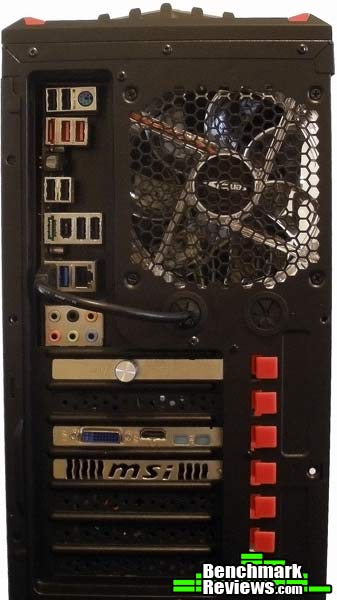
The rear of the Sentey GS-6000 II Optimus is laid out as you would expect it. Almost everyone has moved to bottom-mounted PSUs now, which is true for the GS-6000 II Optimus as well. Just above the PSU slot are seven expansion slots. The expansion slots have some interesting hardware on the GS-6000 II Optimus. We'll delve into that a little later, though. Above the expansion slots you can see two grommets for water-cooling hoses or other cables that need to be passed through from the inside to the outside of the case. The 120mm output fan on the rear of the GS-6000 II Optimus is a blue LED fan, just like the front fan. These two fans are the only two that are included with the GS-6000 II Optimus.
The backside panel of the Sentey GS-6000 II Optimus is very plain and simple. It's just a flat sheet that slides into place. I think both panels on the GS-6000 II Optimus are pre-fabricated and probably used for more than just the GS-6000 II Optimus case. There are more screw holes than actually match up with the case. My only real concern about the back panel is that it doesn't provide any extra clearance for cables. The few centimeters of space behind the motherboard tray isn't going to be large enough for most 24-pin power cables, so getting the panel back on will be more difficult and you might experience some bulging. Let's get a little more detailed look at the exterior of the Sentey GS-6000 II Optimus. Detailed Exterior FeaturesBack at the front panel of the GS-6000 II Optimus, you can see that one of the 5.25" drive bays is designed with a spring loaded door that falls when you open your optical drive tray. The bay door has a button on it to push the eject button on your drive, which will be seated a little farther back. If you have a secondary optical drive, you can install it so that it sits flush with the front panel.
You can also move the front panels around so that the optical-drive-friendly panel is in a lower position. Depending on how you route the cables from the front I/O panel, this might be necessary. I had to move it to the lowest 5.25" bay so that I can route the cables in any sort of a manageable fashion. Moving the panel down wasn't terribly easy, as the bottom two panels just use bent pieces of metal to hold themselves in place rather than clasps. It all worked out okay, but it wasn't the most user-friendly of experiences.
Just above the 5.25" external drive bays is the front I/O panel. The I/O panel is pretty standard, but it does provide some extras that you might not expect. For instance, on the far left of the I/O panel on the GS-6000 II Optimus is an SD card reader. That's not something that you see on every case. Next to that is a single USB 3.0 port. This port doesn't connect through an internal header, however. You'll have to feed the USB 3.0 extension cable out the rear of the case and plug it into a USB 3.0 port on your motherboard I/O panel. Moving to the right you have the standard audio ports for headphones and a microphone. These ports are color coded, which is nice. If your case is under a desk or somewhere with low lighting, I always find it difficult to figure out which port is for the mic and which is for the headphones. This will make things a lot easier. Following the audio ports is a USB 2.0 port that does connect through an internal header. Finally, that last knob on the I/O panel is a fan controller. This hooks up through a MOLEX connection, as do both fans. Up above the I/O panel is the power and reset buttons. They are clearly marked, with the left button being the power button and right being the reset button. Right under those two buttons is an LED strip. Under the power button there is a blue power LED that shines if the machine is on. Under the reset button is the HDD LED that flashes red with the drive is in use.
The top of the Sentey GS-6000 II Optimus is stylized with fins and meshing, as is the bottom. The bottom of the case has a removable filter that can be cleaned as needed. This is the only removable filter on the case. I would have liked to see another on the front intake fan as well.
Closer Look: InteriorAlthough the Sentey GS-6000 II Optimus is a Mid-Tower case, I was impressed by the amount of room inside to work with. The GS-6000 II Optimus can fit motherboards up to full ATX in size. I recently reviewed a Mid-Tower case that can fit up to E-ATX, so the GS-6000 II Optimus is a little behind in this regard. That's not a big deal, however. Up to full ATX is the standard for Mid-Tower cases.
While the Sentey GS-6000 II Optimus supports full ATX motherboards, you might have to scale back on your video card. The clearance for a GPU is 270mm, or about 10.6". Most Radeon HD 7870 or 7850 cards are about 10.5" to 10.6", so you'll be very close. Higher end GTX 600 series and Radeon HD 7900 series video cards can be 11" or longer. Those cards certainly won't fit. The key here is to measure your video card before buying the case. If you are building an entire system, you'll want to stick with a card that is 10.5" or smaller to make sure you have enough room.
The GS-6000 II Optimus has four 3.5" tool-free HDD bays. These drive bays are unique in that they also support a 60mm slim fan installed under the drive. One of the drive bays on the GS-6000 II Optimus comes with the 60mm slim fan already installed. The front fan blows onto the drive bays as well. Each of those bays will also support 2.5" drives, but you'll have to break out the screwdriver for that.
There is room for a fifth 3.5" drive above those HDD bays and under the 5.25" drive bays. It's hidden away and requires the drive to be screwed in, but it's there for expansion if you need it. The four 5.25" drive can be used for internal drives with a kit or for external optical disc drives. Although there are four of them, the top bay really can't be used because of the all the cables from the front I/O panel. The front I/O panel itself means that only an internal drive could be used here, but the sheer amount of cables and their size won't allow you to use that bay anyway. In fact, if you are trying to route the cables throughout the case so that they are out of sight, then even using the second 5.25" drive bay becomes a pain. The 5.25" drive bays do use a tool-free system as well, which is nice. The latches have a red dial that points to a locked or unlocked position. Unlock it and it will pull free easily. Install the drive, insert the latch into the screw holes and twist the red knob to the locked position.
The Sentey GS-6000 II Optimus houses a bottom-mounted PSU, which is now the standard. Under the PSU slot is a meshed area and on the outside of the case is a removable filter. This is perfect for a bottom-mounted PSU as it provides good intake with the ability to filter most of the dust coming in. There is only about a half-inch of clearance due to the GS-6000 II Optimus stand-offs, however. This is pretty standard for a lot of cases, but if you have deep carpeting, you'll cut off the ability for air to flow freely in from the bottom of the case. Up on a desk or on tile, wood, or even a desk floor mat, and the airflow should be fine. Let's take a closer look at some of the interior features of this case in the next section. Detailed Interior FeaturesOne of the most important features of a good case, in my opinion, is the ability to manage the mess of cables that is inevitable in building a computer. The Sentey GS-6000 II Optimus provides some help in this, but fall short of quality cable management for me. There are only three routing holes in the motherboard tray, none of which include grommets to protect the cables. The metal is rounded, so it's not sharp, but grommets would be better.
There needs to be at least two more holes in the motherboard tray, one up at the very top to route the 4- or 8-pin CPU power cable, and one just to the left of the HDD trays to route all of front panel I/O cables back into. As it sits now, if you run the front panel I/O cables behind the motherboard tray and up through the bottom routing hole, they are stretched so tightly that it impedes the usage of the second 5.25" drive bay.
Another very useful feature that I would have like to see on the Sentey GS-6000 II Optimus is a junction for all of the fan and input headers. The front fan, the rear fan, and the 60mm slim HDD fan all use MOLEX headers, as does the fan controller on the front I/O panel. This makes for a huge mess when they are all plugged in behind the motherboard tray. I ended up taking out the bottom HDD drive bay and stuffing all of the excess cables under there. That worked pretty well, although it can make that area a little unsightly. Luckily, with the side panel on, you won't see that area at all. 
Another reason I had to stuff all the cables under the HDD bays is because there is very little space between the motherboard tray or the backsides of the drive bays and the back panel. There is less than half an inch there, which is thinner than my 24-pin power cable. Putting the back panel back on was an absolute pain in the back panel, if you know what I mean. It also resulted in a little back panel bulging, which is never a happy thought. As for my 8-pin CPU power cable, I had to feed that over my video card, since it wouldn't reach when routed behind the motherboard.
One of the features that I am very fond of on the Sentey GS-6000 II Optimus is the tool free expansion slot mechanism. When you install an add-in card like your video card, you can just push down and out on the expansion slot connector to open it up. After putting the card in, just push it back down into place. It's simple and effective and it makes my life easier when building a computer. What's not to love?
As for cooling, the Sentey GS-6000 II Optimus provides three fans with the case; one in the front, one in the rear, and one under a hard drive bay. In addition to those, the GS-6000 II Optimus touts room, supposedly, for four more 120mm fans and three more 60mm slim HDD bay fans. I'm not quite sure about putting more fans on the main panel, but it can be done. There just isn't anything showing you specifically where you should put them. That makes a total of six 120mm system fans and four hard drive bay fans. With the open style of the GS-6000 II Optimus, that will provide for plenty of air flow. It would be nice if they included a couple more fans with the case, though.
Under the rear fan on the Sentey GS-6000 II Optimus there are two round holes with grommets for routing water cooling or other cables. This happens to be a very nice feature on the GS-6000 II Optimus, even if you aren't using a water cooling system. The reason for this is the USB 3.0 cable from the front I/O panel. This cable isn't for an internal header. It's simply an extension cable. You'll have to route it outside the case and plug it into a USB 3.0 port on your motherboard. The GS-6000 II Optimus doesn't include any expansion slots with a hole for the purpose, as I have seen in the past, so these holes under the rear fan work perfectly for it. Gaming Chassis Final ThoughtsThe Sentey GS-6000 II Optimus attempts to bridge the gap that a lot of cases suffer from between price and functionality. The GS-6000 II Optimus has enough features that it could be considered a gaming case, but doesn't cost an arm and leg. Overall, I'm on the fence with the GS-6000 II Optimus. There are a lot of things that I like about it, but there are some areas where it falls short. The case is pretty spacious, even with a full ATX motherboard installed. I really like the tool-free designs for the HDD bays, the ODD bays, and the expansion slots at the back. The Sentey GS-6000 II also has a lot of cooling capability, with the potential for 10 fans in total. Another thing that I really like about the Sentey GS-6000 II Optimus is its appearance. It looks really cool. At the same time, though, the cable management on the Sentey GS-6000 II Optimus is difficult, to say the least. There is no clearance behind the motherboard to route the cables without making it difficult to put the side panel back on. The front I/O cables are the worst, taking up the top two 5.25" drive bays if you try to route them behind the motherboard tray in any way. There are holes in the motherboard tray for routing the cables, but there are not enough of them in the right locations to make cable routing efficient. Some cables, such as the CPU power cable, can't be routed without an extender.
I like the inclusion of a USB 3.0 port on the front panel, but it would have been just a little nicer if it used an internal header instead of requiring the use of an external port. The SD/MMC card reader on the front I/O is also a nice inclusion that you don't often see. One of the nicest features of the Sentey GS-6000 II Optimus is the fan controller on the front panel I/O. I've seen a lot of cases with great fan support, but no controller. With the fans on the GS-6000 II Optimus on full blast, you can definitely hear them. This is true with most cases. Luckily, the fan controller lets you tune them down to silent if you so desire. Speaking of the fans, the Sentey GS-6000 II Optimus actually impressed me quite a bit by its cooling ability with only the two 120mm fans installed. With the fans turned all the way up, my two GTX 560s in SLI only heated up to 58 degrees Celsius while running Furmark. That's a little higher than the Cooler Master HAF XM that I tested recently, but that case also had three fans, two of which were 200mm. That case also costs almost twice what the Sentey GS-6000 II Optimus costs. Overall, airflow didn't disappoint. If you are looking for a gaming chassis and want to keep the costs down, the Sentey GS-6000 II Optimus looks like a good choice from my perspective. Sentey GS-6000 II Optimus ConclusionAlthough we strive for objectivity here at Benchmark Reviews, please remember that each author perceives these points differently, and our conclusions and recommendations will necessarily differ from others. Also, prices can fluctuate and designs change after publication, so that the product we review might not have the same price and specifications of a product that's available later. Please do not base any purchase solely on our conclusion, as it represents our product rating specifically for the product tested, which may differ from future versions. Benchmark Reviews begins our conclusion with a short summary of each of the areas that we rate. For a computer case, performance is how well it accomplishes its task of housing your system while keeping noise levels down and cooling levels high. The Sentey GS-6000 II Optimus, with its two included 120mm fans, does the job well but struggles in some areas. The GS-6000 II Optimus is large enough to house a full ATX system with room to spare, but routing your cables to make sure airflow is at its highest and the view from the main panel window is unobstructed leaves something to be desired. There just isn't enough clearance behind the motherboard tray. The fans are silent if turned down, but at full speed they are audibly present. As for cooling, the GS-6000 II Optimus does very well under the circumstances. I would have expected higher temps for a case with just two 120mm fans, but I was pleasantly surprised. I really like the look of the Sentey GS-6000 II Optimus case. The front panel reminds me of a face mask and I am a big fan of the highlights that break up the monotony of a straight black case. Both of the 120mm fans in the GS-6000 II Optimus, one in the front and one in the back, are blue LED fans. This contrasts with the red trim at the top of the case and on the expansion slots for a nice look overall. As for construction quality, the Sentey GS-6000 II Optimus seemed a little bit flimsy to me. The metal was thin and very light, which obviously helps keep costs down, but I was also afraid that it was going to bend or break more easily. The side panels are definitely not designed specifically for the GS-6000 II Optimus, because the screw holes don't match up exactly. Also, the two lower 5.25" drive bay doors only stay in place because of two bent pieces of metal. To move them, you simply unbend the metal, move it, and bend the metal back over to hold it into place. I don't anticipate too many issues, but this just isn't the sturdiest of cases. In terms of functionality, the Sentey GS-6000 II Optimus has a lot of what we are looking for. There is a USB 3.0 port on the front I/O panel, although only one. There is another USB 2.0 port as well. The front I/O panel also has an SD/MMC card reader. That's a nice feature that a lot cases don't go to the trouble to include. The Sentey GS-6000 II Optimus includes a fan controller for the two fans that come with the case. In my opinion, this is one of the best features, and one I hope other manufacturers start to emulate. The GS-6000 II Optimus has holes for water cooling hoses, and a little space up at the top for a reservoir. It does have plenty of space next to the PSU on the bottom for a radiator and reservoir though. Overall, for the price, the functionality of the Sentey GS-6000 II Optimus is pretty impressive. As fo July 2012 the Sentey GS-6000 II Optimus is listed for $74.99 (Newegg). That's in a pretty average price range for a feature rich mid-tower computer case. The look the GS-6000 II Optimus offers, with all the features of a fan controller, tool-free expansion, extra fan space, LED lighting, and water cooling capabilities makes it a good fit for the price. If it has two USB 3.0 ports instead of one, with an internal header, two more fans, and an extra half inch of space behind the motherboard tray, the Sentey GS-6000 II Optimus would be a steal. As it stands, its well-priced. Pros:+ Spacious inside for a Mid-Tower |
|





Comments
Well Done.. When so many are just Kick Ass or Great. This was a solid and uniquely honest review.