

| QNAP TS-659 Pro II NAS Network Server |
| Reviews - Featured Reviews: Network | |||||||||||||||||||||||||||||||||||||||||||
| Written by Bruce Normann | |||||||||||||||||||||||||||||||||||||||||||
| Thursday, 09 June 2011 | |||||||||||||||||||||||||||||||||||||||||||
QNAP TS-659 Pro II NAS Server Review
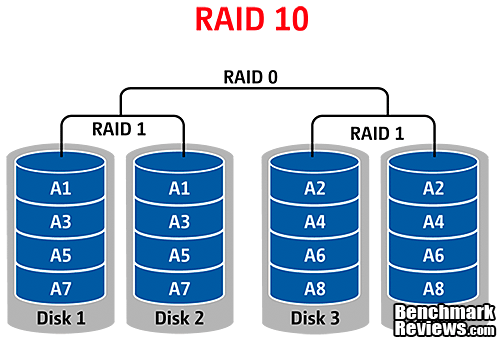
Manufacturer: QNAP Systems, Inc. Full disclosure: The product used in this review was supplied by QNAAP Systems Network storage is a concept that many people use without a second thought in corporate environments, but what about at home? In addition, a larger number of people are beginning to utilize cloud services, and most of those services include some storage capability. What if you could implement both, easily and with one device? All that and much more is readily available in a Network Attached Storage server from industry stalwart, QNAP. The TS-659 Pro II uses a powerful and energy-efficient 1.8 GHz Intel Atom D525 processor with 1GB of DDR3 system memory to eliminate any potential bottlenecks in the device itself. Dual Gigabit Ethernet network interfaces allow failover safety and teaming, while six SATA 6Gb/s drive bays offer single disk, JBOD, and RAID 0/1/5/6/10 configurations. Benchmark Reviews recently examined the QNAP TS-659 Pro II Turbo NAS in detail and compared its performance against other network attached storage servers. The TS-659 Pro II NAS server is a larger unit than many other NAS devices, but it's not the biggest. It fits into the middle ground where most small businesses operate. If you need both capacity and redundancy, you need to implement RAID 5 at a minimum, and that means at least three disks. If you want to go to RAID 6 or RAID 10, you need a minimum of four disks. With two spindles completely occupied by providing multiple levels of redundancy for your data, you're left with only two drive bays worth of storage capacity if you go with the minimum size of four drives. The TS-659 Pro II may look like it has a lot of "extra" space, but it's actually in the sweet spot for a high availability NAS appliance. 
Three features dominate the discussion of network storage hardware: data capacity, data security, and data transfer speed. In the last couple of years there has been a growing emphasis on the software side, and the current crop of NAS devices offer a dizzying array of applications to help manage and distribute the data, and provide several new ways of accessing that data. In the past, this level of control and communication has been limited to the corporate world, because you needed an MSCSE to figure them out. QNAP has always aimed for the high end of the NAS server market with performance and features such as dual Gigabit Ethernet with failover, a full range of RAID functionality, and a diverse, feature-rich user interface. Now, they've upgraded the software suite with some outstanding new features, and we'll look at both its capabilities and ease of use. Benchmark Reviews has tested a number of QNAP products: the QNAP TS-119 NAS single-disk offering made for home users, and the Goliath QNAP TS-809 Pro 8-Bay NAS for the storage needs of large businesses. Most recently we tested a 4-bay QNAP TS-459 Pro Turbo-NAS. Let's see how this six-bay device compares to its big brothers and little sisters.
|
|||||||||||||||||||||||||||||||||||||||||||





 The NAS provides Web File Manager for you to easily download, upload, and manage the files on the server by web browser.

|
CPU |
Intel Atom Processor D525 1.8GHz (Dual-Core) |
|
DRAM |
1GB DDR3-800 DRAM (1x - SODIMM) Up to 3GB with additional 1GB/2GB SO-DIMM RAM module |
|
Flash Memory |
512MB DOM |
|
HDD Form Factor |
Accepts 2.5" or 3.5" SATA |
|
HDD Tray |
6 x Hot-swappable and lockable tray |
|
LAN Port |
2 x Gigabit RJ-45 Ethernet port |
|
LED Indicators |
HDD 1, HDD 2, HDD 3, HDD 4, HDD 5, HDD 6, LAN, eSATA |
|
USB |
2 x USB 3.0 port (Front: 1; Back: 1) |
|
eSATA |
2 x eSATA port (Back) |
|
Buttons |
System Power, USB One-Touch-Backup, Reset |
|
LCD Panel |
Mono-LCD display with backlight |
|
Dimensions |
175 (H) x 257 (W) x 235 (D) mm |
|
Weight |
Net weight: 5.2 kg (11.5 lbs) |
|
Sound Level (dB) |
w/o HDD installed: 35.7 dB |
|
Power Consumption (W) |
Sleep mode: 22W |
|
Temperature |
0~40°C |
|
Humidity |
0~95% R.H. |
|
Power Supply |
Input: 100-240V AC, 50/60Hz, Output: 250W |
|
Secure Design |
K-lock security slot for theft prevention |
|
VGA |
Reserved VGA interface for maintenance |
|
Fan |
2 x axial fan (90 mm, 12V DC) |
QNAP TS-659 Pro II Software Specifications
Software Specifications
Operating System
- Embedded Linux
Supported Operating System
- Microsoft Windows 2000, XP, Vista (32/ 64 bit), Windows 7 (32/ 64 bit), Server 2003/ 2008
- Apple Mac OS X
- Linux & Unix
Supported Web Browsers
- Internet Explorer 7 & 8 or later
- Firefox 3 or later
- Safari 3 & 4 or later
- Google Chrome
Multilingual Support
- Chinese (Traditional & Simplified), Czech, Danish, Dutch, English, Finnish, French, German, Italian, Japanese, Korean, Norwegian, Polish, Russian, Spanish, Swedish, Turkish.
File System
- Internal HDD: EXT3, EXT4
- External HDD: EXT3, EXT4, NTFS, FAT32, HFS+
Networking
- TCP/IP (IPv4 & IPv6: Dual Stack)
- Dual Gigabit LAN with Jumbo Frame
- Multi-IP Settings, Port Trunking/NIC Teaming (Modes: Balance-rr, Active Backup, Balance XOR, Broadcast, IEEE 802.3ad/Link Aggregation, Balance-tlb and Balance-alb)
- DHCP Client, DHCP Server
- Protocols: CIFS/SMB, AFP (3.1), NFS, FTP, HTTP, HTTPS, Telnet, SSH, iSCSI and SNMP.
- Network Service Discovery (UPnP, Bonjour)
- Virtual LAN Support
- USB Wi-Fi 802.11n Adapter Support (Optional Purchase)
Network File Sharing
- CIFS/SMB (Plus DFS Support)
- AFP
- NFS
- FTP
- WebDAV
Backup Solution
- Real-time Remote Replication (RTRR)
- Work as Both RTRR Server & Client
- Supports Real-time & Scheduled Backup
- Supports Encryption, Compression, and File Filter
- USB One Touch Backup (Import/Export)
- Apple Time Machine Support with Backup Management
- Block-level Remote Replication
- Work as Both Rsync Server & Client
- Supports Encrypted Replication between QNAP NAS Servers
- Back up to External Storage Device
- Back up to Cloud Storage (Amazon S3 & ElephantDrive)
Security
- IP Filter & Policy-based Automatic IP Blocking
- Network Access Protection with Auto-blocking
- Encrypted Access: HTTPS, FTP with SSL/TLS (Explicit), SSH/SFTP (admin only), Encrypted Remote Replication (Rsync over SSH)
- CIFS Host Access Control for Shared Folders
- AES 256-bit Volume-based Encryption
- Importable SSL Certificate
- Instant Alert via Email, SMS, and LCD
Disk Management
- Single Disk, JBOD, RAID 0 / 1 / 5 / 5+Hot Spare / 6 / 6+ Hot Spare, 10, 10+Hot Spare
- Online RAID Capacity Expansion & Online RAID Level Migration
- Bad Block Scan & HDD S.M.A.R.T
- Global Spare Drive
- AES 256-bit Volume-based Encryption
- RAID Recovery
- Bitmap Support
- Supports ISO Mounting (via Web File Manager)
iSCSI (IP SAN)
- iSCSI Target
- Multi-LUNs per Target
- Up to 256 LUNs
- Supports LUN Mapping & Masking
- Supports SPC-3 Persistent Reservation
- Supports MPIO & MC/S
- Virtual Disk Drive (via iSCSI Initiator)
- Stack Chaining Master
- Max. Virtual Disk Drives: 8
Server Virtualization & Clustering
- Supports VMware vSphere (ESX/ESXi 4.x)
- Supports Citrix XenServer (5.6)
- Supports Windows Server 2008 Hyper-V & Failover Clustering
Power Management
- Wake on LAN
- Scheduled Power on/off (Max 15 settings)
- Automatic Power on after Power Recovery
Access Right Management
- Max User Accounts: 4,096
- Max Groups: 512
- Max. Share Folder: 512
- Batch Creating Users
- Import/Export Users
- User Quota Management
- Subfolder Permissions Support
Windows AD Support
- Domain Users Login via CIFS/SMB, AFP, FTP and Web File Manager
- Supports NTLMv2 Authentication
Web Administration
- AJAX-based User Interface
- HTTP/HTTPS Connections
- Alert Notification (Email & SMS)
- Smart Fan Control
- DDNS & MyCloudNAS Remote Access
- SNMP (v2 & v3)
- UPS Support with SNMP Management (USB)
- Supports Network UPS
- Resource Monitor
- Network Recycle Bin for CIFS/SMB and AFP
- Comprehensive Logs (Events & Connection)
- Real-time Online User List
- Syslog Client
- Firmware Update with Live Update Notification
- Backup and Restore System Settings
- Restore to Factory Default
Applications
- Web File Manager
- Multimedia Station
- Download Station
- Surveillance Station
- iTunes Server
- UPnP Media Server
- Apache Web Server
- MySQL Server
QMobile App
- QMobile for iPhone, iPad, iPod touch, Android devices
- Third Party UPnP Media Player
QPKG
- Web Applications
- Joomla!
- phpMyAdmin
- WordPress
- AjaXplorer
- vtigerCRM
- GLPI
- Magento
- P2P Applications
- MLDonkey (eMule)
- SABnzbd+
- NZBGet
- Transmission
- Server Applications
- Squeezebox Server
- Tomcat
- Asterisk
- XDove (Mail Server)
- OpenLDAP
- eyeOS
- Media Server
- PS3 Media Server
- IceStation
- Misc.
- Optware IPKG
- Python
- Java Runtime Environment
- Mono
- iStat
Powerful All-in-one server
File Server
- File Sharing across Windows, Mac, and Linux/UNIX
- Protocols: CIFS/SMB, AFP(3.2), NFS, FTP, HTTP, HTTPS
- QNAP Web File Manager
- Supports ISO Mounting
- Direct File Viewing via Google Doc
FTP Server
- FTP over SSL/TLS (Explicit)
- Max Concurrent Connections: 256
- FXP Supported
- Passive FTP Port Range Control
- FTP Bandwidth & Connection Control
- Unicode Support
Web Server
- HTTP/ HTTPS Connections
- Supports WebDAV Connection
- Support Virtual Host
- Importable SSL Certificate
Database Server
- Built-in MySQL Server
- Web-based Management via phpMyAdmin (QPKG)
Backup Server
- Remote Replication Server (over Rsync)
- Real-time Remote Replication Server
- Apple Time Machine Support
- QNAP Client Backup Application-NetBak Replicator
- 3rd Party Backup Software Support: Acronis True Image, CA BrightStor, ARCserve Backup, EMC Retrospect, Symantec Backup Exec, LaCie SilverKeeper
iTunes Server
- Audio and Video Sharing
- Smart Playlist for iTunes Client (Windows & Mac OS)
UPnP Media Server
- Built-in TwonkyMedia Server
- Real-time & Background Photo Transcoding
- Supports UPnP Media Player
- Game Console: PlayStation 3, PSP and Xbox 360
- Digital Media Adapter/Player
- Mobile Device (e.g. iPhone, iPod touch with UPnP Applications)
- Supported Formats:
- ASF - Windows Media Video (Codecs: WMV video and WMA audio)
- BMP - Bitmap Image
- FLV, F1V, F4V - Standard Quality YouTube Video (Codec: Flash, Video: Sorenson Spark H.263 Video Codec & MP3 Audio Codec)
- GIF - Graphics Interchange Format
- JPG, JPEG, JPE - Joint Photographic Experts Group Image
- MP3 - MPEG Audio Layer 3 (Codec: MPEG Audio)
- MP4 - High Quality YouTube Video (Codecs: MP4: H.264 Video & HE-AAC audio)
- MP4 - MPEG-4 Video (Codecs: Microsoft MPEG-4 v1, Microsoft MPEG-4 v2, Microsoft MPEG-4 v3 & ISO MPEG-4 v1)
- MPEG, .MPG, .MLV - MPEG-1 (Codecs: MPEG-1 Video & MP2 Audio)
- PNG - Portable Network Graphics
- WAV - Linear Audio (Codecs: Uncompressed PCM-encoded & ADPCM-encoded)
Printer Server
- Network Printer Sharing (USB)
- Max Printers: 3
- Supports Internet Printing Protocol
- Supports Apple Bonjour Printing
- Advanced Printer Management
- Print Jobs Display and Management
- Access Right Control (IP & Domain Names)
Multimedia Station
- Supports Photo, Audio and Video
- Image Slide Show and Rotation
- Automatic & Schedule Thumbnail Generation for Easy Browsing
- Display Photo Details from EXIF: Date, Exposure Time, Aperture, etc.
- Display Audio Details from ID3 Tag: Album Cover, Title, Artist, Album, etc.
- Access Authority Management
- Multimedia (Video & Audio) Streaming
- Supports Cooliris
- Supports Web Publishing (Facebook, MySpace, MSN Live, Twitter, Plurk, Blogger)
- Share Photos by Email
- Supported Formats:
- Photo - JPG/JPEG, GIF, PNG
- Audio - MP3
- Video
- Playback: FLV, MPEG-4 Video (H.264 + AAC)
- Transcode: AVI, M4V, MPG/MPEG, RM/RMVB, WMV
- QNAP Exclusive iPhone & Android App - QMobile
Download Station
- PC-less BitTorrent, FTP, HTTP Download (up to 500 Tasks)
- BitTorrent Download
- Supports TCP/ UDP Tracker Protocol
- Schedule Download
- Configurable Port Range
- Bandwidth Control
- UPnP NAT Port Forwarding
- Subscribe to RSS Feeds
- RSS Download (Broadcatching)
- Selectable Download Files
- HTTP/ FTP Download
- Configurable Saving Directory
- Bulk Download with Wildcard Setting
- RapidShare Download Support
- QNAP Download Management Software: QGet
- For Both Windows & Mac OS
- Manage the Download Tasks of Multiple QNAP NAS Remotely over LAN or WAN
Surveillance Station
- Supports 4 IP Cameras (Optional Purchase) for Network Surveillance
QPKG Center Software Expansion
Explore the Unlimited Possibilities of Your NAS with QPKG
The Network Attached Storage (NAS) used to refer to a basic network storage device for simple data sharing but now with the high performance SoC and the advantage in power-saving design, it is redefined as a powerful embedded system that allows the possibilities of offering numerous fascinating applications. Over the past years, QNAP has successfully developed a series of All-in-One NAS servers for power users and business users providing a wide variety of software applications. Besides those QNAP provides, many other software packages are also developed in Linux open source community that power users are able to install them on their NAS to further enrich the functions. However, this is only limited to those advanced users or software developers who are more familiar with Linux systems. In order to let majority of general QNAP NAS users to also utilize their NAS servers with those software packages already developed by the open source community, QPKG platform and development framework is then introduced by QNAP.
Inspired from the powerful software package management system in Linux (yum, dpkg, etc.), but unlike those running in the modern PCs today, QPKG is designed and fine-tuned for running on Linux embedded systems like NAS along with many popular software packages ready for install. Besides, in order to publish your software in our official repository all the software packages will be verified by QNAP to prevent from others to embed malicious codes for system intrusion or potential risks of data damage. Therefore QNAP NAS users may enjoy these software packages developed by the community in a safe way through an installation method as easy as firmware update just like you would install/uninstall software in the Windows environment without the need to go through the complicated process.
QNAP has introduced some popular QPKG software packages as the demonstration purpose. Below are the quick introductions on each of them:
MLDonkey (eMule)
MLDonkey (eMule) is a door to the 'donkey' network, a decentralized network used to exchange big files on the Internet and present most features of the basic Windows donkey client. (e.g., eMule)
Slim Server on Turbo Station (with SqueezeCenter 7)
Squeeze Center is the server software from Slim Device that manages common digital audio formats (.mp3, .flac, .ogg, etc.) and streams them to its players. Slim Server On Turbo Station (SSOTS) developed by flipflip is an add-on to the Turbo Station's firmware which provides the environment to run Squeeze Center 7 on it.
Optware Ipkg (Itsy Package Management System)
Ipkg, or the Itsy Package Management System, is a lightweight package management system designed for embedded devices. It is used in the Unslung operating system for the Linksys NSLU2, in OpenWRT, OpenMoko, Gumstix, iPAQ and now on QNAP NAS too.
SABnzbd+
SABnzbd+ is a multi-platform binary newsgroup downloader written in Python language. The program works in the background and simplifies the downloading, verifying and extracting of files from Usenet. SABnzbd+ does not search for files, instead NZB files (similar to .torrent files, but for Usenet) are fed to SABnzbd+ from sites like newzbin.com, binsearch.info and tvnzb.com (Requires prior installation of Python)
Python
Python is a general-purpose, high-level programming language. Its design philosophy emphasizes programmer productivity and code readability.
WordPress
WordPress is a free, open-source personal publishing system that allows you to easily create a complex blog, or web log, on your site. Written in PHP and supported by a MySQL database, WordPress offers intuitive administrative tools and sophisticated design features that make it easy to develop and integrate a personal or professional blog on your site.
Joomla CMS
Joomla! is a free, open source content management system for publishing content on the world wide web and intranets. The system includes features such as page caching to improve performance, RSS feeds, printable versions of pages, news flashes, blogs, polls, website searching, and language internationalization. Benchmark Reviews is built from the Joomla! CMS.
phpMyAdmin
phpMyAdmin is an open source tool written in PHP intended to handle the administration of MySQL over the Internet. Currently it can create and drop databases, create/drop/alter tables, delete/edit/add fields, execute any SQL statement, and manage keys on fields.
xDove Email Server
XDove named after XMail & Dovecot the 2 open source offerings that are combined to provide a complete set of Email server functionalities which is one-click installable on your QNAP NAS. XDove not only provides SMTP, POP3 and IMAP services, it also comes with a variety of features like multiple virtual domains and accounts, AJAX webmail with extended functionalities including personal folders, address book, calendar and real-time chat among users under the same mail domain. Besides the mail services XDove offers scheduled backup and restore of your mailboxes from multiple domains which gives you an extra protection on the top of your RAID data redundancy.
AjaXplorer
AjaXplorer is a file explorer for remotely managing files on a web server or operation as a simple file-sharing system. Its rich layout and actions make it easily accessible to virtually any end-user. The AJAX based interface, providing streamlined and intuitive functionalities, similar to that of a standard file-system explorer on any operating system.
Software Expansion via QPKG Platform
The QPKG software package platform enables the users to maximize the usage of Turbo NAS by installing additional software packages developed from the users and community worldwide. This can be done by simple "download & install" clicking without going through any complicated process.
Network Terminology
Benchmark Reviews primarily uses metric data measurement for testing storage products, for anyone who is interested in learning the relevant history of this sore spot in the industry, I've added a small explanation below:
The basic unit data measurement is called a bit (one single binary digit). Computers use these bits, which are composed of ones and zeros, to communicate their contents. All files are stored as binary files, and translated into working files by the Operating System. This two number system is called a "binary number system". In comparison, the decimal number system has ten unique digits consisting of zero through nine. Essentially it boils down to differences between binary and metric measurements, because testing is deeply impacted without carefully separating the two. For example, the difference between the transfer time of a one-Gigabyte (1000 Megabytes) file is going to be significantly better than a true binary Gigabyte (referred to as a Gibibyte) that contains 1024 Megabytes. The larger the file used for data transfer, the bigger the difference will be.
Have you ever wondered why your 500 GB hard drive only has about 488 GB once it has been formatted? Most Operating Systems utilize the binary number system to express file data size, however the prefixes for the multiples are based on the metric system. So even though a metric "Kilo" equals 1,000, a binary "Kilo" equals 1,024. Are you confused yet? Don't be surprised, because even the most tech savvy people often mistake the two. Plainly put, the Kilobyte is expressed as 1000 bytes, but it is really comprised of 1,024 bytes.
Most network engineers are not fully aware that the IEC changed the way we calculate and name data chunks when they published the new International Standards back in December 1998. The International Electrotechnical Commission (IEC) removed the old metric prefixes for multiples in binary code with new prefixes for binary multiples made up of only the first two letters of the metric prefixes and adding the first two letters of the word "binary". For example, instead of Megabyte (MB) or Gigabyte (GB), the new terms would be Mebibyte (MiB) or Gibibyte (GiB). While this is the new official IEC International Standard, it has not been widely adopted yet because it is either still unknown by institutions or not commonly used.
NAS Testing Methodology
All the NAS devices we test cannot accommodate all the different disk configurations, so our current test protocol has been based on two of the most popular setups: a basic (single) disk and RAID-5 configurations. Since this six-bay device easily supports RAID 5, I tested both disk modes this time. Each NAS device was upgraded to the very latest firmware by flashing the DOM with binary files downloaded from the QNAP website. The recommended firmware was the same for all the devices under test: v3.4.3-0520T
Connected directly to the Realtek 8112L Gigabit LAN controller in the test-bench system by a ten-foot CAT6 patch cable, the NAS product receives one test transfer followed by at least three timed transfers. Each test file was sent to the Western Digital Caviar Black 750GB (WD7502AAEX) hard drives installed in the NAS for a timed write test, and that same file was sent back to a Western Digital VelociRaptor 150GB 10,000 RPM (WD1500HLFS) hard drive in the test system to perform a read test. Each test was repeated several times, the high and low values were discarded and the remaining results were recorded and charted.
This is the start of NAS testing where we are going to exclusively use Windows 7 as the testing platform for the host system. The performance differences between Win7 and XP are huge, as we documented in our QNAP TS-259 Pro review. The adoption rate for Win 7 has been very high, and Benchmark Reviews has been using Win 7 in all of our other testing for some time now. It's definitely time to make the jump for NAS products.

The two transfer tests: read and write, were conducted on each NAS appliance using the 1 GB file and then a 10 GB file. Additionally, a second set of tests were conducted with Jumbo Frame enabled, i.e. the MTU value for the Ethernet controllers was increased from 1500 to 9000. All the NAS products tested to date in the Windows 7 environment have supported the Jumbo Frame configuration. I also include a baseline of sorts, which is the internal file transfer from the Corsair P64 SSD to the Western Digital 150GB VelociRaptor installed on the Intel P55 motherboard SATA connections, where the Intel P55 chipset provides the SATA 3Gb/s interface, and a Marvell 88SE9123 controller provides two ports of SATA 6Gb/s connections.
NAS Comparison Products
- QNAP TS-219P+ Gigabit 2-Bay SATA NAS server
- QNAP TS-259 Pro Gigabit 2-Bay SATA NAS server
- QNAP TS-659 Pro II Gigabit 6-Bay SATA NAS server
Support Equipment
- (4) Western Digital Caviar Black WD7502AAEX 750GB 7200 RPM 64MB Cache SATA 6Gb/s 3.5"
- 10-Foot Category-6 Solid Copper Shielded Twisted Pair Patch Cable
- 1 metric Gigabyte Test File (1 GB = 1,000,000,000 bytes)
- 10 metric Gigabyte Test File (10 GB = 10,000,000,000 bytes)
Test System
- Motherboard: ASUS P7P55D-E Pro (1002 BIOS)
- System Memory: 2x 2GB GSKILL Ripjaws DDR3 1600MHz (7-8-7-24)
- Processor: Intel Core i5-750 (OC @ 4.0 GHz)
- CPU Cooler: Prolimatech Megahalems (Delta AFB1212SHE PWM Fan)
- Video: ATI Radeon HD 5770 1GB GDDR5 (Catalyst 8.840.3.0)
- Drive 1: Corsair P64 SSD, 64GB
- Drive 2: Western Digital VelociRaptor WD1500HLFS 150GB 10000 RPM 16MB Cache SATA 3Gb/s 3.5"
- Optical Drive: Sony NEC Optiarc AD-7190A-OB 20X DVD Burner
- Enclosure: CM STORM Sniper Gaming Case
- PSU: Corsair CMPSU-750TX ATX12V V2.2 750Watt
- Monitor: SOYO 24"; Widescreen LCD Monitor (DYLM24E6) 1920X1200
- Operating System: Windows 7 Ultimate Version 6.1 (Build 7600)
1GB Single-Disk Test Results
The bottom line for any storage device is the combination of capacity and transfer speed. For a network attached storage server, the differences are all about the infrastructure that is placed around the basic HDD array. Since capacity is something that's easy to define and measure, the real question for any NAS product is how fast will it Read and Write data. For this reason, Benchmark Reviews measures NAS performance as the bandwidth achieved during a file transfer test. The first tests we perform utilize a single 1GB (1000 megabytes / 1,000,000,000 bytes) file in a transfer to and from the NAS.
Since we started testing NAS units exclusively with Win 7, there aren't as many prior test results to compare with. We'll try and build up the NAS testing as best we can in the next year. In the meantime, we can compare several units from QNAP that we have on hand now. Even with all the NAS units operating in single disk mode, the TS-659 Pro II comes in slightly ahead on the 1 GB Read tests. The combination of faster CPU, more memory, DDR3 memory, SATA 6Gb/s, and a 64MB cache on the latest WD Caviar Black drives gives it a minor win. It doesn't look like much, but with all the new features that QNAP has included with each new release of their software, it's good to see that performance still takes the front seat.

Moving on to the 1 GB write bandwidth test, our results suggest that while it may sometimes be faster to read files from a hard drive than it is to write files onto it, the opposite is true more often than not in a NAS appliance. The most notable result here is the degraded performance when writing to the QNAP TS-259 Pro with the standard MTU of 1500. The other thing that impresses me is how close the NAS results get compared to the internal transfer speed between an SSD and the 150 GB VelociRaptor, running directly off the motherboard chipset. Yes, they are slower, and the speed goes up with price, but for anyone who is used to USB 2.0 transfer speeds, or multi-drive towers using SATA port replication, these results are a revelation.

Next up is 10 GB (1000 metric megabytes / 10,000,000,000 bytes) file transfer testing. Using the single-disk configuration in each NAS, and a single Gigabit connection, network throughput will be put to the test, and the effect of any system or hardware caches will be minimized.
10GB Single-Disk Test Results
Examining 10GB basic file transfer speeds, the QNAP TS-659 Pro II delivers better read performance than the smaller units, with improvements of 17-21%. These are some of the best transfer speeds we encountered during our testing and are fully comparable to the RAID 5 results. Of course, you get none of the advantages of redundancy with a single disk or JBOD, so most NAS users will go for one of the RAID configurations. The TS-219P+ shows a small advantage over the older TS-259 Pro, but don't forget that several of the more advanced NAS applications are only compatible with Intel-based units and the TS-219P+ runs a Marvell CPU.

In our 10GB write performance tests, the performance equals out a bit between the top two units, and it's also interesting to note that the MTU settings have absolutely no effect on the TS-659 Pro II unit in this test scenario. The TS-219P+ loses some ground in the write test, so any backup tasks are going to run a little slower on the lower priced unit - about half the internal SATA transfer rate.

Next we're going to look at RAID 5 performance, but since the QNAP TS-259 Pro and 219P+ don't support the RAID5 configuration that we normally use to test the large format NAS products, we won't be able to offer much of a comparison.
NAS Comparison Products
- QNAP TS-219P+ Gigabit 2-Bay SATA NAS server
- QNAP TS-259 Pro Gigabit 2-Bay SATA NAS server
- QNAP TS-659 Pro II Gigabit 6-Bay SATA NAS server
1GB RAID 5 Test Results
If you've got more than three HDD spindle to put in play, it makes sense to use one of the more advanced RAID configurations. RAID 5 is one of the most popular setups, primarily due to the balance it exhibits between capacity and redundancy. Not surprisingly, most NAS units that can support more than three HDDs also support RAID 5, so it makes sense to use it for test purposes.
The results for RAID 5 read testing are very similar to single disk testing, which is not a bad thing. Given all the behind-the-scenes processing that goes on to calculate and distribute parity bits and then parse the data to four separate drives, these results show that the QNAP TS-659 Pro II Turbo NAS has all the necessary power under the hood to keep the drives performing at their highest potential.

The 1 GB RAID 5 disk write test is also roughly on par with the single disk results. This is excellent, as RAID 5 write performance can be a weak point, with all the computation overhead involved and the extra parity bits that need to be calculated and written to each of the drives..

10GB RAID 5 Test Results
Looking at read tests with a single 10GB file, the TS-659 Pro II really gets in the groove, breaking the 100 MB/s barrier. Indeed, it gets within striking distance of the results for internal data transfers, between the SSD and VelociRaptor drives running directly off the Intel P55 chipset. The internal drive architecture lost speed when going from 1GB transfers to 10 GB, but the TS-659 Pro II improved its performance when transferring large files, which I thought was interesting. It shows how this unit is built to carry the heavier data loads.

Looking at write tests with a single 10GB file, the TS-659 Pro II suffers from the typical RAID 5 write penalties due to the computing overhead required to deal with the parity bits. The various caches built into the system help out on the smaller file transfers, but they get filled up and lose their effectiveness when dealing with large files like this.

All in all, my impression of the test results is that the QNAP TS-659 Pro II puts in a solid performance, especially considering the added flexibility it offers in terms of advanced RAID support.
NAS Comparison Products
- QNAP TS-219P+ Gigabit 2-Bay SATA NAS server
- QNAP TS-259 Pro Gigabit 2-Bay SATA NAS server
- QNAP TS-659 Pro II Gigabit 6-Bay SATA NAS server
NAS Server Final Thoughts
My first and solemn duty is to remind everyone that relying on a collection of drives in any RAID configuration for data backup purposes is a huge error. RAID systems provide protection against loss of services, not loss of data. Several examples will illustrate the problem, I hope:
-
the drive controller goes bad and corrupts the data on all the drives in the array
-
the entire storage device is physically or electrically damaged by external forces
-
the entire storage device is lost, stolen, or destroyed
-
a single drive in a RAID 5 cluster dies and during the rebuild process, which puts higher stress on the remaining drives, a second drive fails
-
floods, earthquakes, tornadoes, etc.
All these points lead to the inescapable conclusion that multiple drives in a common system, in a single location do not provide effective and reliable data backup. Throughout this review I've talked about high-availability systems, and the QNAP TS-659 fits that description, especially when employed in a RAID 6 configuration. Even with two concurrent drive failures, your data is still available and accessible. The NAS device stays online the entire time while the failed drives are replaced and the array is rebuilt. That's what RAID systems are designed to do. The inherent redundancy is not meant to serve as a backup file set.
I guess I was an early adopter, or at least I was in the early majority. I bought my first NAS in 2005, after my wife's Dell desktop shredded the first of several hard drives. While my NAS from the past has been sitting in one spot for most of those six years, the world of NAS products has not. New products available today offer so much more functionality and additional features that it boggles the mind. Most of the advances have been in the area of software, but the hardware has also kept pace. PATA became SATA; 10Mbps became dual Gigabit NICs with failover; "locked-in-a-box" (AKA: The Brick) became hot-swap RAID clusters; one button & one light became 4-line LCD displays. However you look at it, the range of capabilities available today looms high over what we had to choose from in the not too distant past.
I'm writing this article from a much different perspective than our Executive Editor. He runs an IT company and I support a small network for a home office. That being said, we both recognize the intrinsic value of network attached storage products. I bought my first one six years ago and it does automatic backups every night at midnight and 1:00 AM for the two primary workstations in the house. When I hear it light off at midnight, I know it's time to either finish my article or go to bed. Then the snooze alarm kicks off an hour later, if I'm still up. It performs well and looks stylish even today, if a bit outsized. It looks like this:

All of the QNAP TS series product in this article offer so much more capability than my old, simple NAS. Just as our small business has evolved, so too have the tools available. We're looking at creating a website and a blog to go along with it, and maybe a forum. All these can be hosted from one of these new versatile NAS devices, acting as a server. This kind of capability goes far beyond the simple remote access tools provided by Windows Home Server. Quite frankly, unless you are getting Windows Home Server for free from your MSDN account and you can repurpose an old computer that's sitting in the corner unused, all these NAS systems reviewed here on Benchmark Reviews are a much better value. If your Windows based server is only going to be used for serving out files, sharing printers and managing backups, one inexpensive NAS does all this at less than half the cost.
When you add in the new features that QNAP has added recently, like RAID 10, Real-time Remote Replication, ElephantDrive Cloud Storage, Download Station V2, MyCloudNAS Remote Access, and USB Wi-Fi Network Adapter Support, it's obvious that you get so much more with this solution package. The fact that you can get access to all these capabilities with an IT department is icing on the cake. The very fact that Microsoft offers four version of Windows Storage Server tells me that most end-users would be foolish to try and implement any of the MS solutions without professional services getting involved, at least for a portion of the selection and integration process.
So, what conclusions can we draw, particularly about this high performance, six-bay TS-659 Pro II Turbo NAS server. Click NEXT to find out, and discuss...
QNAP TS-659 Pro II Conclusion
Although the rating and final score mentioned in this conclusion are made to be as objective as possible, please be advised that every author perceives these factors differently at various points in time. While we each do our best to ensure that all aspects of the product are considered, there are often times unforeseen market conditions and manufacturer changes which occur after publication that could render our rating obsolete. Please do not base any purchase solely on our conclusion, as it represents our product rating for the sample received which may differ from retail versions.
The performance of the QNAP TS-659 Pro II Turbo NAS server was very solid. The beefed up Intel® Atom D525 1.8GHz Dual-Core processor and 1GB DDR3 DRAM made all the difference in performance, especially compared to the Marvell-based TS-219P+. The two newest features that QNAP has implemented here: SATA 6Gb/s and USB 3.0 have wildly different impacts. The newer and faster SATA interface has little practical impact on performance with traditional hard drives. Further testing will be needed to see how well various SSDs perform in this challenging environment and with the Marvell host controllers - stay tuned. The USB 3.0 performance was a much needed shot in the arm for interfacing with portable devices, USB 2.0 was such a bottleneck and eSATA was more expensive and difficult to implement for portable use.
The best read performance for the TS-659 Pro II was 106 MB/s, and the best write speed was 99 MB/s, which are both outstanding. The additional load encountered with RAID 5 operation was handled easily, and the top results in RAID 5 were basically equivalent to the single disk results. Unless you just need to provide basic backup and/or file server capability, I would advise getting one of these Intel-based NAS units, as some of the newer, more advanced software features are only supported by those models. Depending upon how many different services are being implemented on the server side, the added 2 GB of DRAM will come in handy and it's easy to install, if needed. Basic file transfer tasks don't benefit much, but there are many potential services that could be running in the foreground, if you take advantage of the full capability offered by this unit.
The larger, six-bay form factor of the QNAP TS-659 Pro II allows for the use of a display on the front of the unit, which was handy for quick adjustments and for out-of-the-box setup before connecting it to the network. The status LEDs for activity on: HDD1-6, LAN, USB and eSATA were helpful to verify what was going on with the unit. Ditto for the flashing indicators and audible status alarms, they were mostly intuitive and I needed just a brief look at the manual to make sure I understood the signals correctly. The exposed portion of the drive trays are nicely finished and blend well with the remainder of the front panel. Three different shades and textures of black can look busy if arranged poorly, but this NAS looks the business. The side and top panel is a one-piece titanium colored section with a fine grained brush finish. The brighter finish adds a bit of elegance to the visual design, plus it doesn't show fingerprints. IMHO, it fits in perfectly with its intended environment, the small office or a sophisticated home office.

The construction quality of the TS-659 exceeds that of many computer-based appliances. The data center crews are all hardware junkies for the most part, and they like their gear to radiate superiority. QNAP takes the level of excellence that is required to win over that finicky community and applies it across the product line. Enjoy the trickle-down effect where you can, even if it's from the data centers on Wall St. and not the banks on Wall St. Every QNAP product I've ever used had the same attention to build quality, even the lower-priced units.
The QNAP TS-659 Pro II Turbo NAS network storage server is going to have tremendous appeal to a very tech-capable SOHO organization that can take full advantage of all the capabilities and functions it offers. For some businesses, that need all the benefits but aren't tech-savvy enough to exploit the full functionality without some hitches, utilizing a Value-Added-Reseller (VAR) to integrate, configure and test it in your environment is always an option. However, most of the applications are well designed and documented, to the point where most resident geeks can handle setup and administration. There's a lot of functionality that's important in a business environment, but the availability of more broad-based web applications is also impressive, with support for several consumer focused cloud-based services being a simple example. The QMobile app for handheld devices, to stream music, digital pictures, and videos from a QNAP NAS server directly to your mobile device, is another example. Most of these consumer oriented features are easier to configure than the hardcore IT apps, like VMware and iSCSI, plus the documentation provided by QNAP is excellent. The newly released ability to implement RAID 10 across 3 pairs of mirrored drives is a functionality that a small set of users is really going to appreciate for database applications.
The QNAP TS-659 Pro Turbo NAS server may be less suited for the SOHO environment, but its size, performance and features certainly hits the corporate enterprise market head-on. The smaller two drive bay devices included in this test only allow for RAID-0 or RAID-1, and that's not enough for many small businesses, even though it may be all you need for the home office. Before we discuss the pricing in detail, remember that these systems are not discretionary items for most businesses, they are a necessary expense. The inevitable costs for not having a robust data management system in place are usually 10-100 times higher than any of the prices you will see in this paragraph. As of June 2011 the TS-659 Pro II model was listed at NewEgg for $1249.99. If you need the wealth of features the top TS-x59 Turbo NAS series provides, but need less storage space, the TS-459 Pro II is the logical choice at $949.99. Home users will probably feel more comfortable with the Marvell-based QNAP TS-219P+ at $349.99 for basic tasks.
Benchmark Reviews has enjoyed testing all of these QNAP network storage solutions, and with the wide range of products on offer from them, anyone in need of a NAS server can find one to fit their current and future needs. The TS-659 Pro II Turbo NAS server seems ideal for certain segments of the corporate market. A few may need something simpler, and others may need more storage space, but the six-bay TS-659 hits the mark for a large portion of business users.
Pros:
+ 106 / 99 MBps best read/write performance
+ New features in v3.4 software are SOTA
+ Support Apps for multiple cloud services
+ Support App for Mobile access
+ USB 3.0 ports on front and back
+ VMware Ready iSCSI for virtualization deployments
+ Online RAID Capacity Expansion and Level Migration
+ Hot-swap RAID storage
+ Dual Intel Gigabit Ethernet with teaming and failover
+ RAID 0/1/5/6/10/JBOD disk configurations
+ SATA 6Gb/s interface for all drive bays
+ Two eSATA ports for additional storage expansion
+ Low power consumption
Cons:
- Marvell 88SE9125 6Gb/s controller may not keep up with new SSDs
- Some capabilities will be too daunting for a novice SOHO user
- Many consumer HDDs not suitable for drive arrays, enterprise units are $$$
Ratings:
- Performance: 9.50
- Appearance: 9.00
- Construction: 9.50
- Functionality: 9.50
- Value: 8.50
Final Score: 9.2 out of 10.
Excellence Achievement: Benchmark Reviews Golden Tachometer Award.
Benchmark Reviews encourages you to leave comments (below), or ask questions and join the discussion in our Forum.
Related Articles:
- Razer Ouroboros Elite Gaming Mouse
- Titan G4TZ Magic Pad Notebook Cooler
- PNY GeForce GTX 460 OC XLR8 Video Card
- Super Talent UltraDrive ME SSD FTM28GX25H
- AMD A10-6800K APU Richland Processor
- Thermaltake MaxOrb CL-P0369 CPU Cooler
- CM Storm Sentinel Advance II Gaming Mouse
- Mushkin PC3-10666 DDR3 1333MHz RAM Kit HP3-10666
- CM Storm Quickfire Rapid Keyboard
- HT Omega Claro 7.1 24-bit 192KHz HD Sound Card

Comments
I must agree that it has cost me, but you show me a NAS with this performance,capacity and posibilities that costs less. I can not find them out there. Software and support is also good.
Home users and businesses definitely have a different POV when it comes to technology costs. The IT director at my company (~400 people) bought one of the 5-bay units a year ago, and remarked how inexpensive it was, for all the things it could do. I don't think a home user is ever going to feel the same way, but a unit like this can serve reliably for a LONG time as the strong foundation of a home network. So, over time the higher initial cost amortizes out.
But, I hear you... I'm a self-declared cheapskate - my relatives call my home "The house that does without". This is an unfair description, but I do have a tendency to buy things once, by choosing things that have lasting value. The rest of my family is always buying the newer, cheaper version of things, and replacing them every 18 months. Me, I'd rather not have to redo everything that often.
I agree the cost is a bit high for most home environments, but it really does satisfy my needs for a compact, environmentally-friedly, and robust "work at home" infrastructure.
Thanks,
Jim
Good choice on the Hitachis, they're one of the recommendations on the QNAP forum. Spinpoint 3 drives from Samsung are another good choice, apparently. I wanted to test out the SATA 6Gb/s capability, and there aren't a whole lot of good choices ATM. You also did the right thing by stress testing the system BEFORE you loaded it up with data.
Jim
FYI
Memory info found while sifting threw the other reviews and the QNAP forum pages.
TS-659 PRO II/TS-x59 PRO II
memory 24.99 at newegg + $0.99 Shipping
Kingston 2GB 204-Pin DDR3 SO-DIMM Unbuffered DDR3 1333 System Specific Memory Model KVR1333D3S8S9/2G
Can confirm it works.
Many thanks for doing the detective work!
I know this isn't true, but it's funny to think that there's a cousin of the ASUS Eeee hiding inside my QNAP. LOL
I spent a few days Googleing for the solution.
NOTE: I found posts that the other Kingston module does -NOT!- work. Any module that's specs match the module above should in theory work.
I couldn't see paying QNAP 600% more for what looked like just a generic little stick of laptop ram.
On the Bios note. Have you or anyone tried connecting a monitor to the VGA port on the back with a USB k/b and mouse and booting up? I was wondering about seeing the bios my self but other things have been occupying my time.
I haven't had it for long but so far I am pleased with that little box.
This unit is a more costly little NAS but has far more capabilities and potential than the other offerings out there.
The resource monitor shows me that it rearly uses more than 400 Mb, even when I am tranfering files at max speed.
The resource monitor shows me that it rearly uses more than 400 MB, even when I am tranfering files at max speed.
BTW, my 459 has been working beautifully for over 6 months now and the hitachi disks are still going strong. I couldn't be happier.
Anything worth doing is worth over doing, With in reason. Reason only being limited by ones Bank account/credit limit.
True, file transfers don't even come close to using the base system memory but start running a few other things and it can start to add up. streaming content to more than one media center running a personal web server etc. and it starts to eat up system resources. So adding 2gb of extra ram to future proof it for less than $30.00 is a no brainier when you have already invested around 2K$ for the box and the drives to populate it.
I wish my linux/programming Kung-Fu was stronger. I would love some one to port mythtv to it. Add a mythtv ipgk/qpkg a silicondust HD Homerun dual the soon to be releases cable card version network tuners. That would make this thing really rock. I have the dual and am impatiently waiting for the cable card version to be released later this month they work with linux mac and ms-win ware the centon offering is an internal card only works with ms-win. I found a post on the silicondust forum that someone was porting mythtv to a synology box. I hope someone takes up the challenge for QNAP. I really like my TS-659 PRO II. I still need to more drives read "a few more pay checks" to complete the box.
Marque de luxe # # [##hollisterfranceum agasin.com hollister france] cet automne et l'hiver apporte de superbes chaussures repartis sur hawk le carcass of men de la chaussure, et accable crush le accrocheur [##hollistermagasinf rance5s.com hollister france] peau violette autour d'un cercle complet de rivets pointes dorees sur le bord superieur de la chaussure est, en effet, tres convaincante. Mais a la fin le addendum excitant que de faire partie chaussures rejoint la down de rouge, [##hollisteruksale4s .co.uk hollister uk] marron et or brillant, laissez-la superposition chaussure entiere hauteur visuelle de soulever beaucoup peut etre dit est plein de chef-d'?uvre de details.
Il a rejoint le conseil de l'Université du Safeguard de Bonne-Espérance lors de sa création en 1873, même en tant que vice-chancelier à la fois. Il a fait un travail considérable en cette qualité sprinkle l'avancement des sciences naturelles [##abercrombiefrance upaschers.com abercrombie]. Il a également été membre du conseil du Collège diocésain, Submissively Town.Smith était aussi très intéressé astounding la philosophie, et il a été impliqué dans la société sud-africaine philosophique depuis sa création en 1877. Il a également occupé le [##abercrombiefrance usoldes.com abercrombie france] poste de trésorier jusqu'en 1908, quand il est devenu Associated de la Noble Compatibility d'Afrique du Sud - nouvellement fusionnée outpouring l'Federation d'Afrique du Sud. Il a re?u un doctorat honorifique [##abercrombiefrance usoldes.com abercrombie france] en droit (LL.D.), en 1917.