

| Penguin United Eagle Eye Converter 2.0 |
| Reviews - Featured Reviews: Input Devices | |
| Written by Austin Downing - Edited by Olin Coles | |
| Tuesday, 21 December 2010 | |
Penguin United Eagle Eye Keyboard & Mouse ConverterConverts USB mouse and keyboard into a Sony Playstation 3 controller.
For many years, there has been an ongoing fight between PC and Console gamers. One of the primary complaints of PC gamers has always been that fact the consoles have "inferior" controls lacking the precision of a keyboard and mouse. Penguin United's answer to this problem is the Eagle Eye Converter, which allows user to map their mouse and keyboard to a PS3 controller effectively allowing users to use a mouse and keyboard with any game in the PS3's library. In this review, Benchmark Reviews will see if the Eagle Eye Converter can quell the control complaints of hardcore PC gamers and help bring two separate communities together again.
Penguin United has listened to its users fixing many of the problems that users had with the original firmware with the Eagle Eye Converter 2.0 Firmware Update. Along with the new firmware, Penguin United has made updates to the software used to program the Eagle Eye with the Eagle Edit 2.0 software. These updates bring about the ability to change your deadzone and sensitivity on the fly allowing for a much more PC like experience. In order to test the Eagle Eye Converter Benchmark Reviews will look at games that were previously played and beaten with traditional controller and compare that experience with what it is like to play using a mouse and keyboard through the Eagle Eye Converter. Through this process, Benchmark Reviews will be able to compare the new experience to old and to actually playing games on PC. Therefore, without further ado Benchmark Reviews presents the Eagle Eye Converter with the 2.0 Firmware.
Manufacturer: Penguin United Full Disclosure: The product sample used in this article has been provided by Penguin United. Eagle Eye Converter Features
Closer Look: Eagle Eye Converter
The Eagle Eye Converter is a very simple looking product with one goal; provide a near PC gaming experience to gamers on the PS3. Penguin United kept the Eagle Eye Converter simple so that once programed only need to be plugged into the PS3 and a user is good to go.
The Eagle Eye Converter uses a simple easy to access exterior to allow even the most technologically challenged people effectively use a mouse and keyboard with ease. Once programed you plug any compatible USB HID 2.0 compatible mouse and keyboard into the designated ports, and plug the Eagle Eye Converter into the PlayStation 3 where it appears as a compatible PS3 controller. In order to make switching between games easier Penguin United has also provided a key map switch to easily switch between two preprogrammed profiles.
On the underside, you have one switch, which is used to alternate between gaming mode and enabling the Eagle Eye Converter to be upgraded as Penguin United introduces new firmware. Normally users should never need to enable the programing mode but the process for upgrading firmware is easy as long as you follow the systematic instructions provided by Penguin United here.
Each button that the Eagle Eye Converter emulates with a mouse and keyboard can also have a turbo function added onto it by enabling the keys switch on the top of the Eagle Eye Converter. This feature may be of particular use if you are using a single shot weapon as you can then fire the weapon as fast as the system will register the inputs.
As the Eagle Eye Converter is intended for use with a console, it is nice to see that Penguin United has included as 13' USB cable allowing for your system to be connected from across the room. The cable is covered in a high quality plastic that has stood up to being stepped on and rolled over with chairs while being no worse for the wear. Eagle Eye Converter Detailed FeaturesThe Eagle Eye Converter would be useless without software to configure its emulation of keypresses to functions on a mouse and keyboard. The included Eagle Edit 2.0 software makes this process painless and quickly allows users to save pre-madeconfiguration that can be shared to allow for easy configuration of games.
Once you open up the Eagle Edit 2.0 software, you are introduced to everything you need to program your Eagle Eye Converter for its first use. You are required to map every button to a key and the software will not allow moving forward and sending the configuration until you have done so. Once you have gone through your initial setup you can save your configuration as a proprietary file format that can used to import or export profiles. Lastly is the newest addition to the software with version 2.0 is the advanced calibration which is designed to make the users gaming experience much more PC like. This allows users to modify their X and Y sensitivity, and X and Y dead zones allowing for more uniform movement with the users mouse.
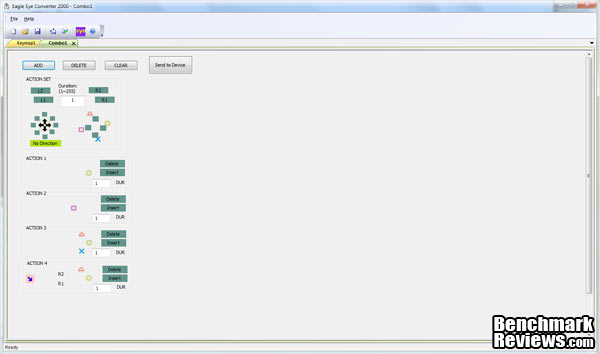
The second page of the Eagle edit software is used to make macros so that users can quickly do multiple actions repeatedly. This is easily done by setting up different commands to "actions" each actions is set of button presses that are used at the same time allowing users to string together long strings of buttons presses. Testing & ResultsTesting MethodologyIn order to test a product that touts the ability to give you a PC like gaming experience on your console you need to actually game for an extended period on games that are familiar to you. In order to do this I tested out the popular PS3 title Killzone 2. Previously I have played through Killzone 2 using a PS3 controller and therefore was able to compare my experience then to my experience using the Eagle Eye Converter. I took the first the first 30 minutes of gameplay to get the advanced calibrations settings perfect. After that point, I put the Eagle Eye Converter through its paces attempting to keep Thomas alive. Although there is no quantitative way of measuring the effectiveness of the Eagle Eye Converter as I played through the game I took note of how natural movement felt, the ease in which I was able to complete tasks, and any problems that I ran into. Sadly with this review as with any other pertaining to a peripheral my experience may differ from yours due to differences in games, play style, and hardware. 
Test SystemHardware
Software
ResultsOverall, the results of using the Eagle Eye Converter were very positive, I found that my experience in game was more enjoyable using the Eagle Eye then using controller. During my gameplay I found that due to the nature of the controls being emulated no matter how much you changed the sensitivity you still had a bit of acceleration that you would not have in a comparable PC game. This showed up when doing large sweeping movement where your turn would start slow and then quickly pick up the pace many times causing me to overshoot a turn and end up just looking at a wall. Fortunately, this did not manifest itself while aiming due to the small amount of movement required. One other issue I had was any actions that required six-axis support required me to pick up a PS3 Controller, switch that to controller one, do the actions, and then switch everything back. I understand that this will always be a limitation of not using a PS3 controller nonetheless takes you out of the moment and brings you back to reality. Beyond these unavoidable issues, I found the Eagle Eye Converter to overall be a good experience. Eagle Eye Converter Final ThoughtsThe Eagle Eye Converter was designed to provide a PC like experience on the PS3 it has some big demands to meet. During my testing of I ran into some unavoidable problems when emulating a PS3 controller with a mouse and keyboard. The fact that users still have acceleration on the mouse, and that there is no emulations of six-axis functions can easily drop users out of the gameplay at times. Overall, these issues are actually minor though and the Eagle Eye Converter with the 2.0 Firmware and Eagle Edit 2.0 software provides close emulations of PC gameplay. My accuracy went up, deaths down, and enjoyment was quite a bit higher which in reality all you can ask for from any peripheral.
Eagle Eye Converter ConclusionWhile using the Eagle Eye Converter I found I that I never died because a key press did not register, never found my mouse not moving, and found no nasty surprises while using the Eagle Eye Converter. For the Eagle Eye Converter this is all you can really ask for. The Eagle Eye Converter fits in perfectly with the PlayStation 3's complete with piano black color and silver outline. Sadly as with the PS3, this beautiful black exterior is quickly marred with dirt and fingerprints. The Eagle Eye Converter is well built with all of the switches, easily taking being moved back and forth over and over without any give. Each one of the USB ports also has a nice amount of force needed to plug your mouse and keyboard making it so you can easily move around without accidently unplugging yourself in a moment of duress. The Eagle Eye Converter is well built with all of the switches, easily taking being moved back and forth repeatedly without any give. Each one of the USB ports also has a nice amount of force needed to plug your mouse and keyboard making it so you can easily move around without accidently unplugging yourself in a moment of duress. The Eagle Eye Converter is priced at $59.99 with its competition being genuine Dualshock 3 PS3 controller, which is priced at $54.99. When you look at the facts you have to ask the question; is it worth paying an extra $5 for a product that is not even complete without spending another $50-80 on a decent keyboard and mouse? In my opinion it is not worth it, it may give you a better experience but for that price, you are better off upgrading your actual computer rather than trying to improve your PlayStation. If you must have you PS3 and you must have a more PC like experience then clearly the Eagle Eye Converter is the choice for you. If on the other hand, you like me yearn for the true PC experience, then you are better off investing the money that would go into Eagle Eye Converter, into your PC and leaving the console games to be played as they were meant to be, on a controller. Pros:
+ Provides closer to PC like experience Cons:
- Accelerations issues Ratings:
Final Score: 7.9 out of 10.Questions? Comments? Benchmark Reviews really wants your feedback. We invite you to leave your remarks in our Discussion Forum.
Related Articles:
|
|




Comments
I have looked into this Eagle Eye solution, but it has still too many problems.
I personally know several PC gamers who would buy Sony PS3 if it truely supported keyboard and mouse. There must be millions of potential customers waiting for Sony to make its move.
I personally can't think of a more primitive method
of game control than a keyboard and mouse.
I'm not suggesting the PS3 or X-Box controllers are
perfect but the user at least has more freedom to physically
move, to stretch the limbs etc, they are ergonomic and quick.
I bought a cheap, wired, Creative brand controller for my PC
and it's ok. At least I can kick back on a reclining chair
with my feet up. How do you use a mouse in this position?
Don't get me wrong though for certain games like GTA IV i prefer a controller but for FPS, RTS, and TPS i much prefer a mouse and keyboard.
I can appreciate that you yourself might be so used to controller that you personally prefer it. But your arguments for it sound a bit beside the point to me.
A controller in the first place is about accuracy and speed, not about being able to do gymnastics while you are playing GTA or Assassin's Creed or Crysis 2. If I want to stretch my legs, I simply pause my game play. But when I game, there exists currently no console controller in the world that can best me in speed and accuracy on my Ideazon Fang gaming keyboard and Creative G700 gaming mouse. That is for sure.
But perhaps even that is besides the point. I am, and have been, an old school veteran PC gamer for decades now. And there are millions like me in the world, with a powerhouse gaming PC, who prefer PC gaming because of the versatility, the graphics, the modding etc. Guys like me already own an incredible platform that can easily cope with any game in existence, and we don't feel like spending another 400/500 bucks on another platform with controls that feel extremely and shockingly awkward and sluggish to us. And I assure it is not for a lack of trying. I and some of my gaming comrades tried several console controllers and they make us feel like we are physically handicapped. Perhaps it is simply easier for the young, who grew up with these type of controllers?
From a business point of view I strongly believe that the brand (Sony or Microsoft) that enables full native keyboard and mouse support on its gaming console would gain, millions of customers like me who would then make the jump to console, because there are several high quality console games we certainly would like to play.
But if I could choose I would much rather see RDR and LA Noire and some other games on PC of course. The money that would save me would be well spend on games.
Some people cant even play CoD and Battlefield games with decent pc setup... your required to upgrade hardwares which is expensive. Crysis 2 for example required $300+ graphic cards just to run on MEDIUM!!!! while on ps3 you can play Crysis 2 w/ almost unnoticable difference...
PS3's graphic cards equates to an outdated 7900GT which is discontinue.. and less expensive... That's why PC games counterpart on Ps3 will never support keyboard and mouse.
Now ask yourself, which do you prefer... An upgrade VGA $300+ for pc games... or a $50-100 EEc for the PS3
/index.php?option=com_content&task=view&id=14747
@Torvic
Who won?t allow it? Who is they? If ?they? want to protect the PC gaming market, wouldn?t it make sense then to bring blockbuster titles like Red Dead Redemption and LA Noire to the PC? It is games like that which seduce PC gamers into buying consoles. Even Microsoft with a huge invested interested in the PC market demands exclusive content for their console.
As a PC gamer pur sang I would only buy those few console games that are not available on PC, and only when they are of high quality (most is garbage to me). Everything else I would buy for PC because of the other advantages. The major one being the modding and editing communities for games like Morrowind, Oblivion, Star Trek Armada, GTA4, X3 series, Dawn of War series, Star Wars Battlefront, S.T.A.L.K.E.R. etc. etc.
@Olin Coles
I strongly believe PC gaming will only die if something can replace the unique creative, customizable and moddable aspect of it. Consoles are extremely limited compared to what PC games allow or even stimulate or intend you to do with games. Many Game developers understand that now.
Consoles are limiting gaming cages. PC?s are enabling gaming worlds. I believe the creative side of gaming will be extremely important into the far, far future, because it appeals to what we as humans are and want, it appeals to our human creative core.
Console games limit you, they imprison you in a prefab, fixed gaming cage, whereas the PC can offer freedom and virtually unlimited creativity. That is why games like Morrowind, Oblivion, X3, Dawn of War and others still have such a huge following after so many years. They are more than just gaming. They are about creating your own world. They are ultimate escapism.