
NZXT Switch 810 Full-Tower Computer Case
NZXT Switch 810 Full Tower Chassis Review
Product Name: Switch 810 Full Tower
Model: CA-SW810-W1
Full Disclosure: The product sample used in this article was provided by NZXT.
What is it that you should look for in a computer case, exactly? The market is full of many different styles with plenty of different features and the prices range from next-to-nothing to arm-and-a-leg. When deciding on a computer case, those are the three areas you want to focus on; price, functionality, and style. Computer case manufacturers are constantly trying to find a balance between those three items by giving customers everything they want at a price they can afford and in a style that they'll like. NZXT is a company that tries hard to please gamers and enthusiasts and their products reflect that. At CES 2012, NZXT announced a completely new case design that offers a lot of functionality for its price. In this article, Benchmark Reviews is exploring the NZXT Switch 810 Full Tower Computer Chassis to help you find out where it fits for you within those three categories.
With their lineup of computer peripherals and cases, NZXT has always focused on computer enthusiasts and gamers. It comes as no surprise, then, that the NZXT Switch 810 is targeted to that very market. The NZXT Switch 810 is big. Very big. It is built to fit not only the big full ATX motherboards, but also the even bigger XL-ATX and EATX motherboards. It really doesn't matter how powerful a machine you are trying to build, the NZXT Switch 810 will fit it.
NZXT is calling the Switch 810 a Hybrid Case because of its adapability to all types of enthusiasts and gamers. NZXT has implemented features and functionality that will cater to extreme airflow, silent operation, or liquid cooling based on the end user's preferences. Hybrid fins on the NZXT Switch 810 allow for a lot of air flow when open and quiet operation when closed. Removable drive bays allow for the installation of a radiator. Add that to the 10 case fans and you have a very solid design.

Hybrid Full Tower Features
- Unique hybrid full tower chassis optimized for extreme liquid cooling, airflow, or silence
- Supports high-end water cooling solutions up to three fans for push and pull configuration: 90mm of internal top space with top 360/420mm and bottom 140/240mm radiator support for unmatched liquid cooling
- Four watercooling cutouts for easy liquid cooling management on the rear panel
- Spacious CPU cutout for mounting high-end CPU coolers without removing the motherboard
- Removable top 5.25" plates to accommodate wide radiators
- Clever hybrid fin design allows the user to choose between maximum airflow or sound reduction
- Innovative right-mounted HDDs for easy hard drive replacement
- Removable HDD pull-out cages and large storage capacity for 7 hard drives
- Equipped with two 140mm pivot fan slots for directing airflow at 15° to the VGA and CPU
- Rear white light for visibility in dark environments with a toggle switch
- Dual high-speed USB 3.0, hard drive dock along with a SD card reader for transfer and quick access to multimedia
- Nine expansion slots for installing EATX motherboards with Quad SLI or Triple Crossfire
- Supreme cooling capacity with up to ten 140/120mm fans
- Stress-free wire management and 23mm clearance in the rear allows for superb wire-tucks
- Ten large specialized cutout holes for easy cable management
- Easily removable bottom filters in the front and rear to prevent dust from entering
- Tool-less 5.25" and 3.5"/2.5" SSD hard drive installation for convenience and ease of accessibility
- Large acrylic window with a view to show off the interior of your rig
Switch 810 Specifications
| MODEL | Switch 810 |
|---|---|
| CASE TYPE | Hybrid Full Tower |
| FRONT PANEL MATERIAL | Plastic/Steel |
| DIMENSIONS (W x H x D) | 235 x 595 X 585 mm |
| VGA Clearance Maximum |
375mm (w/out fan), 350 (installed), 285 (full pivot) |
| COOLING SYSTEM |
FRONT, 2 X 120/140mm (1x 140mm included) |
| DRIVE BAYS | 4 EXTERNAL 5.25" DRIVE BAYS 6 INTERNAL 3.5" DRIVE BAYS Screwless Rail Design |
| MATERIAL(S) | Steel, Plastic |
| EXPANSION SLOTS | 9 |
| WEIGHT | 9.1 kg |
| MOTHERBOARD SUPPORT | E-ATX, XL-ATX, ATX, MICRO-ATX, Mini-ITX |
Features and Specifications provided by NZXT.
Moving along, let's get into a better look at all of the features offered by the NZXT Switch 810 case.
Closer Look: Exterior
The NZXT Switch 810 is a very large case, although not quite as large as some other cases we have seen recently. The chassis is made of steel and plastic and the Switch 810 that we received was painted white inside and out. I am a big fan of the way these huge white cases look, especially contrasted by the black outlining around the edges. As a large case, it is somewhat difficult to move around, especially since there are no handholds or handles anywhere on the case. This isn't something I'd like to lug around to LAN parties.
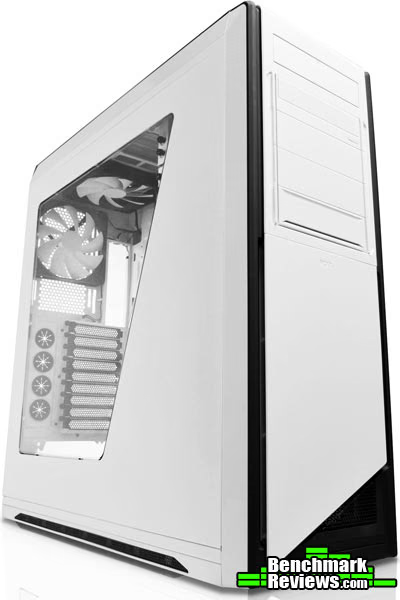
Starting in on the exterior of the case, let's look at the front. The front panel is split into two parts. The top has four external 5.25" drive bays and a flip up I/O panel. We'll look at the I/O panel in the next section. The topmost of the four 5.25" drive bays has a cover that doubles as a front bezel for your optical drive. Since many optical drives are black, this allows you to keep the color scheme uninterrupted. You mount your optical drive like normal and it will sit depressed into the front of the case. Then you can replace the front panel on the case and the button will lineup with the eject button on your optical drive. The front section opens up with your drive tray and it's like you had a white optical drive.

The bottom-most 5.25" external drive bay is fitted with a hot-swappable drive tray that fits a 3.5" or 2.5" drive. We'll take a longer look at this feature later in the article, but it's nice to already see 2.5" drive capability in the case. With SSD prices dropping rapidly, it won't be long before these drives become standard in most gamer's and enthusiast's systems. Since NZXT made the Switch 810 for gamers and enthusiasts, it makes sense to support the smaller drives.

Under the external drive bays on the front panel of the case is a removable panel that gives access to the front fan slots. One of the front fans, a 140mm, is included with the case. Another fan can be added here, as there is a space provided for it. These fans blow air onto the internal harddrive bays. The only issue that I can see is that there isn't a whole lot of space for intake, since the front panel in front of the fans isn't perforated except at the very bottom. There is some room between the fans and front panel, so they could pull air from the bottom corner of the front panel or the front of the case, but that air might not be as cool as if it came from outside of the case.
Moving on, the main side panel of the case has a very large window. The window is big enough that it allows almost a complete view of the internal workings of the case. Since a lot of motherboards use LED lighting schemes (especially enthusiast and gaming grade motherboards), this window helps show off your hardware. While there is plenty of cooling options throughout this case, there isn't any ventilation or fan on the side to bring air in and blow directly on to the motherboard. Down near the bottom of the case, however, there are some vents that should allow air to get in.
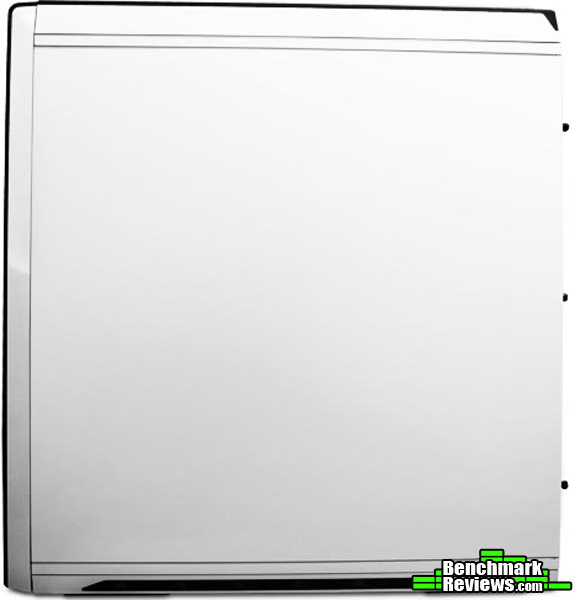
The back side panel of the case is completely unadorned, which is pretty standard. This panel fits behind the motherboard tray and will likely end up against a wall or out of sight because it's the window that you want to look through to see all of the components. Since it may end up against a wall and closes behind the motherboard tray, fans or ventilation would be wasted here anyway. This side of the case has the same line of vents on the bottom as the other side.

The rear of the NZXT Switch 810 comes fitted with another 140mm fan installed. It sits just behind where you would place your CPU and acts as an exhaust for the hot air within the case. The rear of the Switch 810 also has a whopping 9 expansion slots. This allows you to use the PCI slots from those XL and EATX motherboards and also provides enough room for a 4-way GPU setup. Each of the expansion slot covers are perforated to allow air to escape. The rear of the Switch 810 also provides four grommeted holes to meet any of your water cooling needs. In reality, however, you may not have to use these even if you are water cooling. The Switch 810 provides plenty of space for many different sized radiators inside the case itself.
Detailed Exterior Features
Getting down into a more detailed look at the exterior of the NZXT Switch 810, we'll take a look at the front I/O panel. The I/O panel here offers a good mix of everything you typically look for in a front I/O and a little more. First we see two, black USB 2.0 ports. Very standard. These connect via an internal header to your motherboard. Next comes two, blue SuperSpeed USB 3.0 ports. These are becoming more and more common as USB 3.0 gets more standard and more devices start to use the higher speeds. These two ports are also connected via an internal header directly to the motherboard. In a way, this is nice because you won't have to run a cable outside of your case to attach to the motherboard I/O, but it can also cause trouble if your motherboard doesn't have a USB 3.0 header. NZXT didn't include a USB 2.0 adapter for the cable, so the ports will be worthless if you don't have a USB 3.0 header.
One of the things that NZXT included on the front I/O for the Switch 810 case is an SD card reader. This is something that you don't find very often on case I/O panels, but that I find to be a very nice inclusion. The card reader has a cable that attaches to one of your motherboards USB 2.0 headers, of which I'm sure you have plenty. I always find three or four on most motherboards and don't have the extensions to use them all. Further on down the I/O panel is the audio jacks, a reset button, a button that turns on and off the LED lighting system at the back of the case.

Speaking of the LED lighting system at the back of the case, this is actually one of my favorite features of the Switch 810. I usually keep my case under my desk. It's dark under there. When I have to get back there to plug in or unplug some peripheral or other, I usually end up doing so by feel. That process ends up taking much longer than I would like and I getting down there on the ground is already uncomfortable. It sure would be nice if the motherboard I/O panel was lit up so I could see what I'm doing. I guess that's what NZXT thought too, and it's absolutely brilliant. When you push that button on the front I/O panel, it lights up the rear I/O panel. Awesome.

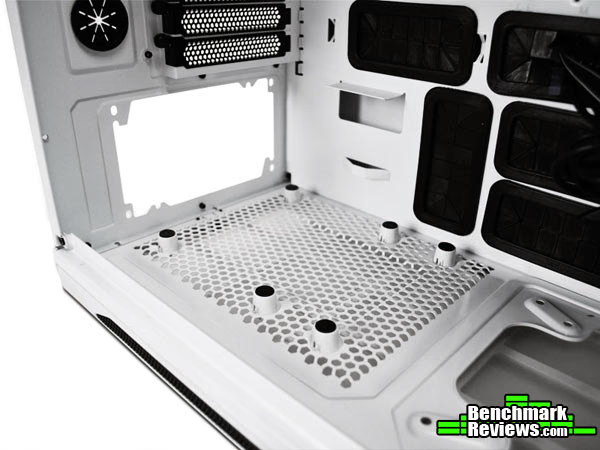
The NZXT Switch 810 mounts the PSU on the bottom of the case. I like this configuration, but it requires some extra work on the part of case manufacturers in order to make it work. For one, there needs to be room for ventilation. I'm a big proponent of an inch of clearance to provide airflow. The NZXT Switch 810 has about half an inch of clearance. Secondly, if you are going to bottom mount the PSU, it's going to pull air in through the intake. There needs to be a filter on the case to stop dust from building up inside of the PSU. NZXT provides two separate filters for the bottom of the Switch 810 case. These two filters are easily removable. They just slide right out toward the front or back of the case, respectively. The filter that isn't located under the PSU mounting area provides filtration for an optional case fan or water cooling radiator that can be installed there.

The bottom half of the front panel also contains filters for the possible two fans blowing air onto the hard drive cages. Since the only intake here is from the bottom right corner of the front panel, I'm not sure how much the filter will actually be catching. I guess any dust caught before it goes into the case is a good thing, though.

The top of the NZXT Switch 810 case sports a very interesting design. There is a removable panel on top that is lined with vents. The vents can be opened or closed by using a lever on the panel near the rear of the case. According to NZXT, the vents should be open if you desire more airflow and closed if you desire less noise. This gives you the option to design your case based on your needs. The top panel of the NZXT Switch 810 uses a latching system to close. Push down and the panel unlocks for removal, push down again and the panel locks back in place. There are no air filters on the top panel of the Switch 810, so if you leave the vents open, the panel itself is purely aesthetic. I think I might actually like the look of the top panel off instead. The fans should be placed to exhaust air out of the case, so as to avoid dust issues.

With the panel off, you can see the indented space there that can hold up to three 140mm fans. With the fans taken out, the empty space can hold a water cooling radiator up to 360mm in size. The fans can then be mounted under the radiator to push air through it. If you are using a air cooling system with an aftermarket CPU cooler, you may not be able to fit those fans in at the top of the motherboard tray on the Switch 810.

Now let's move inside the NZXT Switch 810.
Closer Look: Interior
NZXT designed the Switch 810 to handle pretty much anything a gamer or enthusiast could throw at it. There is plenty of space inside for all but the HPTX sized motherboards. Since there is really only one to speak of, this shouldn't be much of an issue for most people. Since gamers and enthusiasts use big graphics cards, we need space in that area too. The NZXT Switch 810 will accommodate GPUs up to 14.7" in length, and you can fit up to four of them.

If you use the lowest external 5.25" drive bay with the hot swappable option, then you have room for nine 2.5" or 3.5" drives. That hot swappable bay can be removed from the NZXT Switch 810, however, and then you would have room for four external 5.25" drives. The internal hard drive bays are also both completely removable, making room for a water cooling system pump or radiator. If you choose to keep them in, they can both be outfitted with a swiveling fan. The top hard drive bay comes equipped with a fan from the factory. One can be added to the bottom bay as well.

The drive bays themselves are held into place with screws. The optical drives use a tool-free latching system to hold themselves in place. Simply slide the drive into the bay and pop the latch into the screw holes to lock it into place. We'll take a look at the how the 3.5" and 2.5" drives are secured in the next section.
Earlier I mentioned that I like to see plenty of clearance under a bottom-mounted PSU to support airflow. From the inside view here, you can see that the PSU is actually mounted on top of little stand-offs that lift it above the perforated metal floor. This gives the PSU the extra clearance it needs to pull in fresh air. Very good move. You can also see where another fan could be placed next to the PSU pointing upward toward the motherboard. Optionally, a water cooling radiator could be installed here.
Let's take a closer look at some of the interior features of this case in the next section.
Detailed Interior Features
One of the biggest features that cases have been touting for a while now is cable management methods. Most cases now use the area behind the motherboard tray to route cables and keep them out of sight. The NZXT Switch 810 is no different. In fact, the Switch 810 has no less than 10 grommeted holes to thread your cables through. That mass of cables already routed through to the back of the motherboard tray is just the cables included with the NZXT Switch 810. Additionally, the Switch 810 has nine cable tie-down points.
Under that mass of cables is another feature being adopted by many case manufacturers now. There are seven four-pin case fan headers all attached to a junction that takes input from a standard molex power connector.
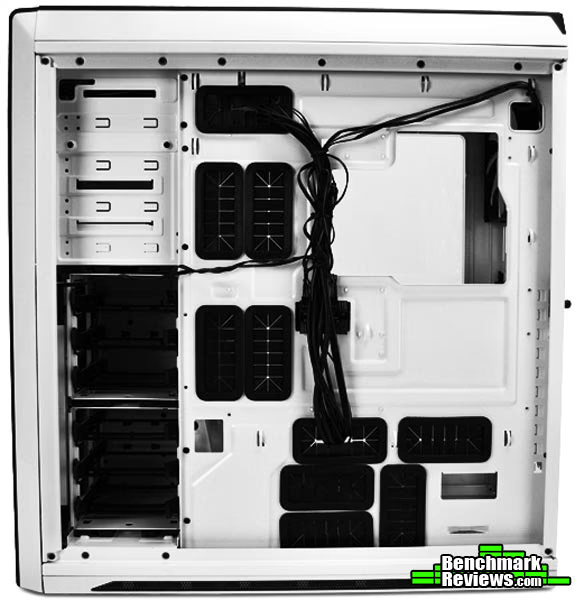
The underbelly of the hollow top of the Switch 810 has room for another three 140mm fans. You can mount these fans underneath any water cooling radiators that you have installed. The NZXT Switch 810 comes with a single 140mm fan installed on top here, and another 140mm fan installed inside the rear of the case. Both of these fans are exhaust fans for warm air radiating from the CPU cooler.

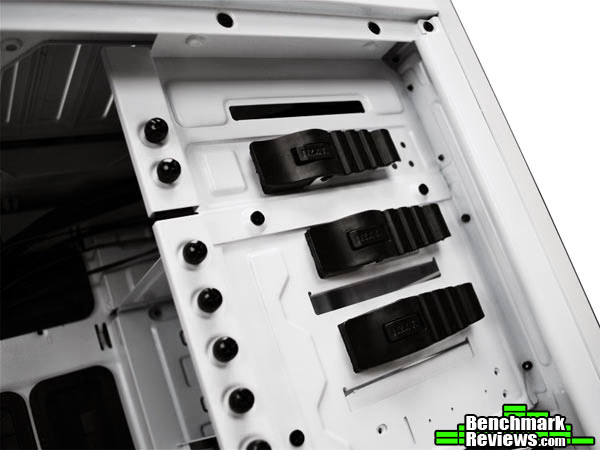
The view below shows the backside of the internal drive bays. Each of these bays has four mounts for either a 3.5" or a 2.5" internal drive. Installing a 3.5" drive using this mounting system is completely tool-free. There are small plugs that line up with the screw holes on the drive. The mounts then just slide into place. They are kept there by tension on the plastic arms. 2.5" drives can also be installed, but you'll have to screw them into place.

As I mentioned before, a ninth internal 3.5" or 2.5" drive can be installed in the hot-swappable bay that takes up the fourth external drive bay. This image shows the backside of the hot-swappable drive bay on the NZXT Switch 810. All it takes to power the drive is a molex power connector and a SATA cable. If you want to use this drive bay as a 5.25" drive bay and get rid of the hot-swappable bay, its as easy as unscrewing this backplane and removing it.

In the image below you can see just how massive the case is and just how much can be installed into it. The system pictured below includes a large radiator at the top of the case with a smaller radiator and a pump down at the bottom of the case. Even with three graphics cards installed, the full ATX case leaves plenty of room in the Switch 810. You can see that there are mounting holes for larger motherboards to be installed, and there is plenty of space between the graphics cards and the hard drive bay, as well as under the graphics cards and above the PSU.
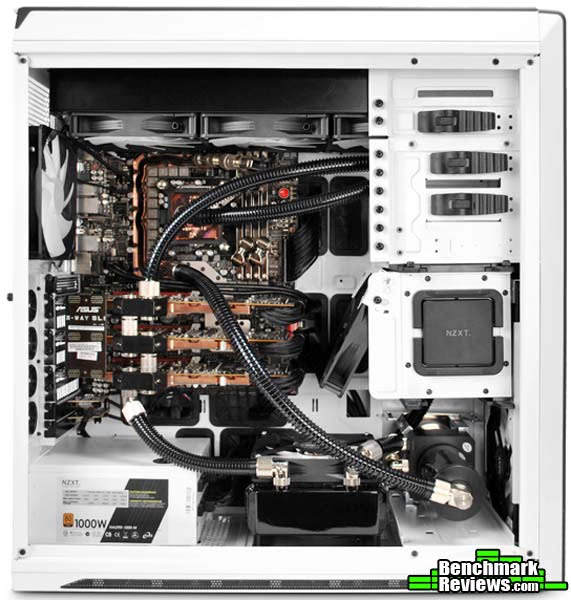
This system shows the NZXT Switch 810 with the bottom of the two internal drive bays removed. In all reality, you could conceivably remove the top hard drive bay as well and simply use the hot-swappable drive bay if you only use a single hard drive. Removing the top drive bay, even if you leave in the bottom one, would open up space for virtually any sized graphics card.
NZXT Switch 810 Final Thoughts
The NZXT Switch 810 is a very big case. Not quite as large as the Cosmos II that we took a look at here at Benchmark Reviews not too long ago, but also not quite so expensive. The reality is that the Switch 810 is still large enough for any enthusiast or gamer to fit everything they need and more.
While such a large case offers just about everything in terms of functionality, it really limits mobility. Weighing in at just over 20 lbs before your system is installed, this isn't something you'd want to lug around empty, let alone full. To top it all off, the NZXT Switch 810 doesn't have anything really to grab onto to help you move it. This is a case that is meant to be built in place, stuck on or under your desk, and left there. As gamers and enthusiasts, this might be hard to swallow. Our cases are constantly being tampered with or moved around. That's not going to be fun with the NZXT Switch 810.
Another minor annoyance I had with the NZXT Switch 810 is that it only included four case fans. I was glad to see that the case fans all came hooked up and ready to go with just the connecting of a molex plug, but only four? There is room in the case for another five fans, why not include a few more? Granted, the NZXT Switch 810 is already relatively inexpensive for its size and features, but would it really have added that much to include a few more fans? This is supposed to be a gamer's case after all.
Four fans isn't bad, I suppose, but one thing abuot the fans that other cases of this size have included is fan speed controllers. Since the NZXT Switch 810 touts the versatility of a case that can be shaped for either extreme cooling or extreme silence, a fan controller might come in handy. In fact, that's probably my biggest complaint about the NZXT Switch 810. It just isn't possible to make this case silent, unless you remove the fans I suppose. Closing the vents didn't really help at all. It's funny, because there are only four fans in the case. My Thermaltake Level 10 GT Snow Edition case is, for all intents and purposes, silent. I measure that by whether or not I can hear the fans. If I could turn the fans to low on the NZXT Switch 810, it might be silent, but I don't know.
NZXT Switch 810 Conclusion
Although we strive for objectivity here at Benchmark Reviews, please remember that each author perceives these points differently, and our conclusions and recommendations will necessarily differ from others. Also, prices can fluctuate and designs change after publication, so that the product we review might not have the same price and specifications of a product that's available later. Please do not base any purchase solely on our conclusion, as it represents our product rating specifically for the product tested, which may differ from future versions. Benchmark Reviews begins our conclusion with a short summary of each of the areas that we rate.
Measuring a case in terms of performance generally means how it performs in noise level and cooling ability. As far as ability to cool is concerned, the NZXT Switch 810 was about average where air cooling is concerned. As for water cooling, the NZXT Switch 810 will cater to literally any of your water cooling needs, that includes the use of a 360mm radiator if that's what your heart desires. Water cooling might also be the only way to make the NZXT Switch 810 silent as well. Buying a fan controller might help too, but as is, the Switch 810 isn't very quiet. I guess it boils down to how you cool your components. If you plan on using liquid, the Switch 810 is great for you. If not, you may not be satisfied.
I think I have a thing for white cases. I really like the look of the NZXT Switch 810. The black outlining makes it quite appealing to me. The NZXT Switch 810 looks tall and elegant, wearing a tuxedo and going to a nice cocktail party. One of my favorite points in the appearance of the NZXT Switch 810 is the LED lighting on the back panel. Not only is it functional, but it makes the case glow when it's on. It's complimented by LED lighting on the top of the case as well. In fact, that is where the HDD LED is located. Its a white LED that is long and somewhat muted. It looks very nice.
For the most part, the NZXT Switch 810 is very solidly constructed of steel and plastic. The empty weight alone tells you this case can withstand a beating. The reason I say for the most part is that there are two areas of the Switch 810 that don't seem very sturdy to me. The first is the top vent plate. This plate pushes down to lock into place, then with slight pressure, it pops back out again to be removed. During the building process, I eventually just took the top off so I would stop popping it out. It seems a little flimsy too, I was afraid I might break it.The lower front panel is exactly the same.
Functionally, the NZXT Switch 810 really shines. There is room for nine 3.5" or 2.5" drives and up to four 5.25" drives. It has a hot-swappable drive bay, the HDD cages are removable, it holds tons of fans, it can fit up to a 360mm water cooling radiator, it fits up to XL-ATX motherboards, and it even has LED lights on the back panel so you can see what you are doing. The top vents seem like a waste to me, but they don't negatively affect anything. The cable management is top notch as well. I really like the addition of a card reader as well.
Even for a case that fits XL-ATX motherboards, $169.99 (at Newegg) can be a lot of money. The key to making this case worth every cent is going to come down to how much of it you would use. If you are going to fill every inch of space with three 5.25" and nine hard drives, use three or four video cards and add in another five fans, the NZXT Switch 810 could be a good value. If you are planning on using all that space and water cooling your devices, then Switch 810 is definitely worth it. So to really get your money's worth, you should already be planning on liquid cooling.
Pros:
+ A Hot-Swappable Drive Bay
Cons:
Ratings:
- Performance: 8.00
- Appearance: 9.00
- Construction: 9.50
- Functionality: 9.50
- Value: 8.00
Final Score: 8.8 out of 10.
Quality Recognition: Benchmark Reviews Silver Tachometer Award.
Benchmark Reviews invites you to leave constructive feedback below, or ask questions in our Discussion Forum.
Reader comments from the original article
13 comments were posted before commenting closed. They are preserved as written. Original avatars no longer resolve and are shown as a placeholder.
RE: NZXT Switch 810 Full-Tower Computer Case Anon Permalink:
"Another minor annoyance I had with the NZXT Switch 810 is that it only included four case fans. I was glad to see that the case fans all came hooked up and ready to go with just the connecting of a molex plug, but only four?" "Four fans isn't bad, I suppose, but one thing abuot the fans that other cases of this size have included is fan speed controllers." "It's funny, because there are only four fans in the case" And if you didn't get it already, there's only FOUR fans. Anyways, screw built in fan controllers, they're 9/10 garbage compared to a cheap 20 dollar controller from any retailer.To conclude, there are only four fans, did you count them? 1, 2, 3, 4 FANS.
Agree about fan controller Mergatroid Permalink:
Agreed. I have never seen a stock case fan controller I liked either. I would much prefer to install my own.
Fan controller Valisor Permalink:
Its not a fan controller in the back. Its just a hub to have one power source to control 7 fans. People are just not so bright these days.
No kidding Mergatroid Permalink:
We never said there was a built in fan controller. The article mentioned the author was unhappy that the manufacturer didn't install one, and we're saying we don't like them anyway and we're happy they didn't bother. But you're right, people really aren't very bright these days.
RE: NZXT Switch 810 Full-Tower Computer Case PaleRider Permalink:
You said, on the ist page, "Add that to the 10 case fans and you have a very solid design." There are only 4 fans. In several places you mention 480mm radiator compatibility, yet it supports only a 360 radiator up top. You even mention 140mm fans with radiators that can only use 120mm fans. Do you actually proofread what you write? If I were the editor I'd be redacting this article with a can of red spray paint. And then have someone else write it.
Really? Hank Permalink:
Did you even read the article? The case fits up to 10 fans, but I clearly mentioned many times that it only comes with 4. That was Anon's major complaint if didn't read the other comment. And the area where the radiators go can fit 140mm fans, even with radiators depending on how you mount them. I currently have a Corsair H60 mounted there with the 140mm fan. You only have to read the 1st page of the article to get all of that. -Hank
480mm Hank Permalink:
I'm not seeing where I wrote that it fits a 480mm radiator, but if I did, that would have a been a typo. Of course, no one ever has typos in their articles, so how dare I. Either way, it says many other times that it fits radiators up to 360mm. Again, re-read the first page to clear up any of your misconceptions.
RE: 480mm PaleRider Permalink:
Here's a little quote from the 1st page: "Supports high-end water cooling solutions up to three fans for push and pull configuration: 90mm of internal top space with top 360/420mm and bottom 140/240mm radiator support for unmatched liquid cooling." You say 420mm radiators are not mentioned in this article? Do YOU actually read what YOU publish? By not disagreeing with a statement of the NZXT spec sheet, then you obviously agree with it. Unless, of course, you never actually read it. I stand by my OP. Are you people always so vindictive of a persons opinion that you publish private citizens e-mail addresses?
RE: RE: 480mm PaleRider Permalink:
Looks like I did it again. I keep seeing 480 when 420 is listed. My only excuse this time is being slightly pissed off.
RE: RE: NZXT Switch 810 Full-Tower Computer Case Olin Coles Permalink:
Dear korangler msn.com Perhaps you should learn to give constructive feedback, because you neither comprehend the author's details correctly nor have the fortitude to write an article yourself. Now go troll some other website and complain about how you're presented with their hard work for free.
RE: RE: RE: NZXT Switch 810 Full-Tower Computer Case Olin Coles Permalink:
PaleRider: I just searched Hank's article, and nowhere in it did I find the term "480" or "480mm". All I can say now is: learn to read and quit being a troll.
SSGT RETIRED Rafael Rivera Permalink:
I just want more info about this case,I buy a Termaltake Case a week ago and I like to switch to this one fore more space.
Looks sweet to me Mergatroid Permalink:
This looks like a great case for $170. Hell, I bought a 600T for the same price. If this would fit in my desk it might be my next case....if it was black. Never got into the white cases myself. I can't really pick out anything I don't like about this (of course I have not tried the top or front panels as you have). I love the bays, the cable management, the looks, space for all the fans and rads. I have been thinking about going from closed loop water cooler to a more traditional loop, and a case like this could convince me to go ahead. I think, due to its size, they might have considered some casters, and I would still like more than 4 5.25" bays (bay reses and fan controllers) but it still looks pretty sweet to me...