
Mionix Naos 3200 USB Optical Gaming Mouse
Mionix Naos 3200 Gaming Mouse Review
Here at Benchmark Reviews we know that with the turbulent financial markets the way they are these days having a high quality product that can draw customers in and keep them coming back for more is essential. Mionix is a relatively new company that is hoping to make their mark on the computer gaming world. This Swedish company knows how to make a good mouse. The Mionix Naos 3200 is affordable, durable, and so comfortable you'll have to use it to believe. Keep reading to see what this gaming mouse can bring to your table.
There are plenty of mice out there, but as a gamer you shouldn't burden yourself with an old track-ball mouse or a generic optical mouse any longer! The Naos 3200 brings a lot to the table without completely breaking your wallet. The Naos 3200 is a slightly stripped version of the Naos 5000. It has a max DPI of 3200, custom macros and binds, onboard memory, 7 buttons for more control, color management, and a high-quality highly ergonomic build that belies its low cost.
Mionix really wants to show gamers what it's like to have a great gaming mouse without sacrificing comfort and while fitting any kind of user's price range. Now let's check it out!
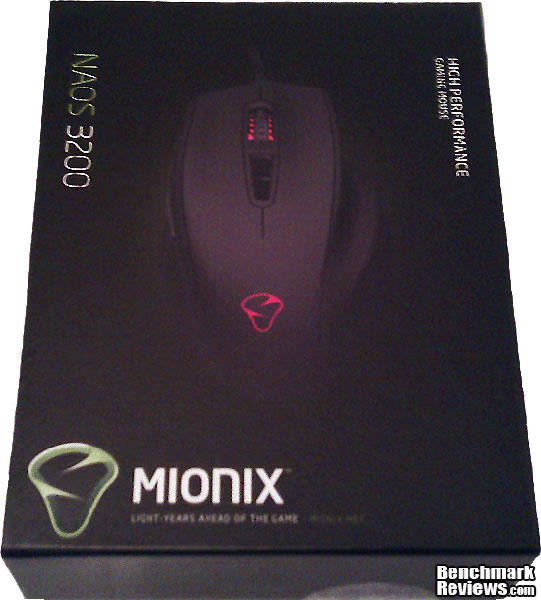
I'll be throwing the Naos 3200 through a series of everyday uses to see how it performs in a variety of different environments and conditions.
3200 dpi Mouse Features
- Truly ergonomic design - Truly ergonomic design with support for all five fingers
- Plug n Play - Completely Plug n Play, software needed only for configuration
- Maximum grip - The rubber coating ensures a maximum grip
- 3200 dpi LED-optical sensor - Reliable and accurate LED-optical sensor technology
- Built-in memory - Bring your settings and recorded macros with you
- Customizable LED light system - Personalize your mouse with your favorite color
- 3 steps customizable dpi in-game adjustment - Choose from 3 dpi steps and switch between them in-game
- 7 programmable buttons - The buttons can be assigned to any key command or macro
- Adjustable polling rate - Tune it all the way up to 1000Hz through the software
Mionix Naos 3200 Specifications
- 3200 dpi gaming LED-optical sensor
- 3.5mm lift distance

- 1 ms response time
- 6469 frames/sec
- Tracking speed: 1 m/sec (40 ips)
- 5.8 megapixels/sec image processing
- Acceleration: 15 g
- True 16-bit data path
Full Disclosure: The product sample used in this article has been provided by Mionix.
Closer Look: Mionix Naos 3200
The Naos 3200 comes in a nice tidy box. It does not come with a disk for drivers but only a mouse and a pamphlet informing you that all the software for the mouse can be downloaded at Mionix's website.

The mouse itself has a black matte rubberized plastic finish. It is equipped with 7 customizable buttons, two on the left side, the scroll wheel, two behind the scroll wheel, and your standard left and right buttons. There are two LED locations on the mouse, one in the scroll wheel, and one that lights up the Mionix logo.

The Naos 3200 has a 2-meter long, high quality braided cable. It also has a shielding magnet near the USB connector to help prevent magnetic interference.

The mouse is ergonomically setup (if you're using it with your right hand), and has a groove for your thumb to rest on the left side and two grooves for your ring and pinky finger to rest on the right side.

On the bottom you'll notice 4 Teflon pads which help the mouse slide across almost any surface with ease. Also, the Naos 3200 comes equipped with an optical sensor instead of a laser sensor like its brother, the Naos 5000, does.
Mionix Naos 3200 Software Features
As stated before, the Naos 3200 doesn't come with a disk for drivers, but instead you must obtain the software from Mionixs' website. The software for the 3200 is limited in comparison to the Naos 5000 in several ways. The main way being there's no surface testing feature. This is somewhat disappointing because I have test and give a qualitative assessment of how it works on certain surfaces instead of being able to show you like I could on the 5000. We'll get to that at another time though. For now, let's see what we do get with the 3200.

Starting from Left to Right we have Mouse Settings. This page gives you access to customize the 5 extra buttons plus the left and right click any way you want. Want to record a macro and assign it to a button? No problem. Also, you have access to some normal functions with Double Click customization, scroll speed and pointer acceleration.

The Custom Settings tab lets you change your DPI settings, Pointer Speed, Polling Rate, and LED Effects. I like the fact that you can make one of the colors linked to a certain DPI, but I'm disappointed that you can't customize them beyond the three included colors and you can't change the order in which they go. It'll always be red, then green, then blue.

The Macro Settings tab is the tab where you can write your own custom macros for use with any of the buttons on the mouse. I didn't play around too much with this tab, but I can see someone who uses macros more frequently definitely using it.

Finally, we have the Support tab. This tab simply links you to online support and Software Updates for your mouse.
Testing and Results
Testing Methodology
Sadly the Naos 3200 doesn't come packed with the software like its bigger brother (the Naos 5000) to analyze surface quality. Instead, I ran the Naos 3200 through a set of vigorous and thorough tests to determine how its performance is on different surfaces. I have a generic piece of printer paper, a glossy magazine, a plain wooden desk, and a generic mouse pad.
After those tests I used it in several applications ranging from Photoshop CS5, Microsoft Office 2007, a MMO game, a First-Person Shooter game, and generic use (Social Networking, E-mail, etc). Finally, I performed and extended use test to determine how the mouse felt after using it for several hours in a row.
Test System
- Motherboard: Gigabyte GA-880GA-UD3H
- System Memory: 12 GB G.Skill Ripjaws Series 240 DDR3 @ 1333
- Processor: AMD Phenom II X4 970 BE 3.5 GHz
- Video: MSI Nvidia 460GTX Cyclone
- Operating System: Windows 7 64-bit Professional
- Monitor: Insignia 42" LCD 1080p HDTV @1920x1080

Test Results
At the lowest DPI setting (800 DPI) the cursor crawled across the screen on each surface. When using it for applications it performed okay in the gaming applications, perhaps just a tad bit slow, but performed well in Photoshop and in Office.
At the middle DPI setting (1600 DPI) the cursor speed worked well enough on each surface. The desk gave me the lowest performance and the mouse pad gave me the highest performance. The paper and magazine were about the same but didn't offer anything special. When playing games this setting was excellent for both FPS gaming and MMO Gaming. It also performed well in Office, Photoshop, and generic use.
At the final DPI setting (3200 DPI) the cursor speed becomes optimal. On every surface the mouse seemed to run smooth. Without having a software analyzer I had no way to determine the actual surface quality, but the feel on each surface felt smooth and I didn't need to lift the mouse up. This setting is a bit much for doing delicate things in Photoshop and when playing my FPS game. I felt that the crosshair would move way too much with the slightest twitch of my hand. If you're an avid FPS gamer who uses a fast scroll then this mouse would fit perfectly. The mouse also performed well in both the MMO game and in generic use.
Finally, the extended use test gave me great results. I used the mouse for several periods of 4-5 hour blocks. My hand never once felt uncomfortable. The shape of it really supports your hand.
Mionix Naos 3200 Conclusion
The Naos 3200 isn't the greatest mouse ever made, but it does the job of a great gaming mouse without emptying your wallet. It comes equipped with a very similar shell to the Naos 5000, so it still feels great, but it is still missing a few bells and whistles that make it be in the upper echelon of gaming mice. I feel this mouse has definitely shown you don't need to buy a mouse with around a $100 price tag to get great results.
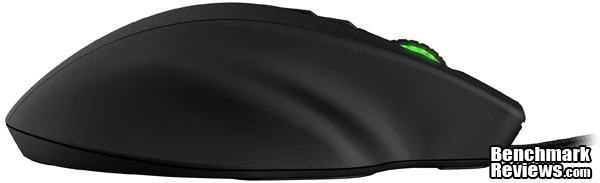
The Naos 3200 performed wonderfully when using the 1600 and 3200 DPI settings. It ran on every surface I tested splendidly, although the 800 DPI settings were not desirable for most applications, it still did a good job when I needed better precision. It would have been nice to have higher DPI settings since there are comparable mice on the market with higher numbers.
The mouse looks good. Its matte black finish and 2 LED locations really make it noticeable. Anyone who I showed this mouse agreed that it was one of the "cooler" looking mice on the market.
The mouse is also built well. The fact that I can switch between the modes so easily is a bonus considering that it feels so comfortable. Also, the locations of the default DPI switching buttons are in the perfect area because it would be rather difficult to accidentally switch settings. The cord for the mouse is braided and shielded which shows high quality craftsmanship. The only thing that I would have liked to see was a laser sensor, but when the mouse is on the mouse pad you won't be able to tell the difference.
The 7 programmable buttons, onboard memory with custom macro settings, and plug-and-play ability make the 3200 a great gaming mouse. It worked in any instance in which I needed it, from gaming to generic usage, and did a good job in those situations.
Priced at $54.99, the Naos 3200 isn't the cheapest mouse but for what it brought to the table I can say that it's worth its price. It's high quality, comfortable, and perfect for any gamer or PC enthusiast looking for an awesome looking mouse.
If you're not looking for a mouse that needs to have 32 built in changeable colors or weights, but still has what it takes to customize your gaming experience with 7 programmable buttons, onboard memory, and a high quality build, then this mouse is for you.
Pros:
+ Plug and Play
+ High Quality Construction
+ Comfortable
+ Works on multiple surfaces well at the higher DPI settings
Cons:
- Limited customizability with the 2 built in LEDs
- Does not come with as many accessories or software features that Naos 5000 does.
Ratings:
Performance: 8.00
Appearance: 9.50
Construction: 9.50
Functionality: 8.50
Value: 8.50
Final Score: 8.8 out of 10.
Quality Recognition: Benchmark Reviews Silver Tachometer Award.
Questions? Comments? Benchmark Reviews really wants your feedback. We invite you to leave your remarks in our Discussion Forum.
Reader comments from the original article
3 comments were posted before commenting closed. They are preserved as written. Original avatars no longer resolve and are shown as a placeholder.
SS Ikari Poldo Permalink:
Now, this mouse looks like an Ikari that I have (Iron Lady) sans LCD at the bottom.
This mouse is not a star Eric Merlin Permalink:
All Mionix mouse made by La View Hong Kong. They didn't design the mouse, therefore, they don't give birth to the star, i mean mouse. They bought the star, again, mouse. Tons of gaming mouse out there are OEM from CHINA. This applies to ozone gaming too.
It's not a OEM Johno Permalink:
I can assure you that this mouse is not an OEM. It's been discussed before, and they've clearly stated that it's not.