
Func MS-3 Gaming Mouse
Func MS-3 Gaming Mouse Review
Manufacturer: Func
Product Name: MS-3
Model Number: FUNC-MS-3-1ST
UPC: 817301018999
Price As Tested: $79.99 (Newegg)
Full Disclosure: The product sample used in this article has been provided by Func.
On 9/9/1999, a company started in California with the goal of creating "fantastic equipment...with the sole purpose of enhancing the experience of playing a great game, rather than diminishing it." Soon after, the original Func sUrface 1030 launched, winning awards from many different sites and magazines. In 2013, Func has introduced their first-ever gaming mouse. A result of hundreds of hours of study, the Func MS-3 Gaming Mouse sports an ergonomic shape and purposefully placed buttons - all to enhance your game and provide the greatest advantage possible. Have they succeeded on their first try? At Benchmark Reviews, we intend to find out.
It is only fitting that Func's first gaming mouse arrived with the refresh of the original Func pad - the 1030 (XL). Consistency is the key to accuracy, and there is no better way to ensure your mouse has a consistant surface than to put a high-grade pad under it. Made of a polycarbonate material, the Func 1030 XL has two surfaces with either a rough or smooth finish to match your preference.

Func MS-3 Specifications
MCU/Processor: WT6573
Switches: Omron
Sensor: Avago UGS 9500
Memory: Onboard, 512 kB
Resolution: 90-5670 DPI
Frames per second: 12 000
Tracking speed: 5.1 m/sec (150 ips)
Max Acceleration: 30 g
Image processing: 10.6 megapixels/sec
Report rate: Adjustable, up to 1000Hz
Lift-off distance: Adjustable
Upgradable firmware: Yes
Connection: USB. Goldplated (2 m braided cable)
Dimensions & Weight
126.92x100.69x42.38mm / 4.99x3.97x1.69inNet weight: 127g / 0.28lbs.
System Requirements
Windows® 2000 / XP / Vista / 7 / 8Available USB port
10 MB free space on hard drive
Func Surface 1030 XL Tech. Specs.
Surface material: PolycarbonateSurface type: F30.r / F10.s
Size: 36x28 cm / 14x11 in
Weight: 422 gr / 0.93 lbs
Thickness: 4 mm / 0.16 in
Specifications taken from the manufacturer's product page.
Closer Look: Func MS-3
After reviewing a few gaming-grade mice, one begins to anticipate certain details. The packaging will of course be eye-catching to stand out from the crowd, with marketing buzzwords prominently displayed with ever-bigger numbers and features to proclaim the device's superiority. While there is nothing wrong with wrapping up a high-grade device in packaging to match, Func takes a slightly different (and wonderfully refreshing) approach...
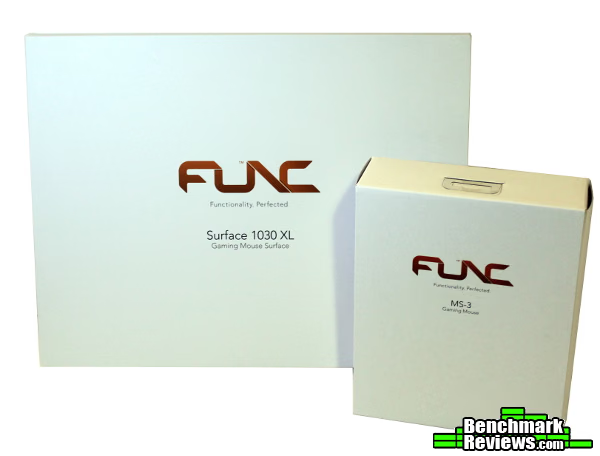
Honestly, I wasn't expecting this. The white and orange boxes certainly stand out, if only for their simplicity and focus - the only information you get on the front is the product name. This aligns perfectly with Func's slogan, "Functionality. Perfected." The focus on functionality is reflected in their packaging - a pretty efficient marketing approach.

In any case, the packaging is more than adequate. A short history and some product information are displayed in many languages under the front flap, while the MS-3 itself sits in a form-fitting clear plastic shell. It is a nice gesture, allowing you to "try before you buy," in a sense - complete with a cutout for your wrist.
Other than the MS-3, the box contains the product manual and a CD for the settings software (also available for download). Again, simple and functional - everything you need, and nothing more. The product manual itself bears mentioning - I was impressed with the straightforward approach and simple, easy to understand explanations. This is the first manual I've seen that bothered to explain terms such as Angle Snapping and Pointer Acceleration, along with recommendations for achieving better accuracy. While veteran gamers may already know and understand these terms, it is important to have access to this information when upgrading to a feature-rich model like the MS-3. Understanding how the OS translates the mouse movement through the different sensitivity settings can help you make the most of a device with a high-end accurate laser sensor. A nice touch, and it certainly relays the message that this isn't just another peripheral manufacturer.
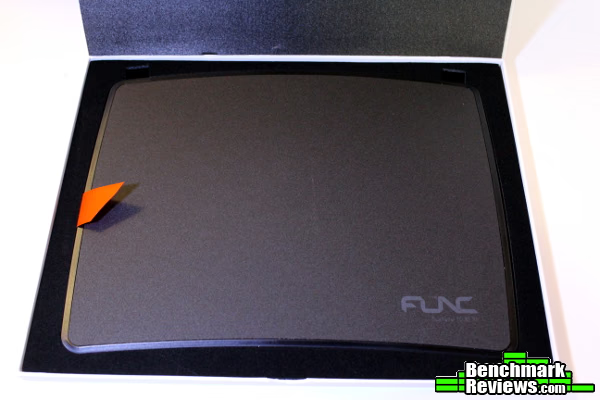
The packaging for the Surface 1030 XL follows the same design. Overall, a great presentation of some high-end peripherals.

Of course, what we're really here for is the MS-3 itself. Covered in a soft-touch, grippy finish and an array of buttons, this mouse promises to be packed full of features and comfort. Let's take a closer look.
Func MS-3 Detailed Features
Since this is the detailed features section, I thought it only fitting to try and provide some more photgraphic detail of the two surfaces on the 1030 XL. The two pictures below were taken from as similar of a distance as possible while still keeping the "grain" of the pad in focus. Func lists the two surfaces as "F30.r" and "F10.s".


The two surfaces differ distinctly in their feel. The rough side has a granular feel, while the smooth is just that: smooth. Initially, I found myself preferring to use the smooth side as it seemed to have a better glide (the rough side felt too "scratchy" at first - it may have needed a break-in period). Soon however, I switched to the rough surface as it didn't seem to cause as much drag if some oils from your fingerprints transferred to the mouse pad. Over time, I began to prefer the rough surface over the smooth - of course, the benefit of a dual-sided pad is having a choice! Switching sides is a simple process as the pad sits in a plastic tray that is anchored by large rubber feet (foregoing the need to place disruptive pads on the mousing surface itself). Just flip the surface over, and you're ready to go. Throughout the entire course of using the Surface 1030 XL with the MS-3 I didn't experience any sensor skips or jitters (although I use lower DPI settings, not approaching the full 5670 DPI). The combination works well, as one would expect.
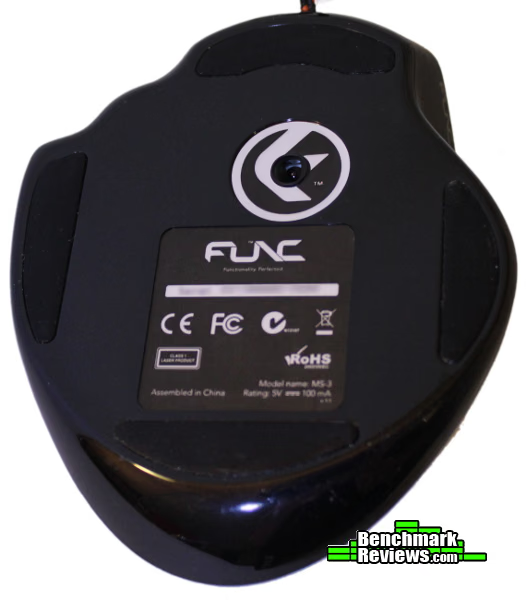
Aside from the buttons, the bottom of the MS-3 is the only other place we find some glossy black plastic. The rest is all coated in a rubbery, soft touch finish that feels great beneath your fingertips. That laser is a Avago ADNS-9500, the same used in mice such as the Roccat Kone[+], Steelseries Sensei and XAI, Mionix Naos 5000, and the Corsair M60 and M90.

The right side of the MS-3 houses those formed ring and little finger rests, and you can also see the profile switch button (which is programmable for other functions as well) by the right mouse button, along with the two DPI switching buttons beneath the scroll wheel (which are also programmable).

The left side of the MS-3 shows us the T+4 thumbzone arrangement and the DPI/Profile indicator LEDs. This arrangement is admittedly well thought out, and the tension on the buttons is perfect for preventing mis-clicks while still allowing for easy activation (I was able to rest my thumb on the lowest button, and still click only when I meant to). Leaving the central area free for your thumb was a great decision - all four buttons are in easy reach, but you still have more than enough room to rest or grip with your thumb. Depending on your grip the Instant Aim button towards the front can be hard to reach without moving your hand; I found it was not enough of an issue to affect my use of that button during gameplay. This button is also programmable so you aren't restricted to that function.

Func claims they've spent more than 100 hours studying the human hand, and have designed the MS-3 to provide the greatest and most ergonomic grip possible. After first placing my hand on the MS-3, I'd be inclined to believe them. Keep in mind, I already have my preferences for mice: small, low profile mice that I can use a modified claw grip to move with my fingertips. The MS-3 does not fit that profile, but I couldn't tear myself away from how comfortable it was. My only complaint with the shape is you are forced into a palm grip...but when a palm grip feels this good, that isn't much of a complaint. Since I am complaining however, I would have preferred less of a "shelf/ledge" shape to the right side grips - rounding those grooves a little more would have felt even more comfortable, in my own humble and subjective opinion. Still, having those vertical edges helps with gripping the mouse during side to side movements or if you should ever need to pick up the MS-3 during gameplay.


Here again we see the DPI indicator LED. There are three along that seam which light up to indicate the current DPI step. When pressing the button mapped for the profile switch, these same LEDs will temporarily change to white, allowing you to switch between configured profiles. This change happens almost instantly, along with the color changes to the scroll wheel and instant aim button. I grew to quickly appreciate this efficient and unique approach to indicating the current DPI and profile - it is simple, functional, and informative while remaining unobtrusive.
Func MS-3 Settings Software
The MS-3 works just fine without software, although of course you are then limited to the default settings. Installing the MS-3 Settings Software is done from a simple installer, after which you can then begin to customize various aspects of the mouse.
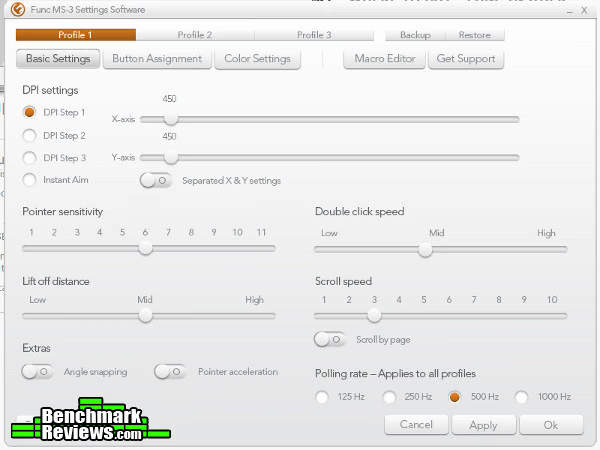
The Settings Software follows the same as the packaging, with clean white lines and orange accents. Functionality is the focus here, and changing settings is simple and straightforward. The default settings are actually well thought out and quite usable - most mice I have to turn down the absurd DPI levels for the cursor to be controllable.

The polling rate is set to 500 Hz by default, but you can choose between 125, 250, 500, and 1000 Hz. Using the Mouse Rate Checker and Direct Input Mouse Rate tools, I verified the polling rate does report as it should at the full 1000 Hz. Remember, the polling rate determines how often the mouse sends location information to the computer, so don't worry about the Current and Average values. They just identify that the mouse was not moving when the screenshot was taken, therefore location information did not need to be updated. You can see through the average and peak rates the mouse does communicate location information at 1000 Hz when the location information changes fast enough to warrant it.
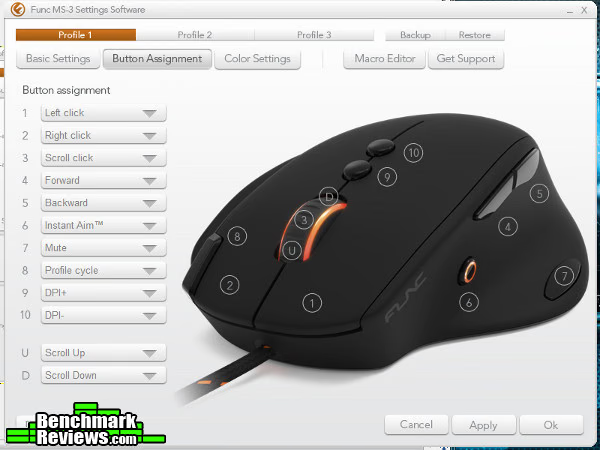
Every button is programmable. The manual will tell you as a safety precaution the software will not let you apply settings if there isn't at least one button assigned to "Left click" (for obvious reasons), but everything is fair game here.
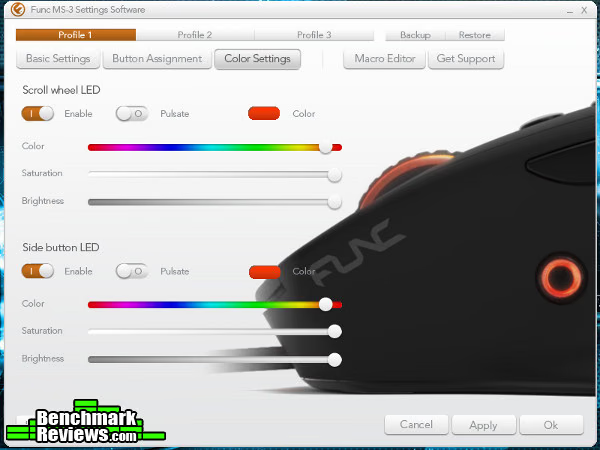
Finally, my favorite part: glowy things! In all seriousness, this is the first multi-color LED device I've seen that actually gives you the entire range of colors from which to select. Most others will say they support up to 16 million colors, but only give you eight to choose from (along with differing levels of brightness for those eight colors). Playing with the color slider for the MS-3, I began to understand the two different approaches - it is hard to match the colors for the two different zones when you are sorting through 16 million colors! Of course, this only affects those that are bothered by the little details. It would be nice to have an option to "copy" colors. Other than that, this function works perfectly fine, and is implemented well.

The Button Assignment page allows macros to be set to any button one would like. Those macros are created here, in the Macro Editor. Simply press record, and type away. Once saved, the macro can then be selected for use as a button function. While it works, I found myself wishing for a little more power here: more specifically, the ability to edit macros. If you mis-type a key as part of a sequence, you cannot delete just that portion from the macro, you must start over. Also, mouse buttons or actions cannot be included - keyboard sequences only. To be honest, I rarely use macros (but I'd love to hear comments on good uses for them!) so something like this isn't a deal breaker for me. However, I'd like to see at least the ability to set time intervals, include mouse actions and edit portions of the macro in a software update to bring the macro function in line with other gaming devices.
Gaming Mouse Final Thoughts
I already have my favorites, and I didn't think a palm grip was for me. This mouse made me want to switch - it's that comfortable. That being said, there are still some things I would prefer slightly different... Smooth out those rests for the ring and pinky fingers, and maybe place that default profile switch button by the DPI buttons. Then again, the amount of research Func has done is probably an order of magnitude more than I've done, so who am I to complain? I'd be interested to hear if others feel the same way. Otherwise, this is my first experience with a purpose-built palm grip mouse, and it was a great one. I'm still not entirely sure I'm a convert though, I found I just couldn't get the same precision using my palm as I could with my fingertips (understandable, considering how much more dexterous your fingers are than your palm by design). Using this mouse in fast paced shooters like Battlefield 3 was a good and very comfortable experience, but I never felt like I could get the DPI low enough to make those precision shots at a distance if necessary. Of course, that's what the Instant Aim feature is for, and it works great for those moments.
It is obvious this is a mouse designed to be used with a full palm grip. I believe this is inherently inferior for precision - you simply cannot move a device with as much precision with your palm as you can with your fingertips. That being said, Func has provided more than enough functionality to offset this, with DPI settings and the Instant Aim function. Likewise, to be fair, how many of us can reach laser precision with our fingertips anyway? It is entirely possible the comfortable grip and other features will more than offset the slight loss in precision for most users...it did for me. For a device that you use for hours at a time, comfort and feel usually become the most important features. If it doesn't feel right, not much else is going to matter. The MS-3 feels good.
So did Func get it right on their first try?

Func MS-3 Conclusion
They got it right. It isn't perfect, and won't be for claw or fingertip grip users, but the MS-3 is a well-constructed device with a focus on giving you an advantage in-game. It does that quite well - better than most, I'd say.
The MS-3 is a top performer. Even using the MS-3 on pads other than the 1030 XL didn't cause any strange sensor behavior. Laser sensors can be notorious for preferring certain surfaces; I didn't notice any of this type of behavior with the MS-3. Cloth pads (Goliathus Speed edition and Kabuto), hard pads (Surface 1030 XL, Destructor 2), microfiber pads, straight desktop surfaces...none of these caused tracking issues. The Omron switches allowed for solid and tactile clicks - no mushy buttons here, making it easy to click a single time or rapidly without missing a beat. This is truly a mouse that allows you to focus on your game.
It just so happens the MS-3 has the appearance to match. As always, this is such a subjective rating - beauty is in the eye of the beholder, right? This is one of those devices of which a picture cannot do justice - the design really attracts your eye in person. The smooth curves, proportions, bright and even LED lighting that manages to stay understated, matte finish with gloss black for the buttons...all of these add up to a sophisticated and attractive presence. The small touches and unique additions (profile/DPI lights in the seam, ring of light for the Instant Aim button) set the MS-3 apart from the competition. In my opinion, this is one of the best-looking mice available on the market. The attention to detail from the packaging to the orange accents on the braided cord really clue you in to the amount of time put into the design. I think Func should be commended for bringing something so polished to market on their first try.
Similarly, the MS-3 is constructed well. There aren't any squeaks or rattles, and the mouse feels solid in your hand. Each button actuates with a pleasant tactile click (with Omron switches, they should!). My only complaint here is the default profile cycle button above the right mouse button. Once again, it isn't a deal breaker as it is rarely used, but this is the only button that wiggled ever so slightly in its place. Every other button had that perfect feel, this was the one outlier of the group.
The functionality of the MS-3 is right on par with most mice in this price range, if not more so. The ability to remap any button, switch to your favorite color, and store those profiles on-board is welcome in any mouse. The MS-3 manages those operations with zero fuss. While there are still some growing pains with the software especially in the macro area, the function is still there and adequate - hopefully it will be made even more powerful in future updates. Until then, the macro recorder sits on the lower end of the competition - yet the overall functionality of the MS-3 is easily within the top 5% of the gaming mouse market at this price range.
As of the time this article was written, the MS-3 retails for $79.99 (Newegg), placing it square in the upper-mid range for gaming peripherals. To get the ten programmable buttons, the customizable LED colors, on-board memory to save profiles and DPI switching features, you can expect to pay at least that amount or more. The MS-3 brings its comfortable shape to the relief of palm-grip users (and converts) everywhere, and a touch of class and sophistication on top of that. Most other mice that use the same sensor and have similar features are right in the middle of this price range, making the Func MS-3 arguably the best value for palm-grip users. If you need a mouse that can accommodate different grip styles, this may not be the absolute best option for you - but the MS-3 makes no apologies for that, and it shouldn't have to. Therefore, I've rated value as it would apply to palm-grip users, and for those users I believe this is one of the best mice available. Its only real competition is the Mionix Naos 5000 (or possibly the Naos 8200 for a little more), and I believe the button placement on the Func MS-3 is superior (otherwise, the two are very similar and retail for the same price).
I always struggle with how to rate certain peripherals, as many features of gaming mice simply cannot be benchmarked or viewed strictly objectively. However, the Func MS-3 has a strong foundation of very functional features that work very well. These features are wrapped in a comfortable and elegant looking shell, topped off with a premium feel for the switches and surface finish. It is my opinion that Func did an excellent job on their first gaming mouse, from the packaging to the hardware and core functions of the software. Even though it isn't for everyone, I feel for its target audience (and even those looking to switch to a palm grip) the MS-3 deserves a Golden Tachometer award. These features are what you should look for in an $80 peripheral, and the MS-3 delivers.
Pros:

+ Comfortable!
+ A lot of thought put into every detail
+ Features really do let you focus on your game
+ DPI/Sensitivity/Angle Snapping/Button Assignments/LEDs all customizable
+ Has a sense of style - great design throughout
+ Very comfortable grip for palm grip users (and anyone that likes comfortable mice...)
+ Dependable and consistant tracking
Cons:
- Palm grip only!
- Palms/mouse will get sweaty
- Macro editor needs to be little more powerful
Ratings:
-
Performance: 9.50
- Appearance: 9.75
- Construction: 9.00
-
Functionality: 9.50
-
Value: 8.25
Final Score: 9.2 out of 10.
COMMENT QUESTION:
Reader comments from the original article
3 comments were posted before commenting closed. They are preserved as written. Original avatars no longer resolve and are shown as a placeholder.
RE: Func MS-3 Gaming Mouse tarsus7 Permalink:
Not a complete review IMHO. Does the mouse record macros and how many buttons does it have? These are important issues for gamers.
RE: RE: Func MS-3 Gaming Mouse Tom Jaskulka Permalink:
Of course the review isn't very complete if you refuse to read the whole thing ;) There are ten programmable buttons (as stated in the conclusion), and there is a picture of them labeled as well in the Func Settings Software section. However, I did fail to mention the macro editor will accept up to 20 actions/10 commands in one macro (60 macros total). I usually stray away from simply repeating specifications that are easily found on the manufacturer's site and try to provide more of a "feel" of the "experience" of using a product (things that are harder to Google, if you will). I normally trust in fellow gamer's abilities to find out the information that is important to them :) I'm more interested in relaying the "hard to find" information if applicable.
Nice 143BPM Permalink:
Excellent review, well done. I've been unable to find a suitable replacement for my G5, which is just a bit small for palming for me. I'm assuming this is going to do the trick.....ordering this bad boy today.