

| Antec DF-35 Dark Fleet Computer Case |
| Reviews - Featured Reviews: Cases | |
| Written by David Ramsey | |
| Wednesday, 07 July 2010 | |
Antec Dark Fleet DF-35 Computer Case ReviewAntec is one of the premier computer accessory manufacturers, and their cases have garnered a well-earned reputation for quality and features. Indeed, the Antec "Hundred" series of cases (the Two Hundred, Three Hundred, Six Hundred, Nine Hundred, and Twelve Hundred) are considered by many to be the benchmarks in their classes for cost-effective enthusiast level cases. Antec has just introduced their new "Dark Fleet" series, with several new models sporting an edgier style than they've previously shown. Benchmark Reviews examines the mid-tower DF-35 case to see how it fares against the competition. Antec's been around since the mid-80s, and has been making computer cases almost that long. They produce cases for servers, for HTPCs, and for your grandmother's e-mail and web browsing machine. They make cases with no discernible market (the Skeleton series) as well as cases for gamers and enthusiasts. The Dark Fleet series is "...designed to meet the cooling and convenience demands of PC gamers and professional users." Well, there are a lot of cases designed to meet those demands; Antec's Dark Fleet series brings new styling, hot-swappable drive bays, and some serious cooling to the show.
Antec DF-35 Features and Specifications
About Antec Inc.Antec, Inc. is the global leader in high-performance computer components and accessories for the gaming, PC upgrade and Do-It-Yourself markets. Founded in 1986, Antec is recognized as a pioneer in the industry and has maintained its position as a worldwide market leader and international provider of quiet, efficient and innovative products. Antec has also achieved great success in the distribution channel, meeting the demands of quality-conscious system builders, VARs and integrators. Antec's offering of enclosures includes a wide range of cases, such as its advanced Performance One Series, economical New Solution Series and VERIS family of media components designed for the home theater PC market. Antec's products also include front line power supplies, such as its premium Signature Series, powerful TruePower Quattro Series and EarthWatts, one of the most environmentally friendly power supplies available. PC gamers are an increasingly significant consumer of performance components, and many Antec products are designed for the gaming demographic, like the premier gamer enclosure: the Nine Hundred. Antec also offers a line of computer accessories comprising many original products, including its patented LED fans and notebook cooling solutions. Antec is headquartered in Fremont, California, with additional offices in Rotterdam, The Netherlands, as well as in Germany, China and Taiwan. The company's products are sold in more than 40 countries throughout the world. Please visit www.antec.com for more information. Closer Look: Dark Fleet ExteriorThe Antec DF-35 box calls out the main features of the case. Part of Antec's new "Dark Fleet" series, the DF-35 has a 2.5" SATA drive bay at the top of the case, swing-out front fans with removable filters, and two pluggable drive bays (aka "Fleet Swap") at the bottom of the chassis.
The accessory kit is minimal: two bags of screws and two cable ties. The bag of screws and white rubber mounts on the right is for mounting a 2.5" device at the very bottom of the case. No manual is included; purchasers are advised to go to the Antec web site to download it. As of the time of this writing, Antec has not posted a manual for the DF-35.
The DF-35 case body is steel and painted black, inside and outside, with an elaborate black palstic front bezel. Weighing in at 15 pounds, it has three 5.25" drive bays, one bay for an externally-accessible 3.5" device, and room for six 3.5" hard drives, three behind each front fan.
From this view we can see the rear 120mm fan and the top 140mm fan, as well as a mounting spot in the window for a user-supplied 120mm fan. The window mount only accomodates two screws (Antec supplies two longish self-tapping screws in the accessory kit that thread through the white rubber mounting points at opposite corners of the fan opening); the clear plastic mounting points have pins that fit into the screw holes on a fan's case. In this view you'll also notice something a little odd: although the power supply mounts at the bottom of the case, there are no ventilation holes or grill below the power supply.
The right side of the case is a simple black panel, relieved only by the "Antec Design" stamp.
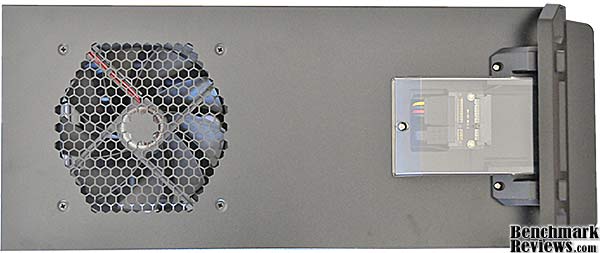
The top of the case comprises a 140mm exhaust fan and the 2.5" SATA drive bay. The clear cover of the drive bay reveals the small SATA backplane board.
At the rear of the case we see the 120mm exhaust fan, 7 card slots, the power supply mounting area, and two punch-out holes for water cooling hoses. If the mounting area for the power supply looks a little odd, it's because it's designed to allow you to mount the power supply in two orientations: "normal" and "upside down".
Let's take a closer look at some of the exterior features of the Antec DF-35. DF-35 Detailed Exterior FeaturesThe Antec DF-35's three 5.25" device bays have snap-down, swing-out trim pieces (I'm not sure what else to call them). These snap down very firmly and your optical drive drawer will not be able to push them open. They're easy to release, though: just press lightly in on the left side where it snaps down into the case.
At the top front of the case, on either side of the 2.5" drive bay, are the power and reset buttons. Just below are two USB ports, unlabelled microphone and headphone ports, and, just visible to the left of the USB ports, two tiny holes through which shine blue power and HDD activity LEDs. The left hole is for the power LED and the right hole is for the HDD activity LED. The two USB ports are spaced far enough apart so that interference between two items plugged into them is unlikely; I see too many cases with the USB ports placed so close together that you can really only use one at a time.
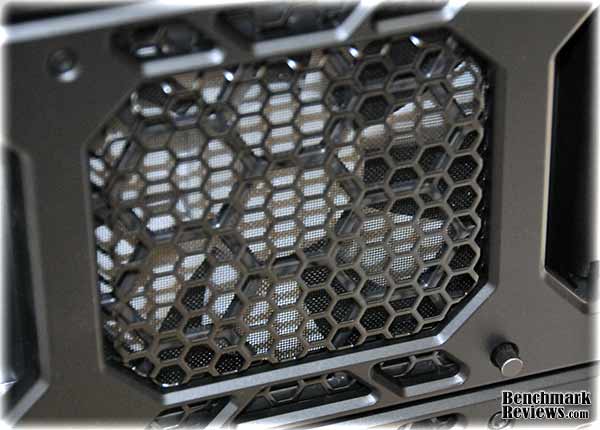
Each of the two front 120mm fans has its own fan controller knob, visible in the lower right of this photo. The fan controller is hardwired into the fan body, so you can't replace these fans and retain the controller.
A nice touch: each fan swings open easily to reveal three drive bays; a removable dust filter pops out for easy cleaning.
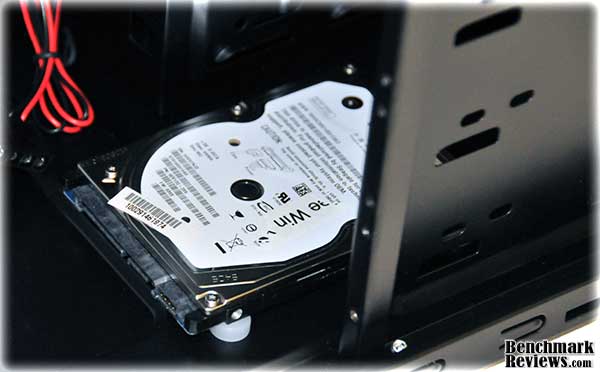
2.5" drives slot easily into (and out of) the top SATA drive bay (the picture below shows the drive fully inserted). But given the amount of space on top of the case, why didn't Antec make this a 3.5" SATA bay? That would have accomodated both 2.5" and 3.5" drives, and most enthusiasts I know have a lot more 3.5" drives laying around than notebook drives or SSDs.
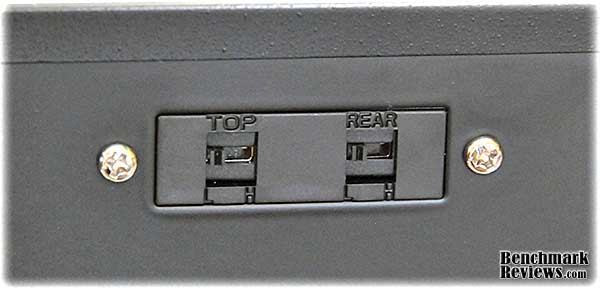
These two switches on the rear of the case allow you to set "Low" and "High" speeds for the top and rear fans...so every fan in the case has a fan controller! Nice. But as with the front fans, the controllers are hardwired directly into the fan body. Each of the case's four fans has a four-pin Molex pass through connector for power, with no three-pin connector, so you'll need to connect each fan directly to your power supply rather than to motherboard headers.
The side panel fit is a little sloppy: even with the panels fully in place, there's about a 1/4" gap between the back of each side panel and the back of the case.
Now it's time to explore the inside of the case. Closer Look: Dark Fleet InteriorWhen I look at a new case, the interior is one of the first things I scrutinize, because this is where I will be spending some quality time. The interior of the Antec DF-35 is surprisingly spartan for a modern enthusiast case. There are no cable management holes in the motherboard (Antec touts a "cable management compartment", but I'm not sure where that is); the rear card slot covers are punch-out, and there are no drive rails or other toolless features. Six motherboard standoffs are pre-installed; you'll need to add another three for standard ATX motherboards. XL-ATX motherboards like the ASUS Rampage III Extreme will not fit. One nice touch is the black case interior, which looks a lot better than bare metal.
Above the punch-out card slot covers are two circular punch-outs, presumably for water cooling hoses, but the lack of rubber grommets means you'd need to take some steps to prevent the hoses being damaged by the thin metal edges of the case. This is probably a moot point since the interior of the DF-35 mid-tower case would be very cramped for a water cooling system. Since the punch-out card slot covers cannot be screwed back into the chassis once they're removed, if you remove an existing card you'll have a hole in the rear of the case.
There's no room for any cables behind the motherboard tray. I measured 4mm of clearance between the bottom of the motherboard tray and in the inside of the panel.
There are still a few surprises inside this case, though... DF-35 Detailed Interior FeaturesThere are four holes drilled in the bottom of the Antec DF-35, in front under the hard drive bays. Antec supplies white rubber mounts and screws for installing a 2.5" drive here. This will, however, occupy part of the space for the bottom 3.5" drive.
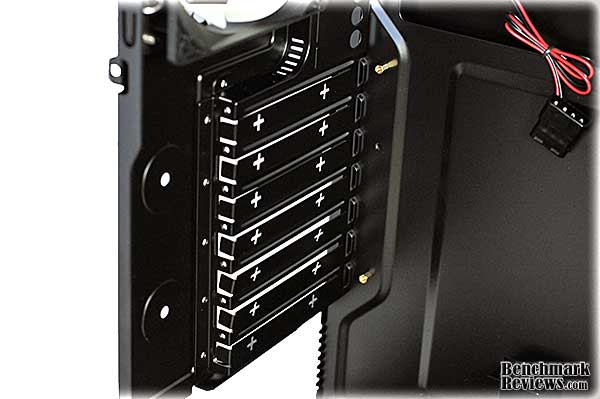
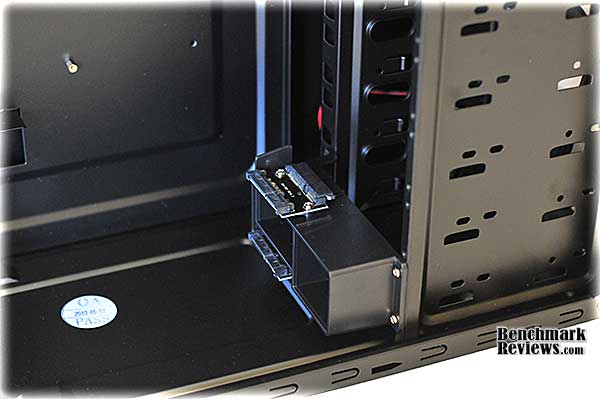
A two-drive SATA backplane assembly can be moved inside the case to service any two adjacent 3.5" drive bays. Antec calls this their "Fleet Swap" feature.
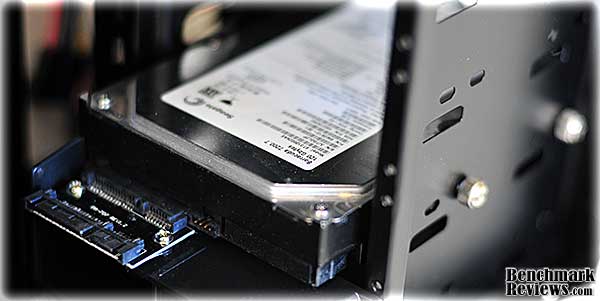
However, since the 3.5" drives mount with screws, rather than rails, you'll still have to remove the side panel to swap out a drive, which makes me wonder what advantage this backplane provides other than moving the SATA power and interface connectors back an inch in an already crowded case. There were two (only two) appropriately-sized thumbscrews in the accessories package which I used to secure the drive in this picture. The design of the Antec DF-35 case is such that you can only screw 3.5" drives in from one side; the far side of the drive cage has no screw holes.
The motherboard tray is not removable (this seems to be a vanishing feature these days, even in high-end cases, and I rather miss it). However, the giant hole behind the processor socket means that you'll never have to remove the motherboard to mount a third party cooler.
This space behind the 3.5" drive bays is my choice for the "cable management compartment" Antec mentions; it's the only place in the case where I can see to hide extra cable length other than empty drive bays. Note that you can't run cables over the support bar that divides this area since there's virtually no clearance between the back of the bar and the inside of the case panel.
I built a system in this case with an ASUS P6T V2 Deluxe motherboard; 6G of Corsair RAM, a Sapphire Radeon 5870 Vapor-X video card, and whatever hard drive and optical drive I had laying around. I mounted a card reader for the 3.5" bay; although this bay is riveted in place you can reach the screw holes on either side to secure devices. You'll need to remove the front bezel to pop out the blanking plates and install 5.25" devices, and this requires removing 8 screws of three different types. Admittedly, three of the screws secure the 2.5" hot-swap drive bay on top of the case, but since the wires from the power and reset buttons on the front bezel run under it, you'll need to at least loosen it to get the bezel off. With most of the power supply cables removed for clarity, this image should give you a good idea of how much room there is inside the case. While Antec says you can fit an 11.5" graphics card in this case, the 10.5" 5870 seems to be about as large as most would want to try to deal with.
Note the upside-down mounting of the power supply, with the fan on top, necessary since there are no ventilation holes in the bottom of the case. The correctly-oriented "Antec" logo on the power supply casing illustrates that Antec knew this might be necessary at some point. However, mounting the power supply this way compromises the airflow inside the case, ensures that the power supply is ventilated with warm case air rather than cooler outside air, and means that cards using the lower slots on your motherboard can restrict the air intake of the power supply. Even an unfiltered air intake on the bottom of the case would have been better than this. This oddity is a common feature on Antec cases; even the $200 Antec Twelve Hundred shares this design. Antec Dark Fleet Final Thoughts
Once I had finished building the system, though, things looked up a little. The case's appearance is handsome and the white LED lit fans add a nice visual touch. The fans themselves were impressive, too, moving a lot of air with very little noise. Turning all four fans to maximum resulted only in a muted whooshing noise; turning them all down to minimum made the system almost inaudible. This case should easily provide enough ventilation to host a high-performance SLI or CrossfireX system. I never was able to get the cabling as neat as I wanted and would prefer a non-windowed version of the case for this reason. Any case manufacturer will have a budget, and Antec obviously thought that features like the SATA backplanes, fancy fans, and swing-out access panels on the front of the case merited the lion's share of the cost of the case. But even some of the extra features seem incompletely implemented: for example, what's the point of easy front access to drives that plug into a SATA backplane when the drives are held in by screws and you have to take off the side panel to add or remove drives? Extra features are nice, but I think that the "basic" features should take precedence. I would have fewer complaints about the DF-35 were it priced at $99.95 or less, but at $140, it's competing with some very nice cases, most of which make building a system a lot easier. Antec DF-35 ConclusionAntec owns the bulk of the market share for computer cases, and with good reason: their cases historically offer high construction quality, compelling features, and competitive prices. The DF-35, however, seems remiss in each of these categories. With just a little extra effort on Antec's part— primarily punching a few extra holes in strategically-located spots— this could be a great case, with functionality to match its looks. Clunky construction process aside, the performance of this case was very good. The cooling is excellent and should serve owners of hot, high-performance hardware well. Providing each fan with its own controller is a nice feature, although it was done by using specialized, Antec-only fans with integrated controllers. I found the appearance of the case appealing. Antec was obviously trying to ramp things up a bit over the more pedestrian "Hundred" series, and they've succeeded. The construction quality, on the other hand, wasn't as good as it should be for a case of this class. The sloppy fit of the side panels and the number of screws securing the front bezel (6 of which were self-tapping screws into plastic, which will limit the number of times they can be effectively secured) count against the DF-35. And I still hate the punch-out card slot covers. Functionally, the case performed well. Having an integrated 3.5" externally-accessible device bay is a feature I wish more cases had; the 2.5" drive mount at the bottom of the chassis in an inexpensive and elegant solution. On the other hand, having to manually move a snap-down trim piece every time you need to access your optical drive will get old pretty quickly. The value? Sorry, that's where this case fails. Selling for $139.99 at NewEgg, this case sacrifices too many basic features for the less-basic ones it has. Antec die-hards may overlook these issues, but cost-conscious shoppers know they have other options. Pros:
+ Sleek, semi-military appearance Cons:
- High price Ratings:
Final Score: 7.85 out of 10.Questions? Comments? Benchmark Reviews really wants your feedback. We invite you to leave your remarks in our Discussion Forum.
Related Articles:
|
|











 This case was disappointing in some ways, and rather nice in others. I'll cover the disappointing stuff first: building a system in the Antec DF-35 was more trouble than I expected in a $140.00 case, maily due to the lack of cable management and the unnecessarily complex operation to remove the front bezel. Some aspects of the case, like the lack of power supply ventilation holes, cable management, and punch-out card slot covers, are things I'd be surprised to see in a case costing half as much. And the competition in the $150-and-under case segment is fierce: for example, the
Comments
Other revisions are in the oven :).
Also, Lian Li is using louvres on some of their new cases to reduce the risk: /index.php?option=com_content&task=view&id=526&Itemid=61&limit=1&limitstart=3
"The side panel fit is a little sloppy: even with the panels fully in place, there's about a 1/4" gap between the back of each side panel and the back of the case. "
I would like to point out that this is for cable management... which makes the air flow in this tower so much nicer. For the complaints on the drive bays there is also a FULL tower keep in mind this is mid and is trying to support optimal air flow because the better the air flow the better the entire machine will run.
Went with Lian Li PC-60FNWX instead
As the owner of 3 antec nine hundred cases, I can tell you there is nothing wrong with the way the power supply being mounted the way it is. If you cannot understand the logic behind the engineering, perhaps you should not even be reviewing cases. I actually PREFER this design over the old "over the motherboard" design. traditionally with the powersupply mounted up high, it was sometimes the "only exhaust fan" running in the computer. With 140mm fan up top and 120mm in the back, let the fans do their job and let the power supply fan do the job its suppose to do, which is to cool the power supply. As for the hot swap 3.5" being useless without rails, does the harddrive not sit in the "slot" once inserted? I don't know about the df35 but on the full tower, when you slide a drive in, it just clicks and stays there. So having this the idea is so you can put in a hdd for "temporary use" quickly, where you don't need to open the case to connect sata / power cord I think it serve its purpose just fine.
I agree the price could've been lower and I didn't exactly like the looks of it at first glance, but once I finish building for my friend I liked the case enough to look into this. So if anyone reading this is interested in this case, check out the DF 85, If you have the space, its a much better case for not so much more.
I ordered the 35 as it was $79.00 with free UPS shipping for the case & the rest of the order,
I to thought it was not that pleasing to the eye but after popping a few of the plastic swing brackets off & growing on me its really a half decent looking case along with its better attributes.
Big Case
Good Cooling, airflow
Holds lots of Hd?s
Bottom HS Bay made just for my SSD Drive
Top Hot Swap 2.5" Bay perfect for my media player HD (made just for me)
Bottom PS great with Sandy Bridge build
Installed the 2 SATA 3 on front of case rather than out the back, easily have both
fan filters are great, work well
Does ANYONE who has this case know which plug is which?
I must say that this case isn't that bad as you guys think.
I admit it's kind of cheap material used for the case, but the hotswap on top is pretty cool. My only problem is the light produced from the led fans... It's a bit to much IMO. I like to watch movies on my pc, but with the amount of light produced it isn't so great.
Except for that i think it's a great case for stronger pc's.
The cords are easily to put away.
And in black it looks so much better.