
Use PlayStation3 Gamepad with PC Games
DUALSHOCK 3 wireless controller
Manufacturer: Sony Computer Entertainment Inc.
Product Name: DUALSHOCK 3 Wireless Controller
Model Number: 99004
UPC: 711719805007
Price As Tested: $39.99 (Newegg / Amazon)
Full Disclosure: The product sample used in this article has been self-supplied.
Ever considered buying a gamepad for racing, sports, or split-screen PC games? Well, there are quite a few options from Microsoft, Logitech, and Saitek including the popular Logitech F710 and Saitek P3600. However, if you don't fancy the grip of the Xbox controller, don't agree with the colour scheme of the F710, or are just looking for something different, there is good news! The Sony DUALSHOCK 3 controller (designed for the PS3), with a little work can be made to work on your PC. Certain unique features of the PS3 controller, such as six-axes motion-sensing and pressure sensitive buttons, make it a viable competitor to the more popular options. In this article, Benchmark Reviews will demonstrate that one of the best controllers of all time can be used to score breathtaking goals, pull off amazing combos, and crush lap times in your favorite PC games.The PS3's controller is the third iteration in their Dualshock series. As well as refining the basic components of the controller, Sony has added wireless functionality and motion-sensing capabilities. Having undergone 15 years of evolution and being no more expensive than its Microsoft counterpart, it is definitely worth the attention of anyone considering buying a new gamepad.

As with most Sony products the hardware is cutting edge and promises durability, but how will the controller perform when connected to a PC? We will be using a free 3rd party software called DS3 tool to connect the PS3 controller to the test system. In this review we will test the controller's performance with an array of games and see just how reliable the hardware and connectivity software are.
DUALSHOCK 3 Features
- SIXAXIS highly precise motion sensing
- USB and bluetooth connectivity
- Haptic feedback
- 6 Pressure sensitive buttons
- Pressure sensitive D-pad
- 30 hours gameplay on fully charged battery
DUALSHOCK 3 Specifications
- USB mini-B port
- 3.7 V Li-ion battery
- 192 g
- 160 mm × 97 mm × 55 mm
- 12 buttons (programmable through software)
Closer Look: DUALSHOCK 3
The PS3 controller has a solid, ergonomic design. It is not as rigid and caveman-like as the NES gamepad, but not as comfortable as the Xbox 360 controller.

The controller has 4 pressure sensitive action buttons which only require light presses to register actions. It's a button-masher's delight.

The DUALSHOCk 3's sixaxis technology is truly amazing. It recognizes back, forward, left and right tilt of the controller and remains precise through haptic feedback, even when the controller is vibrating or the player is moving.

Unlike the F710 and other popular gamepads, The DUALSHOCK 3 does not sport rubber panels. However, this is not a major issue because rounded and curved handles provide sufficient grip even for the longest gaming sessions.
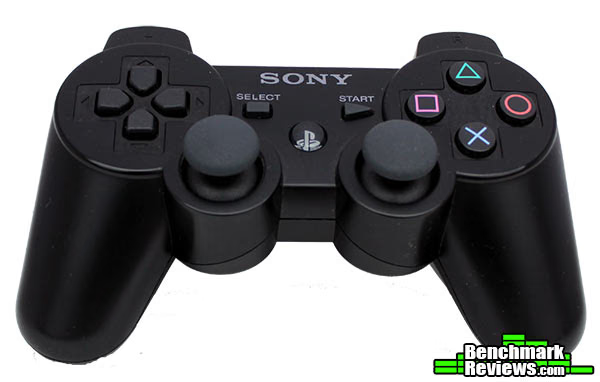
Sony's PS3 controller has both analog sticks directly beside each other unlike its Microsoft counterpart. The heads of the sticks are bulged, despite the popular depressed design. Some may not like this feature, but I find no difficulty in using them.

The controller features 4 indicator lights to show which user is player one, two, three or four. When the number of players exceed four, numbers whose sum represent the player number are illuminated; for example, lights one and four together indicate player five. The software used in this article supports a maximum of 4 players and allows the indicator lights to be customized. The lights can also be used to display the controller's remaining battery life.
Testing & Results
Testing Methodology
Here we will test the reliability of the hardware components: wireless range, battery life, and resistance to interference from other wireless devices. We will then test how the controller performs in a suite of controller-friendly games. These games will also be tested with the Xbox 360 contoller, and any noticeable advantages and differences will be reported.
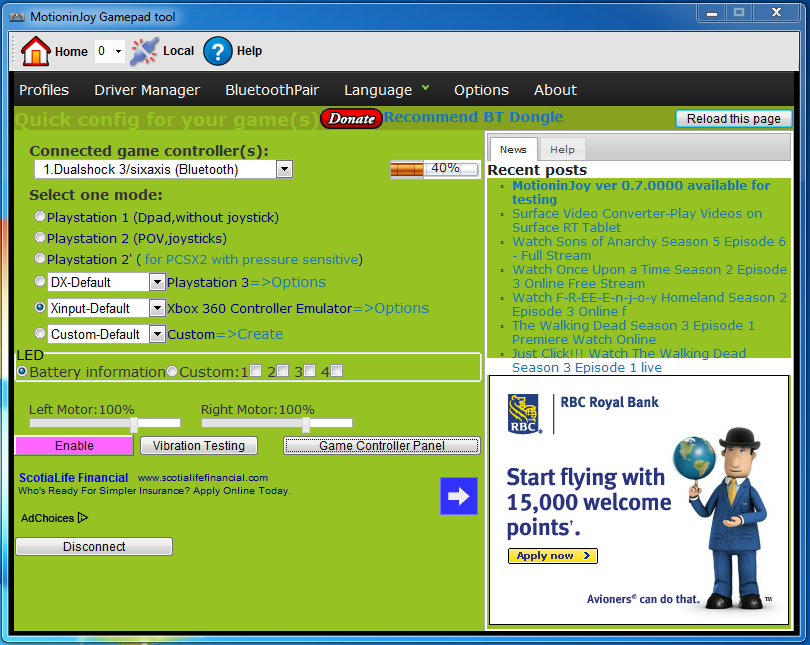
Before testing, the third-party software DS3 tool from MotioninJoy was installed. The software can be downloaded here, and a comprehensive tutorial on how to set it up can be found here. The entire process should take no more than 15 minutes. After installing the software, the drivers must be loaded, the controller must be paired to the PC (if using bluetooth), and then a profile must be applied. The Xbox 360 profile is recommended since most PC games already support the controller.
DS3 tool makes it possible for users to connect their controller via USB or bluetooth. All the tests in this article were carried out with the controllers wirelessly connected to the system.
NOTE: If you are also using the controller with a PS3 console, you will need to repair the bluetooth by connecting it to the console with a USB cable.
Test System
- Motherboard: Asus Rampage 4 Extreme
- System Memory: G.Skill 8GB
- Processor: Intel i7 3820
- Audio: Asus Xonar DSX
- Video: NVIDIA Geforce GTX 570 SLI
- Disk Drive 1: Patriot Pyro 120GB SSD
- Disk Drive 2: Seagate Barracuda 2TB HDD
- Operating System: Windows 7 Professional
Test Software
- DS3 Tool (version 0.60005)
- Street Fighter X Tekken
- Crysis 2
- FIFA 13
- DiRT 2
- Borderlands 2
Results
The setup was fairly simple and finished without error. The vibration worked and in the Windows game controller program all key presses registered without lag. To test the controllers before gameplay, I opened the game controller panel, the button highlighted in the third image below. After setting up, the screen should be similar to the one in the bottommost image.


With the Xbox 360 profile selected, all the games recognized the PS3 controller without any problem. In FIFA 13 the controller worked wonderfully. Thanks to the pressure sensitive buttons, only light presses were needed for the corresponding actions. As a result, it felt very natural to quickly string passes together and follow them with sudden strikes at goal. Due to its compact form, it also felt lighter and easier to manage as opposed to the Xbox controller that is quite comfortable to hold, but feels like a burden when rapid button mashing. The story holds true for Street Fighter X Tekken. I found it way easier to pull off complex combos and dodge enemy blows with the PS3 gamepad than the 360's. For all the games tested, the PS3 performed well and, because it has the same number of keys as the 360 gamepad, the default key mappings were spot on. However, for the first person shooters I found myself switching the default aim and fire keys (L2 and R2) with L1 and R1.
Regarding the battery life: I play for around 1 to 2 hours most days and it has been more than 2 weeks since the gamepad was charged. Also, there is no delay in response time when the charge level is low. The room where I tested the controller is 12' x 14' and I was able to use the controller from any spot in the room. The PS3 controller is supposed to work at up 30' away from its console, but that range will likely differ based on your bluetooth adapter.
While testing the controller, I had my desktop, laptop, and cellphone connected to the home wifi network, with the router not too far from the test system. In addition to the computers, I also had two other PS3 controllers and a Corsair Vengeance 2000 wireless headset connected to the system. With all the wireless devices present, I noticed no drop in performance with the controller. All the controllers were able to operate simultaneously without interference issues.
DUALSHOCK 3 Final Thoughts
The PS3 controller is quite good-looking and even better to hold. It is available in many colors to suit your taste. The simple design and great ergonomics make it suitable for just about any game that supports a controller. If your PC has a bluetooth adapter, you don't have to worry about using USB ports to set up signal transmitters, and you will never have to go out and buy batteries. Paired with the DS3 tool software, the PS3 gamepad becomes a fully capable PC input device and also doubles as a media controller for music and movies. After using it, you will probably be wondering why you have ever used anything else. I like everything about the PS3 controller and after looking very hard, I cannot find any flaws. I myself own three, and would recommend them to anyone in a heartbeat.

There are many DUALSHOCK 3 drivers on the interweb and after experimenting with a few, none delivered the solid performance and stability of DS3 tool. The user interface is easy to use, numerous tutorials are available and it is frequently updated with added functionality for the controller. If you look hard enough you will find mini-games on the web that support the motion-sensing feature of the controller, or you can simply map motion inputs to keys in the game. My only complaint is the required internet connection to run the software, but then again the program is free.
DUALSHOCK 3 Conclusion
The PS3 controller in tandem with DS3 tool make for a great gaming experience. With the right profile selected, the controller is ready to go. The performance of the controller in just about every game is stellar; there are no drops in signal, no unregistered button presses, no surprises.
Regardless of what color you get, the DUALSHOCK 3 color looks great. It is by no means a simpleton, but at the same time there is nothing outlandish about it. It is simply perfect and hard not to like.
The software allows ample customization options, including changing vibration strength and toggling turbo mode for specific buttons. With a bluetooth adapter, wireless gameplay is great but if you seek additional assurance, all you need do is connect it with a USB cable and you're good to go. The software is very responsive and has never crashed during the testing period. Users have reported problems with the program, but they were likely due to unsupported adapters or older unstable versions.
For a price of $39.99 (Newegg / Amazon), the SONY DualShock 3 wireless gamepad isn't a bad deal. You might be thinking that since it costs the same as the Xbox controller, why not just get the Xbox gamepad and be done with it? The goal of this article is not to bash the 360 controller; it is a great controller and you wouldn't have made a bad choice in getting one. However, if you want to avoid buying AA batteries and if you have a tendency to lose things (the 360 adapter), then the DUALSHOCK 3 is the controller for you.
Before buying a PS3 controller, be sure to check the application's website to see if your bluetooth adapter is supported. If you have the patience to set up the freeware and get the controller working (which is no great feat), you will be generously rewarded. The PS3 controller is peerless and well deserves its Emmy award, as well as the more prestigious BmR Golden Tachometer award.
Pros:
+ No batteries or usb signal transmitter required+ Great battery life
+ SIXAXIS motion sensitivity
+ Ergonomic design
+ Easy to use software
+ Good value
+ Pressure sensitive buttons
Cons:
- Not natively supported- Bluetooth adapter required for wireless use
- Software requires initial internet connection
Ratings:
-
Performance: 9.5
-
Appearance: 9.2
-
Functionality: 9.0
-
Value: 8.8
Benchmark Reviews invites you to leave constructive feedback below, or ask questions in our Discussion Forum.
Reader comments from the original article
3 comments were posted before commenting closed. They are preserved as written. Original avatars no longer resolve and are shown as a placeholder.
Great and insightful Review for gamer at any level RobN Permalink:
I recently borrowed my brother's ps3 controller to test out how well it works in DiRT 3. It's amazing. I personally hate the xbox controller since prior to my pc i have been a playstation gamer. I feel right at home. DS3 tool ftw.
Good review but you missed some important stuff. Mordecones Permalink:
Hi! Been using the DS3 tool with my PS3 controllers for a couple years now and I thought I'd chime in on a couple inaccuracies/omissions in this review: 1.Internet Connection *is not* required for DS3 tool, you simply have to run the program in "local mode", via a tiny download available here: #forums.motioninjoy.com/viewtopic.php?f=66&t=2885 Extract the archive into your motioninjoy install folder and then click local (at the top) after you load the program. Archive verified clean here: ##virustotal.com/file/a4b397ae625ac21869ee6b8778cb72593bb98604170478c2dccf73337478eb17/analysis/ 2. You stated that both controllers would cost the same for the intent of using on the PC. This is incorrect. The xbox360 controller requires a special wireless adapter to work with windows, and cannot connect via a USB cable as it does not transmit data, it only charges. You would need a wired 360 controller or the aforementioned wireless adapter. Either way, the PS3 controller is a clear winner here, using common bluetooth *and* being connectable over the USB cable alone. 3.You stated that the PS3 controller has the same number of buttons as the x360 controller. This is only true in 360 mode. If you run the controller in PS2/PS3 mode you can use the PS button in the middle as an additional button as well. There are plenty of titles that will work perfectly fine in PS2/PS3 mode in the drivers, including every emulator under the sun. Keep in mind you do not want to bind this button to an in game command that requires you to hold down the button for extended periods of time, as this will disconnect your controller! Thanks for spreading the DS3 love! Great controller and great drivers! -Morde
lol one last thing Mordecones Permalink:
The local mode files go into the MotioninJoy\ds3\ folder, not the base motioninjoy folder. Sorry for the commentspam!